10.3. Service Modes
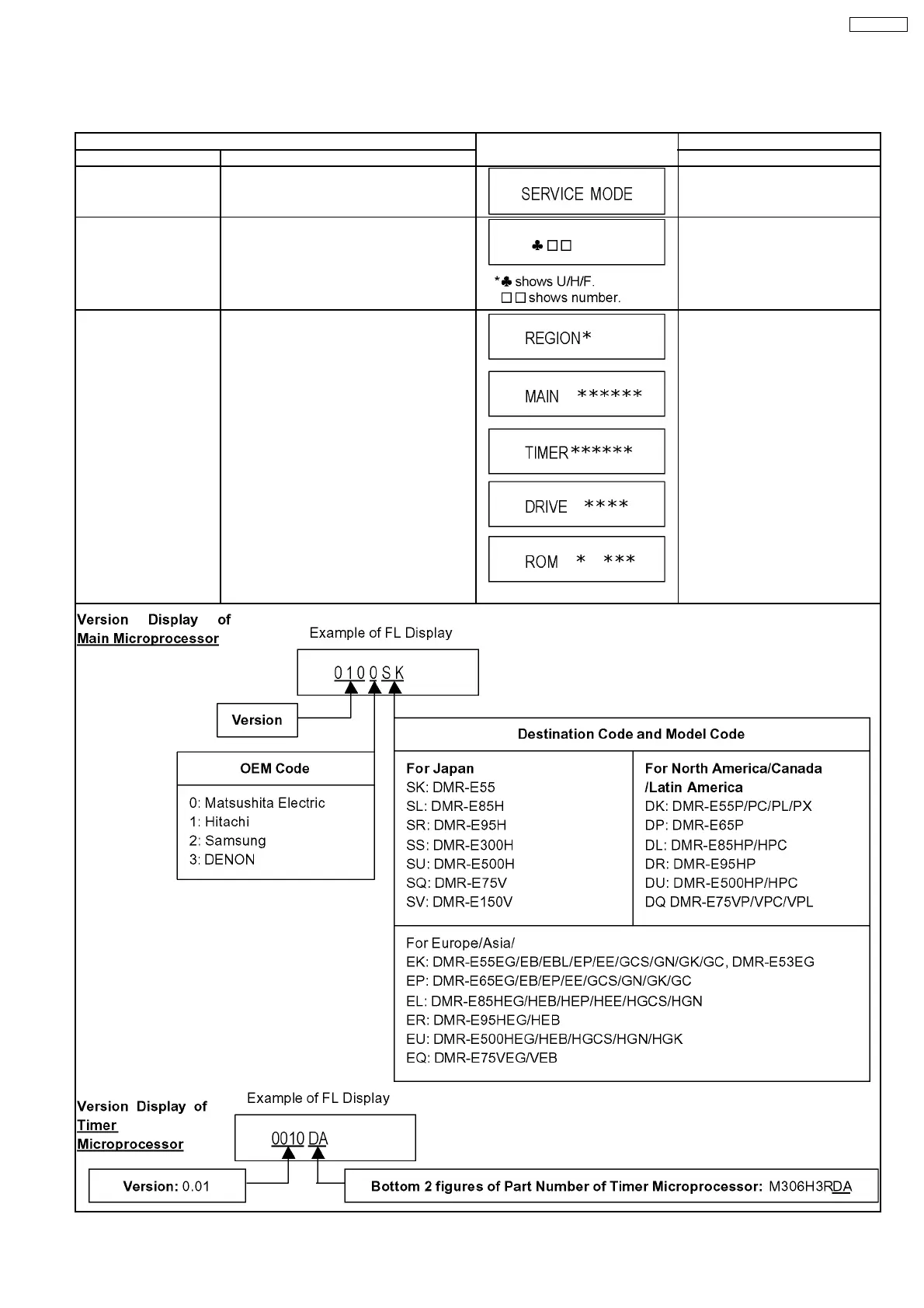
Service mode setting: While the power is off, press TIME SLIP, STOP and OPEN / CLOSE simultaneously for five seconds.
Item FL display Key operation
Mode name Description (Remote controller key)
Release Items Item of Service Mode executing is cancelled. Press [0] [0] or [Return] in service
mode.
Error Code Display Last Error Code of U14/H/F held by Timer is
displayed on FL.
*Details are described in “10.1. Self-
Diagnosis Functions”.
Press [0] [1] in service mode
ROM Version Display Region code, MAIN firm version, TIMER firm
version and DRIVE firmware versions are
displayed on FL for five seconds per each
version in order, but ROM version will be left
displayed.
are version displays.
Press [0] [2] in service mode
19
DMR-E55PL








 To Next Page