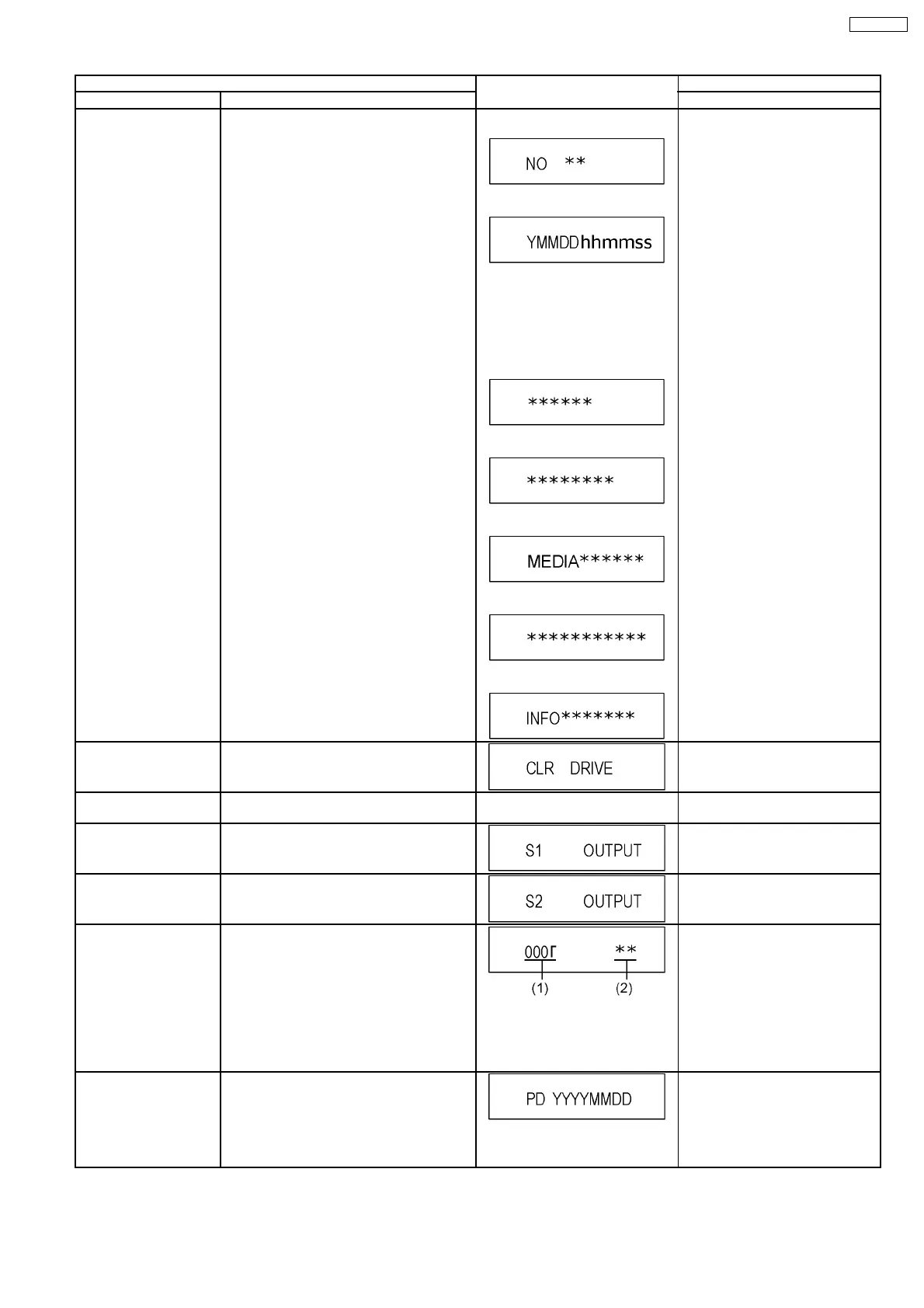
Item FL display Key operation
Mode name Description (Remote controller key)
RAM Drive Last Error RAM Drive error code display.
*For details about the drive error code, refer
to the Service Manual for the specific RAM
Drive.
*Details are described in “9. Service
Explorer ”.
1. Error Number is displayed for 5
seconds.
2. Time when the error has occurred
is displayed for 5 seconds.
Y: Year
MM: Month
DD: Day
hh: Hour
mm: Minute
ss: Second
3. Last Drive Error (1/2) is displayed
for 5 seconds.
4. Last Drive Error (2/2) is displayed
for 5 seconds.
5. Error occurring Disc type is
displayedfor 5 seconds.
6. Disc Maker ID is displayed for 5
seconds.
7. Factor of Drive Erroroccurring is
left displayed
Press [4] [2] in service mode.
Then press [0] [1] ~ [9] [9], the past
99 errors are displayed.
Incase that the supplier cannot be
identified, display is black out.
Delete the Last Drive
Error
Delete the Last Drive Error information stored
on the DVD RAM-Drive.
Press [9] [6] in service mode.
Turn on all FL/LEDs All segments of FL and all LEDs are turned
on.
All segments are turned on. Press [5] [1] in service mode.
S1 signal output Forcibly superimpose the S1 signal (approx.
4.5V DC) on the EE chroma signal, and check
the output on the S terminal.
Press [5] [2] in service mode.
S2 signal output Forcibly superimpose the S2 signal (approx.
2V DC) on the EE chroma signal, and check
the output on the S terminal.
Press [5] [3] in service mode.
Front connection
inspection
Press all front keys and check the connection
between Main P.C.B. and Front P.C.B.
(1) Each time a key is pressed,
segment turned on increases one
by one.
(2) Total umber of keys that have
been pressed.
Press [5] [4] in service mode.
Production Date Display Display the date when the unit was produced.
YYY: Year
MM: Month
DD: Day
Press [6] [1] in service mode.
21
DMR-E55PL








 To Next Page