7 Operation Procedures
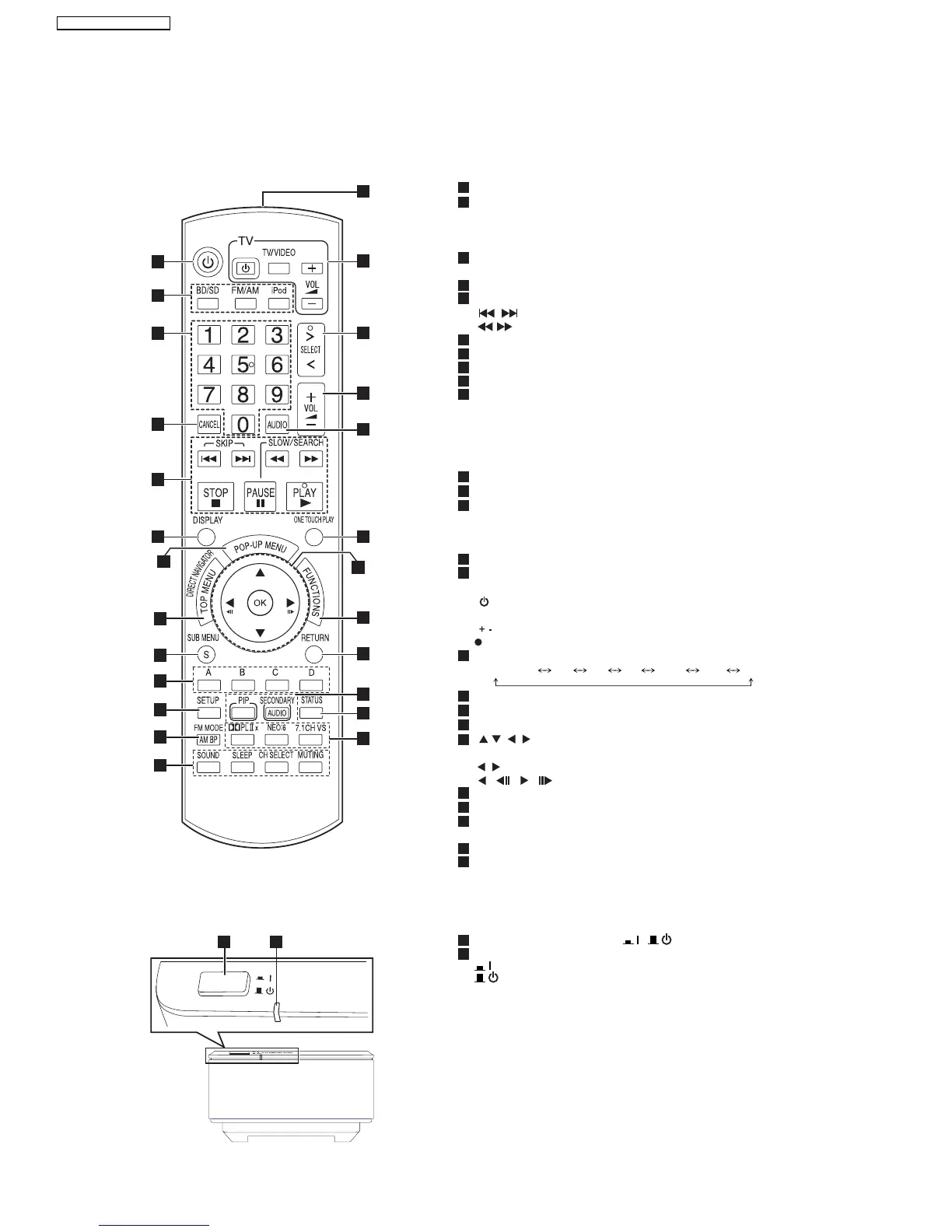
7.1. Remote Control Key Buttons Operations
Remote control
Wireless system
AUTO OPERA
TION ON/OFF
POW
ER
2
3
4
5
6
8
9
10
11
12
13
14
15
16
17
18
19
21
22
23
24
25
7
20
1 2
1
2
3
4
5
6
8
9
10
11
12
13
7
14
15
16
17
18
19
21
22
23
24
25
20
Turn the unit on and off
Select the source
[BD/SD]: Select disc drive or SD card drive
[FM/AM]: Select FM/AM tuner
[iPod]: Select iPod as the source
Numbered buttons
Select preset radio stations and title numbers, etc./Enter numbers
Cancel
Basic playback control buttons
[ , ]: Select preset radio stations
[ , ]: Select radio station manually
Show on-screen menu
Show Pop-up menu
Show Top Menu/Direct Navigator
Show sub menu
These buttons are used when operating a BD-Video disc that
includes Java
TM
applications (BD-J). For more information about
operating this kind if disc, please read the instructions that came
with the disc.
The [A] and [B] buttons are also used with the "Title View", "Picture
View" and "Album View" screens
Show Setup menu
Remove interference during radio reception
[SOUND]: Set the sound effect
[SLEEP]: Set the sleep timer
[CH SELECT]: Select speaker channel
[MUTING]: Mute the sound
Transmit the remote control signal
TV operation buttons
Aim the remote control at the Panasonic TV and press the button.
[ TV]: Turn the TV on and off
[TV/VIDEO]: Switch the input channel
[ VOL]: Adjust the TV volume
This may not work properly with some models.
Select the source
Adjust the volume of the main unit
Select audio
Start up and play a disc automatically
[ , , , ]: Menu selection
[OK]: Selection
[ , ]: Select preset radio station
[ ] ( ),[ ] ( ): Frame-by-frame
Show FUNCTIONS menu
Return to previous screen
[PIP]:Switch on/off Secondary Video (Picture-in-picture)
[SECONDARY AUDIO]:Switch on/off Secondary Audio
Show status messages
Enjoy surround sound
BD/DVD/CD SD FM AM IPOD D-IN AUX
1
2
Unit on/off button [POWER , ]
Use this button to turn the unit on and off.
AUTO OPERATION ON/OFF POWER indicator
The indicator lights red when the wireless system is turned on and
lights green when the wireless link is activated. When the wireless
link is inactive for a long time, it turns red.
: This unit is on.
: This unit is off.
1
14
SA-BT100P / SA-BT100PC






 To Next Page