7.6. Basic Connections
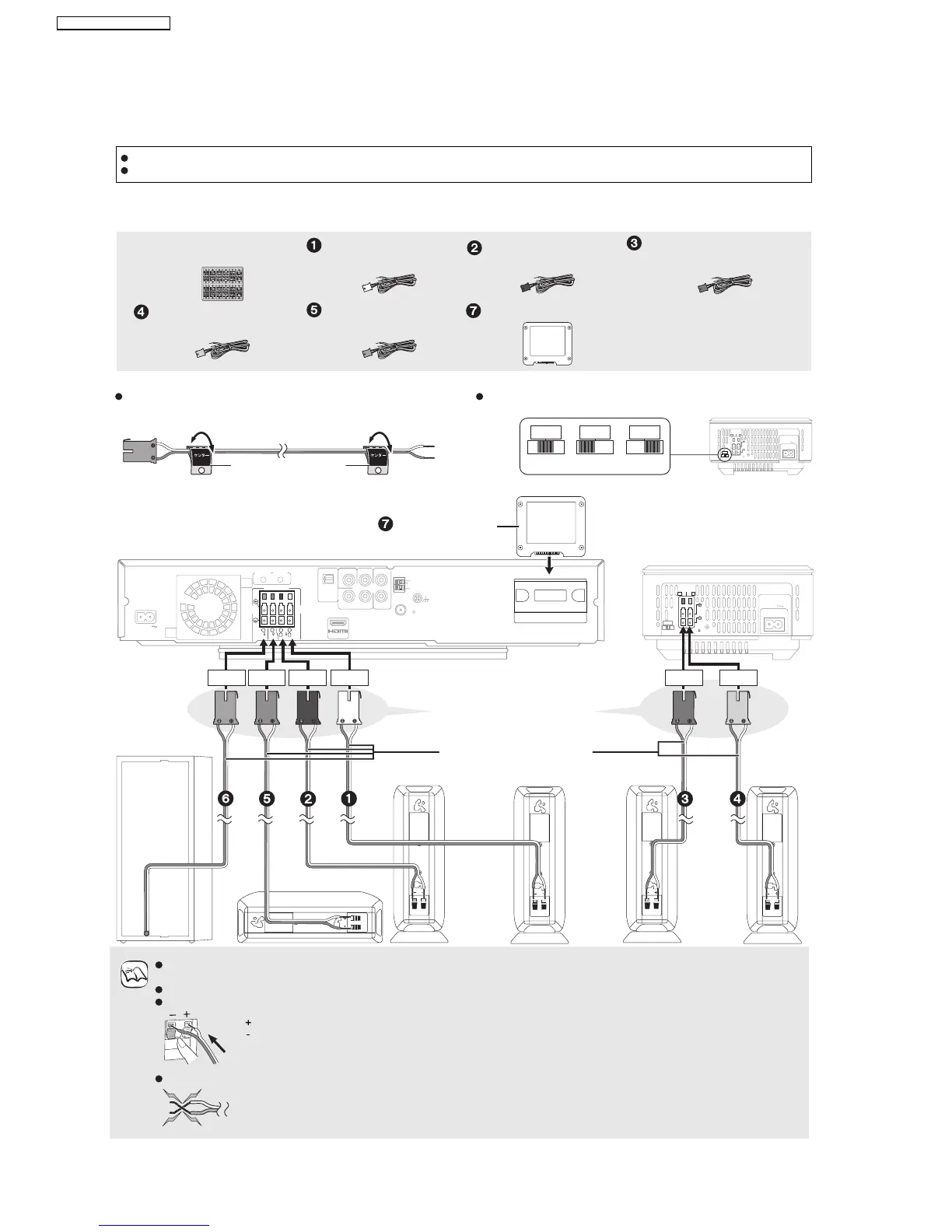
7.6.1. Speaker Cables and Transmitter Connection
SurroundSurround
Front
Center
Front
Center speaker
Preparation
Attach the speaker cable stickers to make connection
easier.
Set the surround selector at the rear of the wireless
system to tis center.
Do not place the unit on amplifiers or equipment that may become hot. The heat can damage the unit.
Turn off all equipment before connec tion and read the appropriate operating instructions.
Speaker cables and transmitter connection
5
CENTER
5
CENTER
e.g., Center speaker
Speaker cable sticker
(included)
AC I
N
SPEAKERS
NCEINTES
LS / RB LB / RS
SURROU ND (3 6 )
AMBIOPHONIQUES
SURR
L
SIDE
R
SIDE
I/D SET
SURRSURRSURR
Do Do not Do not
OPTICAL IN
L
R
DIGITA L
COMPONENT
VIDEO OUT
VIDEO OUT
Y
AU XP
R
P
B
SPEAKERS
SURRO U N D
SURRO U N D
BAC K
FM ANT
ANT
EXT
LOOP
AM
75
AV OUT
R
L
66
CENTER
6
SUBWOOFER
FRO NT
6
5
2
1
GND
ANT
LOOP
AC I N
TRANSMITTER
DIGITAL
AC I
N
SPEAKERS
EN
CEI
N
TES
LS / RB LB / RS
SURROU ND (3 6 )
AMBIOPHO
NIQUES
SURR
L
SIDE
R
SIDE
I/D SET
OUT
Digital transmitter
Insert fully until you
hear a click.
Connect to the terminals of the
same color.
Purple Green Red White Blue Grey
Main unit
Subwoofer
Front speaker (R)
Speaker cable
Front speaker (L)
Surround
speaker (L)
Surround
speaker (R)
Wireless system
(included)
Sheet of speaker cable
stickers
Be careful not to cross (short-circuit) or reverse the polarity of the speaker wires as doing so may damage the speakers.
Do not use a front speaker as a surround speaker or vice versa. Verify the type of speaker with the label on the rear of the
speaker.
Do not insert or remove the digital transmitter while the main unit is on.
Insert the wires fully.
NOTE
Push!
: White
: Blue
Do not
Speaker cable for surround
speaker (R) (Grey)
Speaker cable for front
speaker (L) (White)
Speaker cable for front
speaker (R) (Red)
Speaker cable for surround
speaker (L) (Blue)
Speaker cable for center
speaker (Green)
Digital transmitter
20
SA-BT100P / SA-BT100PC






 To Next Page