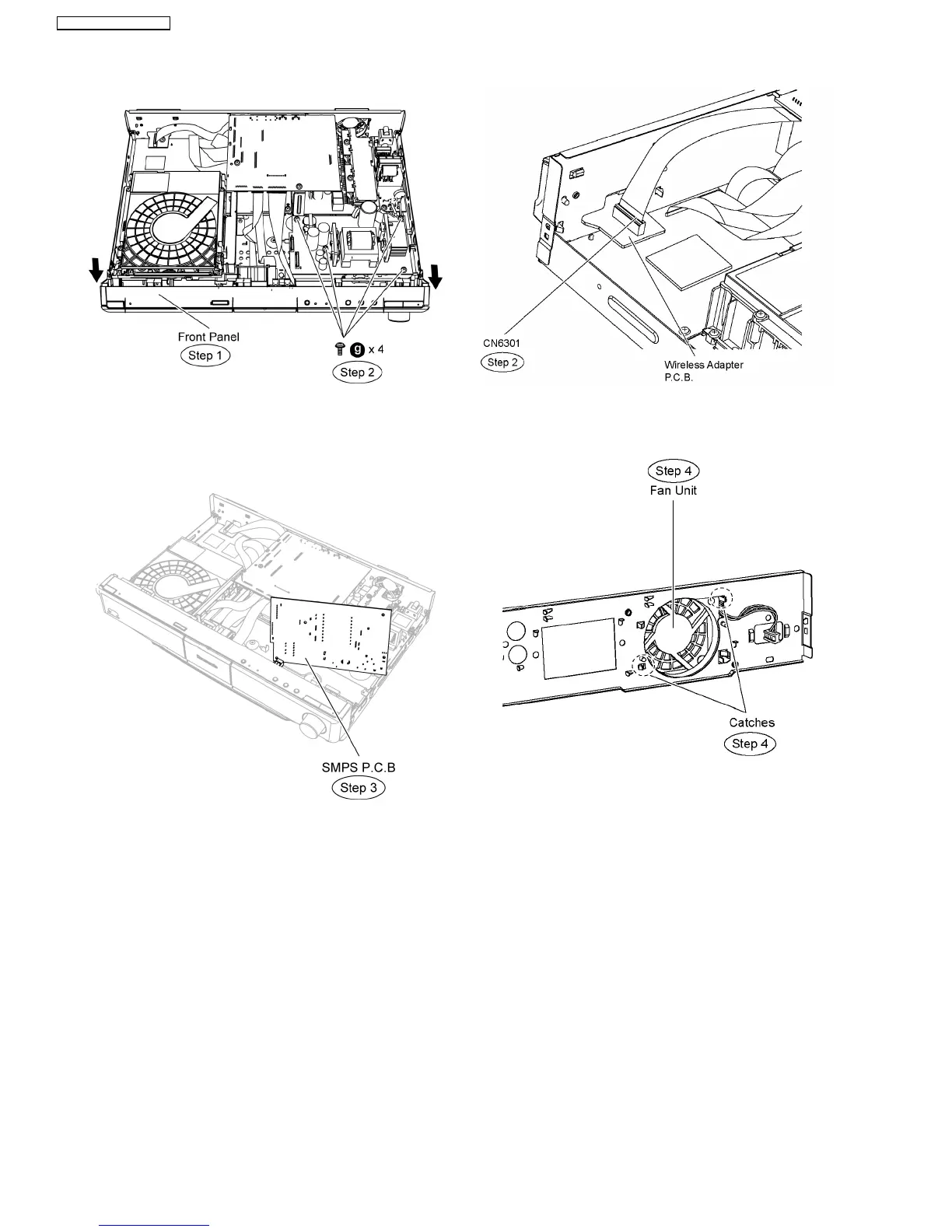
Step 3 Detach SMPS P.C.B. from the bottom chassis and flip
it vertically.
Step 4 Position SMPS P.C.B according to the diagram shown.
12.4. Checking & Repairing DSP
P.C.B.
•
• •
• Servicing side A of DVD Module P.C.B.
Step 1 Remove the top cabinet.
Step 2 Detach 19P FFC cable at the connector (CN6301) on
wireless adapter P.C.B.
Step 3 Remove the rear panel. (Remove all the screws).
Step 4 Release the catches and remove the fan unit.
Step 5 Remove wireless adapter P.C.B.
Note: Refer to the diagram of item wireless adapter P.C.B.
Step 6 Connect the fan unit at the connector (CN5501) on D-
Amp P.C.B.
Step 7 Connect 19P FFC cable at the connector (CN6301) on
wireless adapter P.C.B.
64
SA-BT100P / SA-BT100PC






 To Next Page