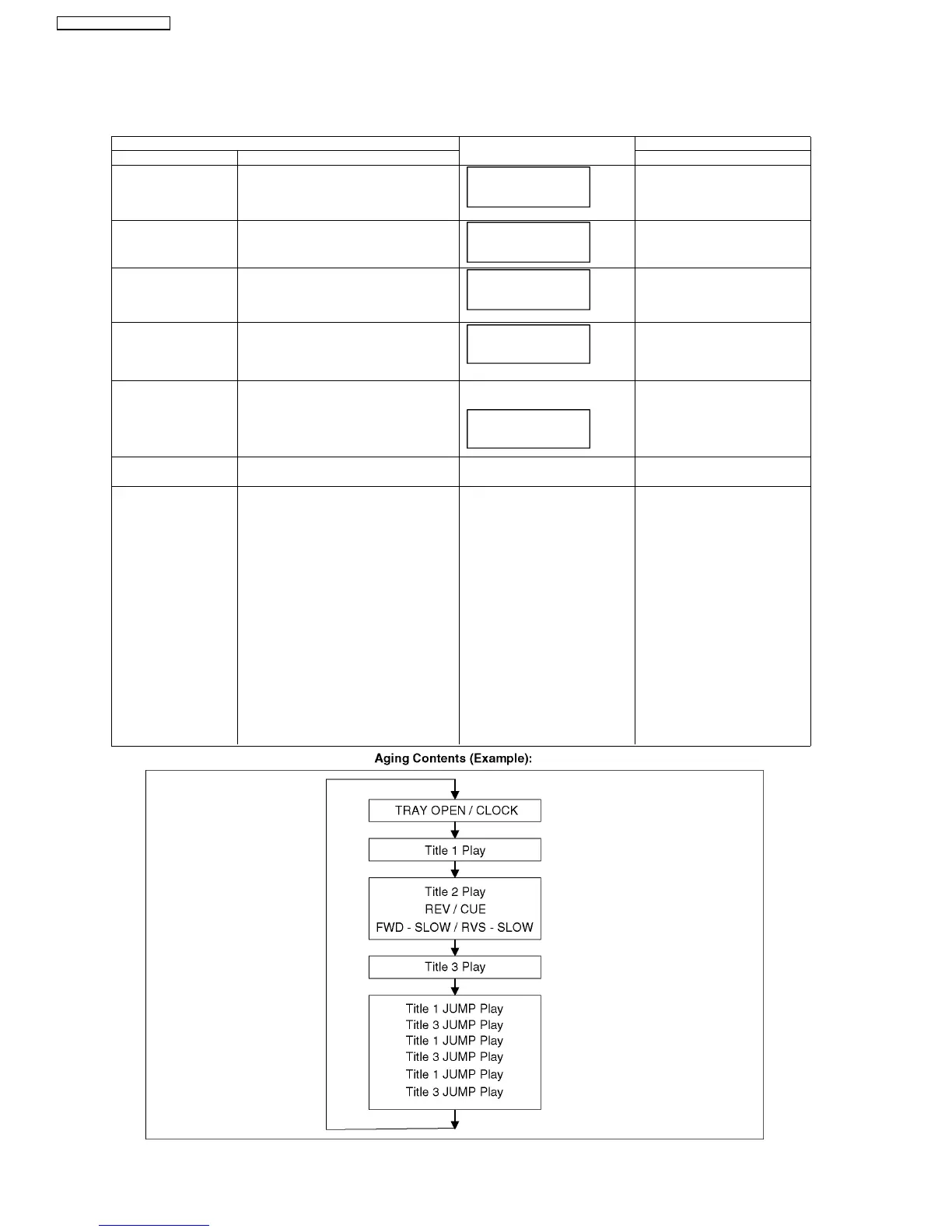
9.2. Special Mode Setting
9.2.1. Service Mode Table 1
Item FL display Key operation
Mode name Description Front Key
Initialize Mode *All the main unit’s parameters are initialized. Press [STOP], [SKIP FWD] and
[OPEN/CLOSE] keys simulta-
neously for five seconds when
power is off.
Rating password The audiovisual level setting password is ini-
tialized to Level 8.
Open the tray, and press [SKIP
REV] and [PLAY] simultaneously for
5 seconds.
Service Mode Setting every kind of modes for servicing.
*Details are described in 9.3.1. Service Mode
at a glance.
When the power is off, press [SKIP
FWD], [OPEN/CLOSE] and
[PLAY] keys simult aneously for 5
seconds.
BD-ROM history cleaning < Persistent Storage> of BD-ROM standard is
cleaned.
Screen display: [The player’s history data has
been cleared] is displayed for five seconds.
Same display as before execution.
When disc is not in tray. press
[STOP] and [POWER] keys simulta-
neously for 5 seconds.
Forced disc eject Removing a disc that cannot be ejected.
The tray will open and unit will shift to P-off
mode.
While Demonstration Lock is being set, this
Forced disc eject function is not accepted.
The display before execution
leaves.
When the power is off, press [SKIP
REV ] and [PLAY] keys simulta -
n
eously for 5 seconds or more.
Forced power-off When the power button is not effective while
power is ON, turn off the power forcibly.
Display in P-off mode. Press [POWER] key over than 10
seconds.
Aging Perform sequence of modes as * Aging
Description shown below continually.
Display following the mode. When the power is ON, press
[STOP], [POWER] and [OPEN/
CLOSE] simultaneously for over 5
seconds and less than 10 seconds.
NOTE1:
If Unit has not turned into Aging
mode by operations shown above,
execute TEST MODE once and re-
execute operation shown above.
(*All the main unit s parameters
include tuner are initialized by TEST
mode.)
NOTE2:
If the unit has hung-up because of
pressing keys for over 10 seconds,
once turn off the power, and re-exe-
cute this command.
*When releasing Aging mode, press
[POWER] key over 10 seconds.
INITIALIZE
INITINIT
SERV
************
******
30
SA-BT100P / SA-BT100PC






 To Next Page