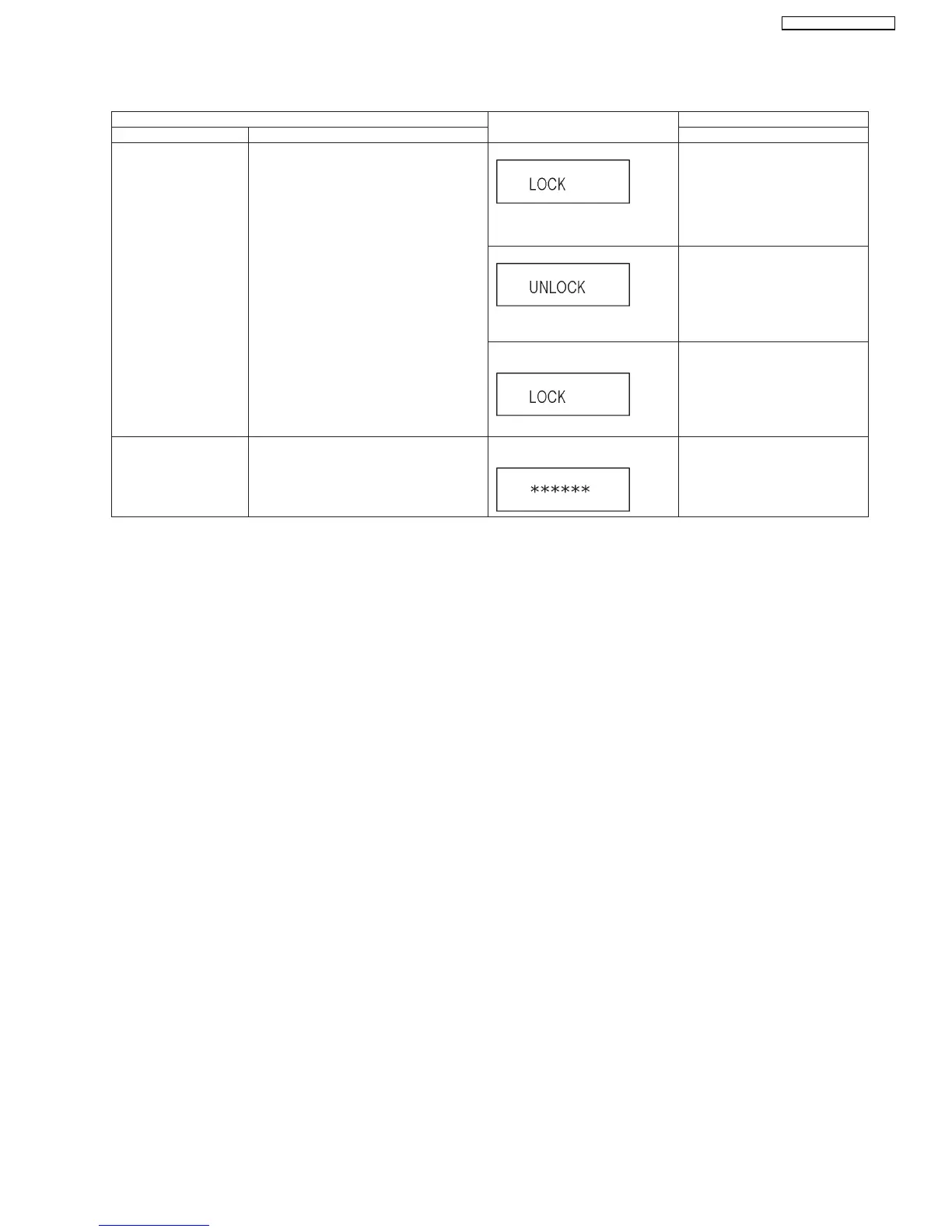
9.2.2. Service Mode Table 2
Demonstration lock/
unlock
Ejection of the disc is prohibited.
The lock setting is effective until unlocking the
tray and not released by Main unit
initialization of service mode.
*When lock the tray.
LOCK is displayed for 3 seconds.
When the power is on ,
press [SKIP FWD] and [OPEN/
CLOSE] keys simultaneously for 5
seconds.
Note:
When a disc is not in tray, this
setting is not effective.
*When unlock the tray.
UNLOCK is displayed for 3 sec-
onds.
When the power is on ,
press [SKIP FWD] and [OPEN/
CLOSE] keys simultaneously for 5
seconds.
*When press OPEN/CLOSE key
while the tray being locked.
Display LOCK for 3 seconds.
Press [OPEN/CLOSE] key while the
tray is being locked.
Progressive initialization The progressive setting is initialized to Inter-
lace.
The display before execution
leaves.
When the power is on (SS mode),
press [STOP] and [PLAY] simulta-
neously for 5 seconds.
Item FL display Key operation
Mode name Description Front Key
31
SA-BT100P / SA-BT100PC






 To Next Page