arrow.
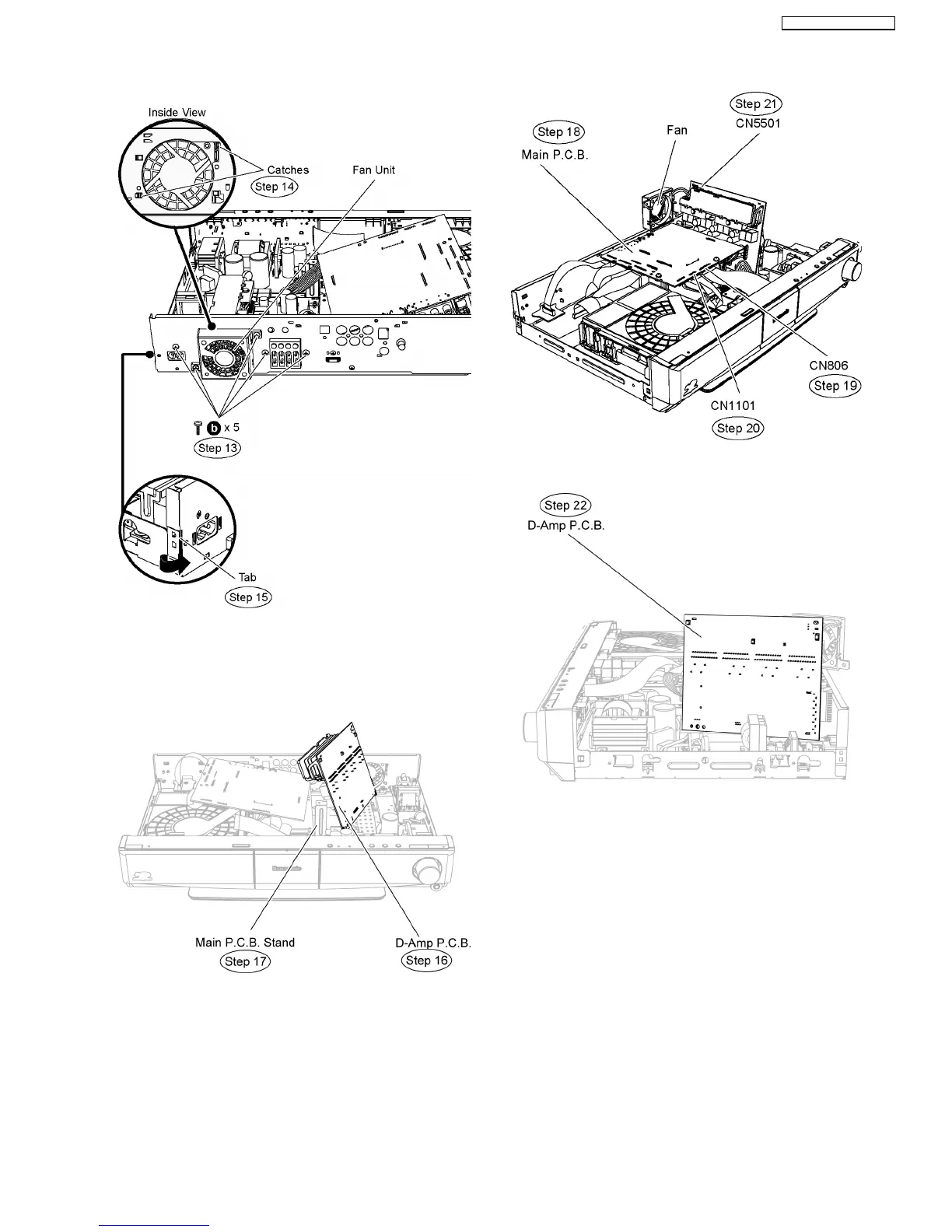
Step 16 Detach D-Amp P.C.B. from the bottom chassis and flip
it vertically.
Step 17 Remove the Main P.C.B stand.
Step 18 Position Main P.C.B. according to the diagram shown.
Caution Note: Ensure the cable is attached properly.
Step 19 Connect 25P cable at the connector (CN806) on Main
P.C.B.
Step 20 Connect 14P cable at the connector (CN1101) on
Main P.C.B.
Step 21 Connect the fan unit at the connector (CN5501) on D-
Amp P.C.B.
Step 22 Position D-Amp P.C.B. with insulated material
according to the diagram shown.
Caution: Insulate D-Amp P.C.B from other parts insulating
material (eg:plastic).
12.3. Checking & Repairing SMPS
P.C.B.
•
• •
• Follow (Step 1) to (Step 7) of Item 12.2.
Step 1 Detach the front panel slightly forward in the direction of
arrow.
Step 2 Remove 4 screws on SMPS P.C.B.
63
SA-BT100P / SA-BT100PC






 To Next Page