EasyManua.ls Logo

Panasonic SA-BT100P - Page 38

Panasonic SA-BT100P
174 pages
Print Icon
To Next Page IconTo Next Page
To Previous Page IconTo Previous Page
Loading...
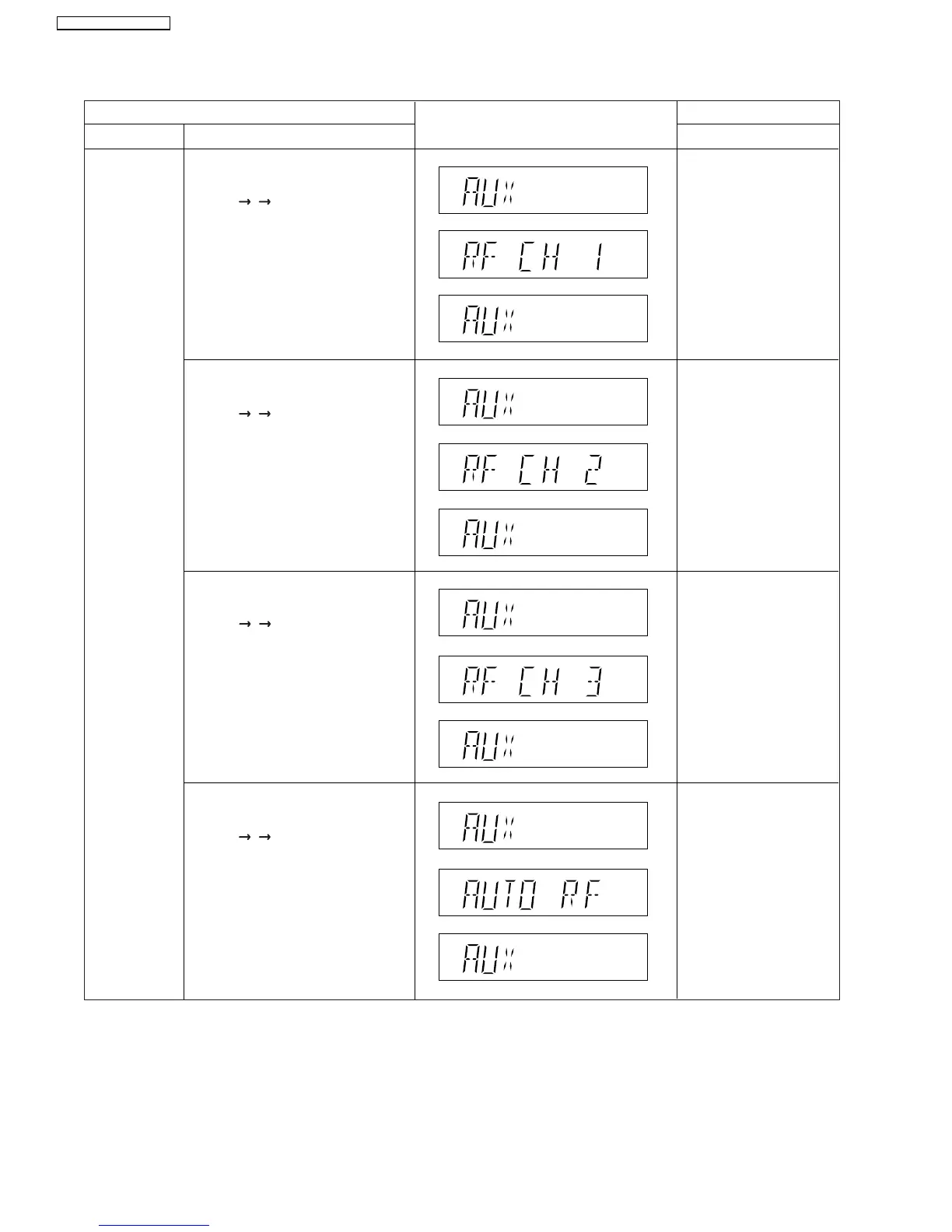
9.4.2. Service Mode Table 2
FL Display
Key Operation
Front Key
Item
DescriptionMode Name
RF Channel
Selection
Display
RF Channel 1 Display*
FL Display sequence:
Display 1 2 3
RF Channel 2 Display*
FL Display sequence:
Display 1 2 3
Auto RF Channel Display*
FL Display sequence:
Display 1 2 3
*Note:
*Note
:
This mode is for purpose of disabling/enabling the frequency of automatic allocation and be able to select a fixed
RF channel (channels 1, 2 or 3).
After 2 seconds.
(Display 1)
(Display 2)
(Display 3)
After 2 seconds.
Main set is in AUX mode.
Press and hold [STOP]
button on the main unit,
and [4] button on the
remote control unit.
Press and hold [STOP]
button on the main unit,
and [5] button on the
remote control unit.
After 2 seconds.
Press and hold [STOP]
button on the main unit,
and [6] button on the
remote control unit.
After 2 seconds.
Press and hold [STOP]
button on the main unit,
and [7] button on the
remote control unit.
(Display 2)
(Display 1)
(Display 3)
(Display 2)
(Display 1)
(Display 3)
(Display 2)
(Display 1)
(Display 3)
RF Channel 3 Display*
FL Display sequence:
Display 1 2 3
38
SA-BT100P / SA-BT100PC

Table of Contents

Related product manuals