86
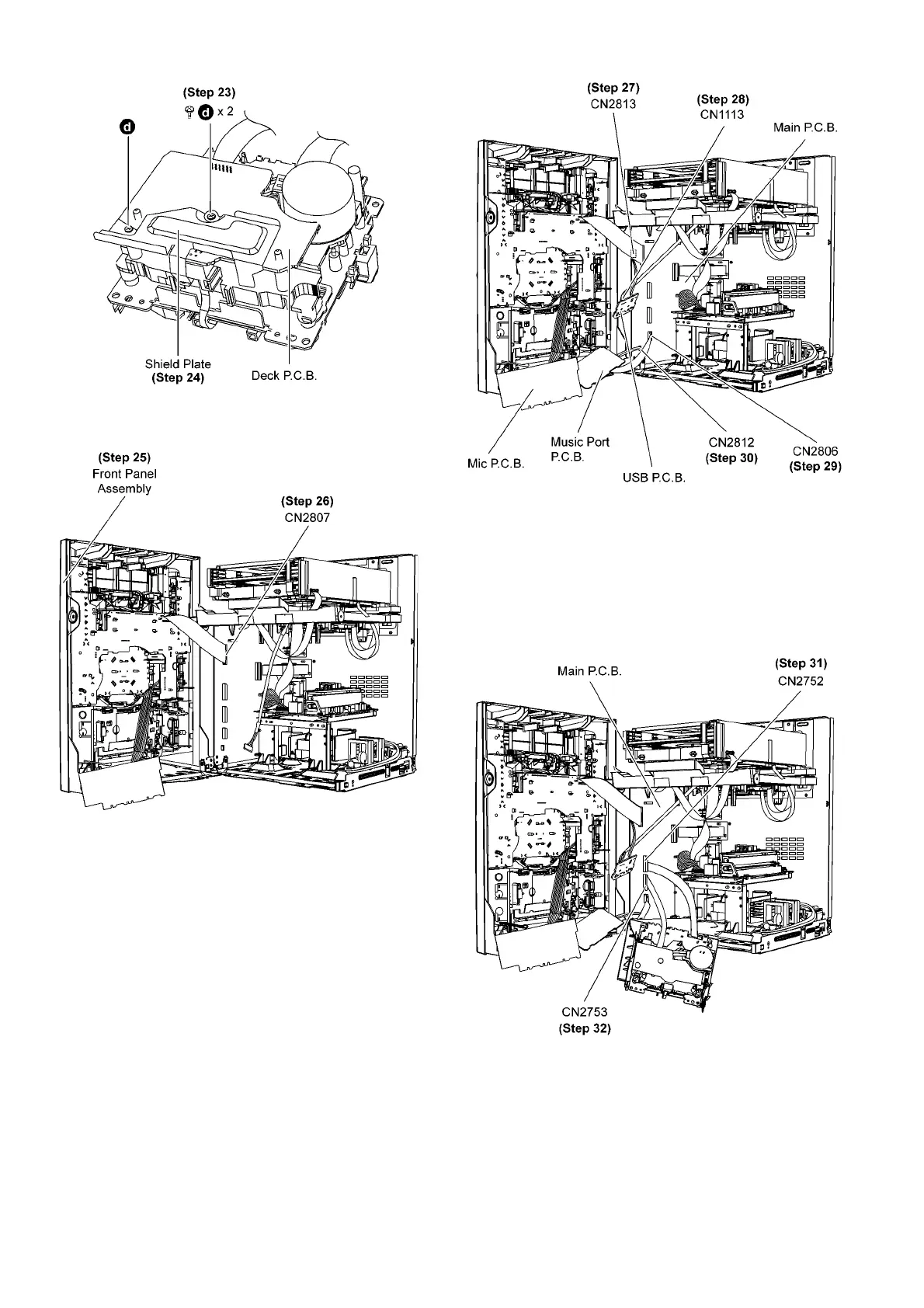
Step 23 Remove 2 screws.
Step 24 Remove shield plate.
Step 25 Position front panel assembly according to the diagram
show.
Step 26 Connect 27P FFC at connector (CN2807) on Main
P.C .B ..
Step 27 Connect 2P cable at connector (CN2813) on Main
P.C .B ..
Step 28 Connect 5P cable at connector (CN1113) on USB
P.C .B ..
Step 29 Connect 10P FFC at connector (CN2806) on Main
P.C .B ..
Step 30 Connect 2P cable at connector (CN2812) on Main
P.C .B ..
Step 31 Connect 10P FFC at the connector (CN2752) on Main
P.C .B ..
Step 32 Connect 12P FFC at the connector (CN2753) on Main
P.C .B ..
Step 33 Check and repair panel P.C.B., Deck P.C.B., Volume
P.C.B., Music Port P.C.B. and Mic P.C.B..











 To Next Page