32
1
"- LEVEL EXPERT- PELLENC POWER TOOL BATTERY" Workshop document
Issue 11/2016 ref. : DOCUMENT ATELIER_BATTERIE_EXP_OUTILS_PELLENC_V2_2016_ENG
LEVEL 3 - PELLENC AUTHORISED REPAIRER
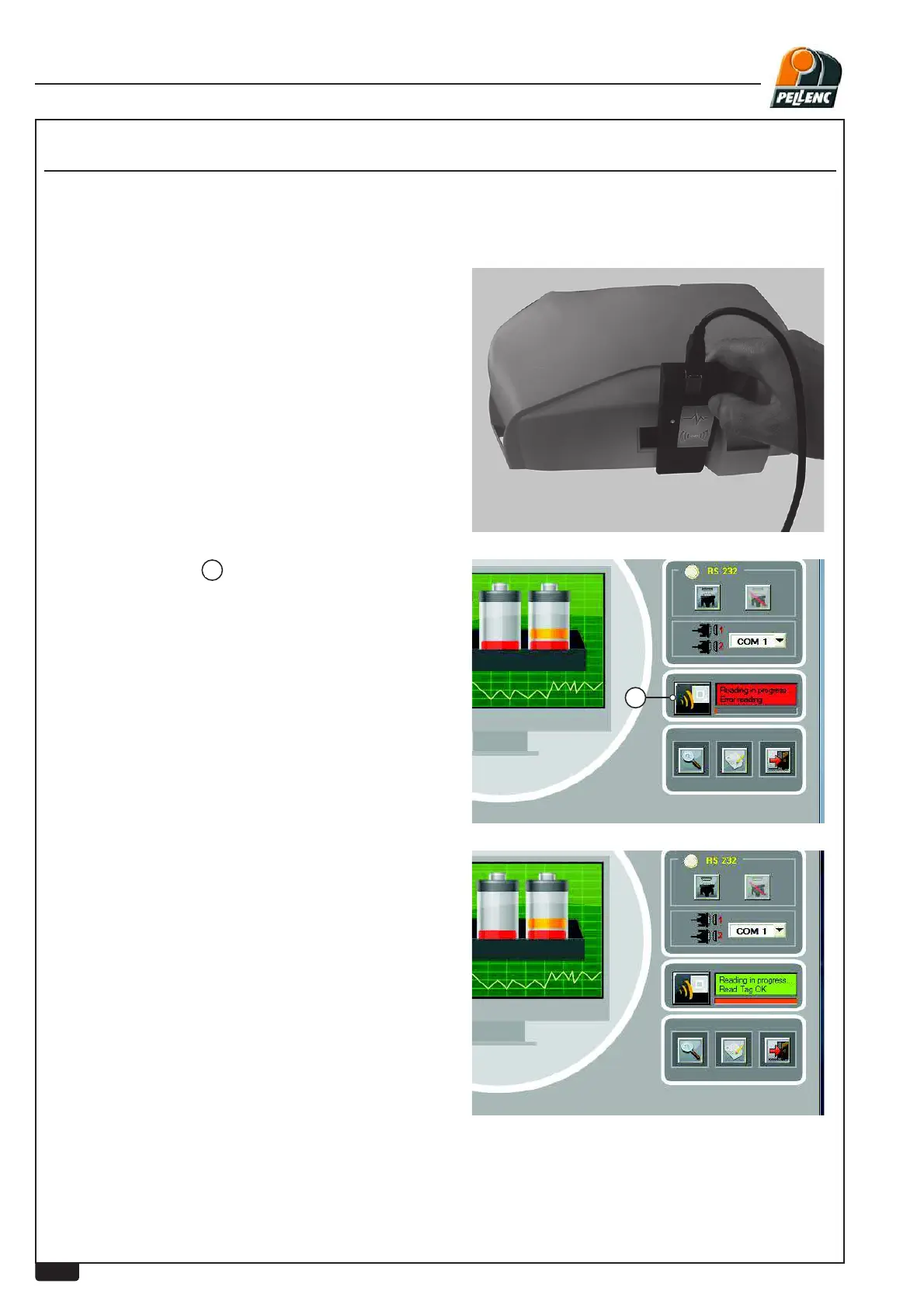
Put the card in the precise position shown in the photo
opposite.
Start the software by clicking on the “DIAG-Bat-RFID.exe” window.
A red indicator light will show that the antenna has
EHHQGHWHFWHGIRUWKH¿UVWWLPH
Press the RFID icon
1
to start the battery reading.
If a red screen appears, this means that the battery
reading has failed.
The card should then be replaced in the proper
position on
the battery.
A green screen with a progress bar shows that the
battery reading has succeeded.
USE OF RFID SYSTEM


 To Next Page