64
56_11_526A
56_11_527A
1 3 4 5 6 87 9 10
11 12 13
14
16
17 18
15
2
272625242219 21 2320
"- LEVEL EXPERT- PELLENC POWER TOOL BATTERY" Workshop document
Issue 11/2016 ref. : DOCUMENT ATELIER_BATTERIE_EXP_OUTILS_PELLENC_V2_2016_ENG
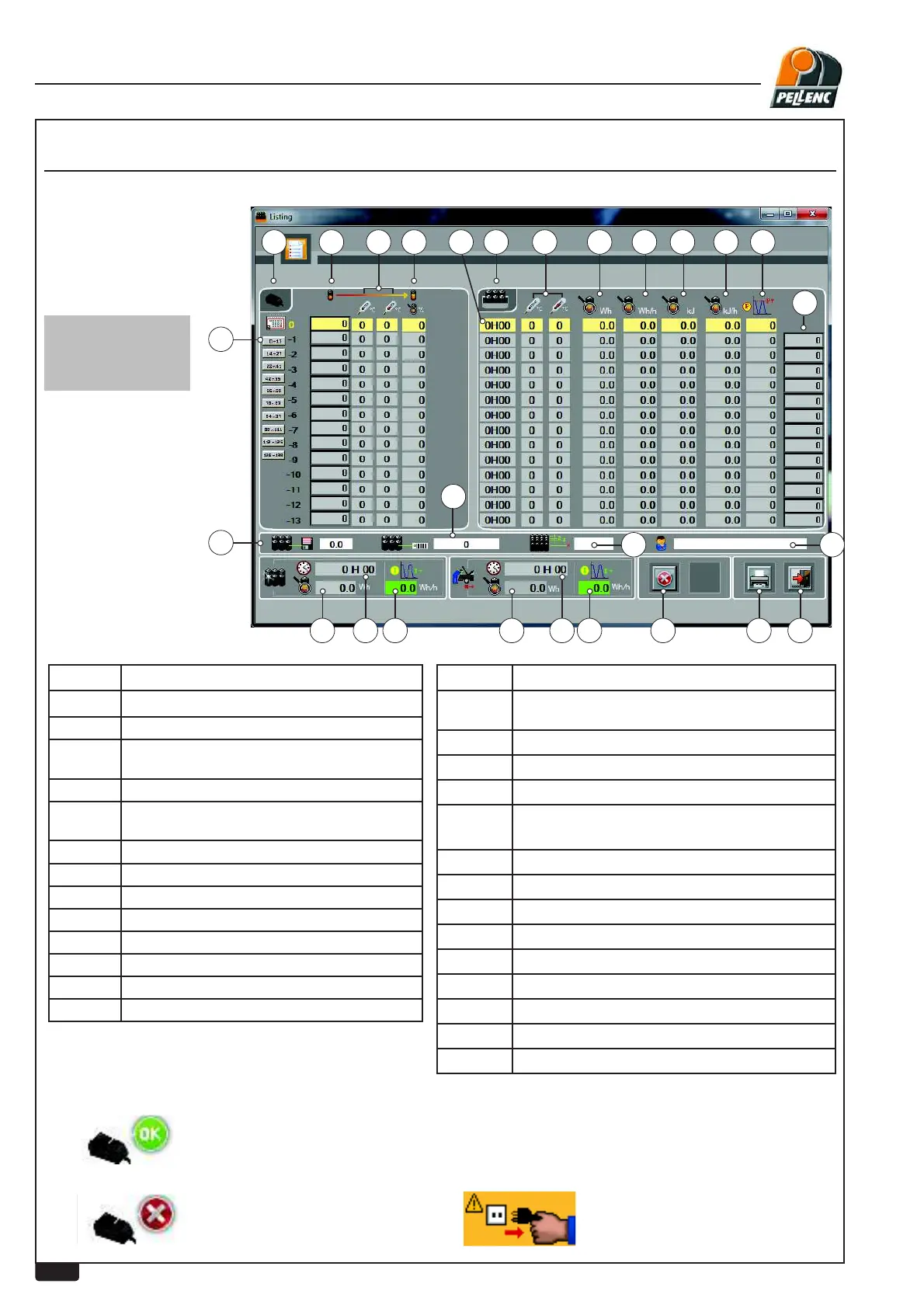
USING THE LI-ION BATTERY SOFTWARE - LISTING SCREEN
Green icon / OK =Full charge
Red icon =Charging fault
Orange icon / Caution =
Charger disconnected before full
charge
LEVEL 3 - PELLENC AUTHORISED REPAIRER
Labels Explanations
1 Charging part
2 Cycles
3 Remaining charge when the charger is con-
nected
4 High and low temperature during charging
5 Remaining charge when the charger is con-
nected or disconnected
6 Usage part
7 Operating time
8 High and low temperature during use
9 Power consumed in Wh
10 Average power
11 Power consumption in Kj
12 Average energy
13 Maximum\power
Labels Explanations
14
Charge remaining when work complete.(Voltage
on largest cell, value in % or Mv)
15
Battery software version.
16
Battery internal serial No.
17
Number of battery cells
18
Name of customer entered during wired download
or battery serial number in RFID
19
Charge consumed since commissioning
20
Working time since commissioning
21
Average current since commissioning
22
Working time since last overhaul
23
Charge consumed since last overhaul
24
Average current since last overhaul
25
Fault screen button
26
Print button.
27
Return to previous screen (escape)
REMINDER:
1Wh => 3.6 Kj


 To Next Page