34
1
9
6 7 8
10
11
12
2
3
4
5
"- LEVEL EXPERT- PELLENC POWER TOOL BATTERY" Workshop document
Issue 11/2016 ref. : DOCUMENT ATELIER_BATTERIE_EXP_OUTILS_PELLENC_V2_2016_ENG
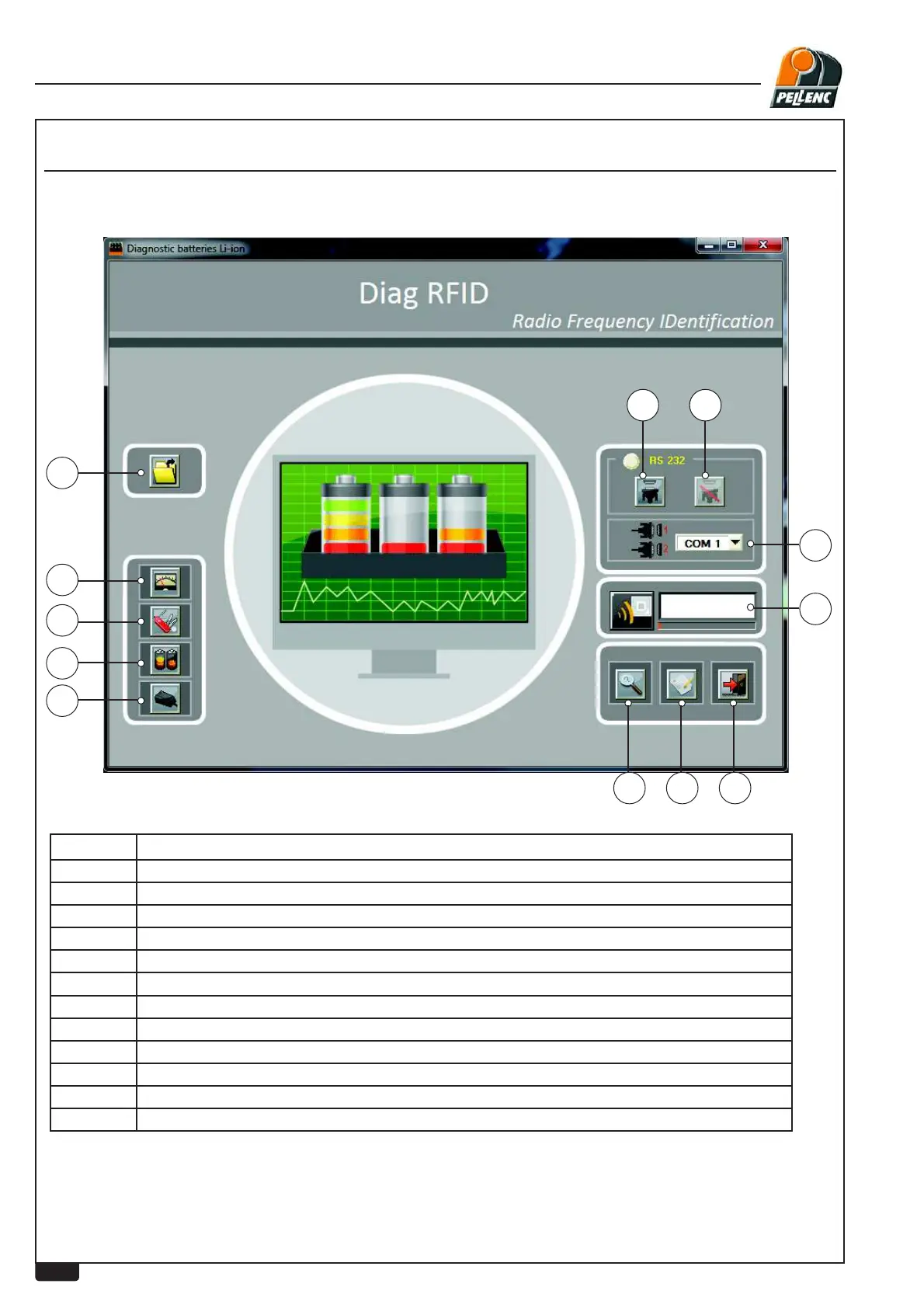
USING THE LI-ION BATTERY SOFTWARE - MAIN SCREEN
LEVEL 3 - PELLENC AUTHORISED REPAIRER
Labels Explanations
1 %XWWRQIRURSHQLQJDOUHDG\VDYHG¿OH
2 Screen button for measurement
3 Screen button for tool information
4 Screen button for information on battery (Listing screen)
5 Screen button for information on charger
6 "About" Button
7 Button for entering comments
8 Software exit button (Esc)
9 Connection (Serial link only)
10 Disconnection (Serial link only)
11 Port number / Port selection (Serial link only)
12 USB communication initialise


 To Next Page