65
2
1
3 4 5
6
7
8
9
11
10
12 13 14
15
"- LEVEL EXPERT- PELLENC POWER TOOL BATTERY" Workshop document
Issue 11/2016 ref. : DOCUMENT ATELIER_BATTERIE_EXP_OUTILS_PELLENC_V2_2016_ENG
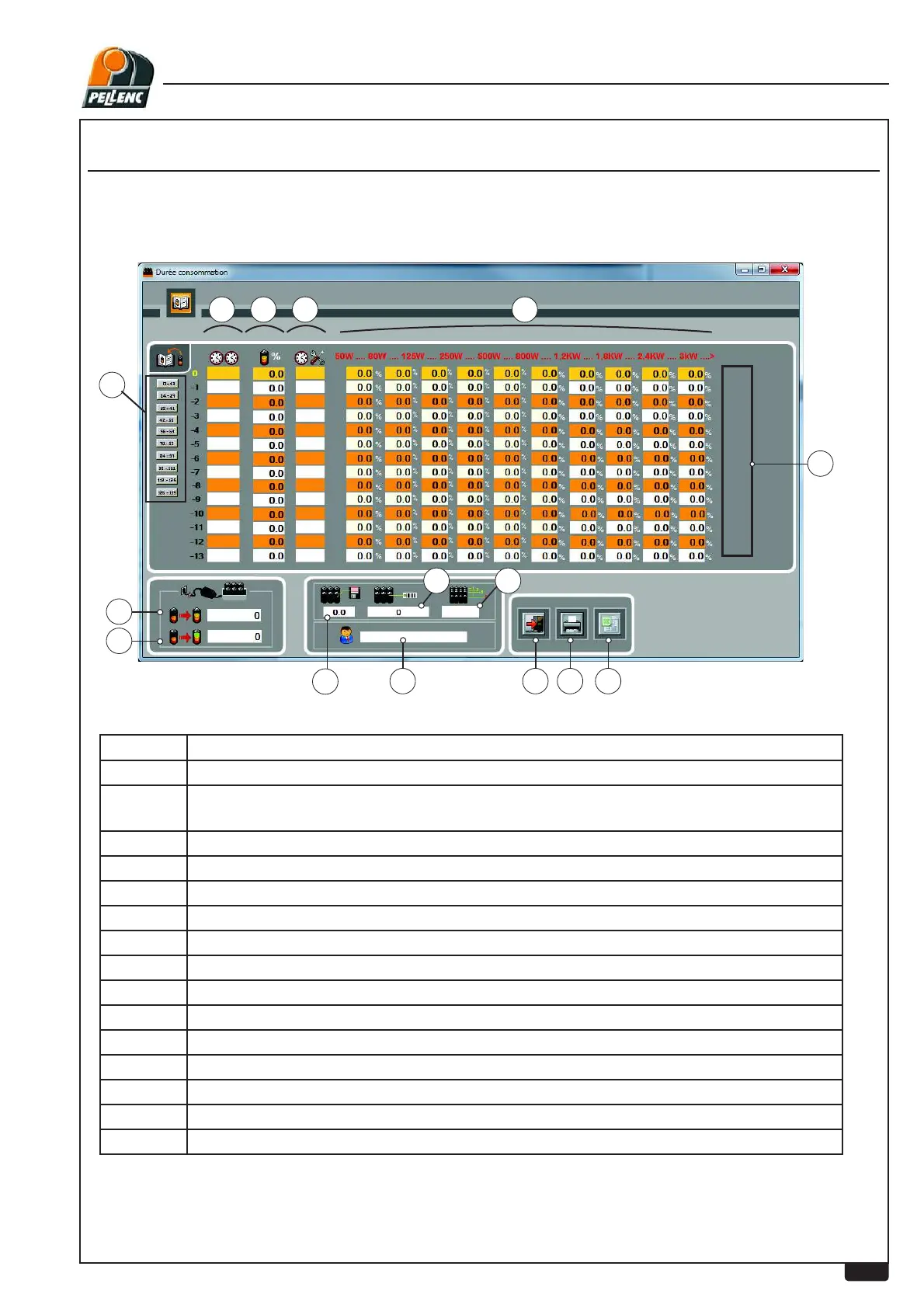
USING THE LI-ION BATTERY SOFTWARE - "CONSUMPTION TIME" SCREEN
Item No. Description
1 Cycle from 0 to -13
2 Time switched on (Charging level between "switched on" and "consumption time" at
50W)
3 Charge used / consumed
4 Time where P is > than 50 W
5 Percentage according to power consumed (Caution! time different from usage time)
6 Number of charging operations performed
7 Number of complete charging operations
8 Battery software version.
9 Battery internal serial No.
10 Number of battery cells
11 Customer’s name if saved during downloading.
12 Return to previous screen (escape)
13 Print button
14 Extraction of information on Excel spreadsheet
15 Tool(s) used in each work cycle
CTRL + SHIFT + C
LEVEL 3 - PELLENC AUTHORISED REPAIRER


 To Next Page