87
1
2
"- LEVEL EXPERT- PELLENC POWER TOOL BATTERY" Workshop document
Issue 11/2016 ref. : DOCUMENT ATELIER_BATTERIE_EXP_OUTILS_PELLENC_V2_2016_ENG
3. Replacing a battery assembly
In each of the four cases listed below, the entire battery assembly must be replaced.
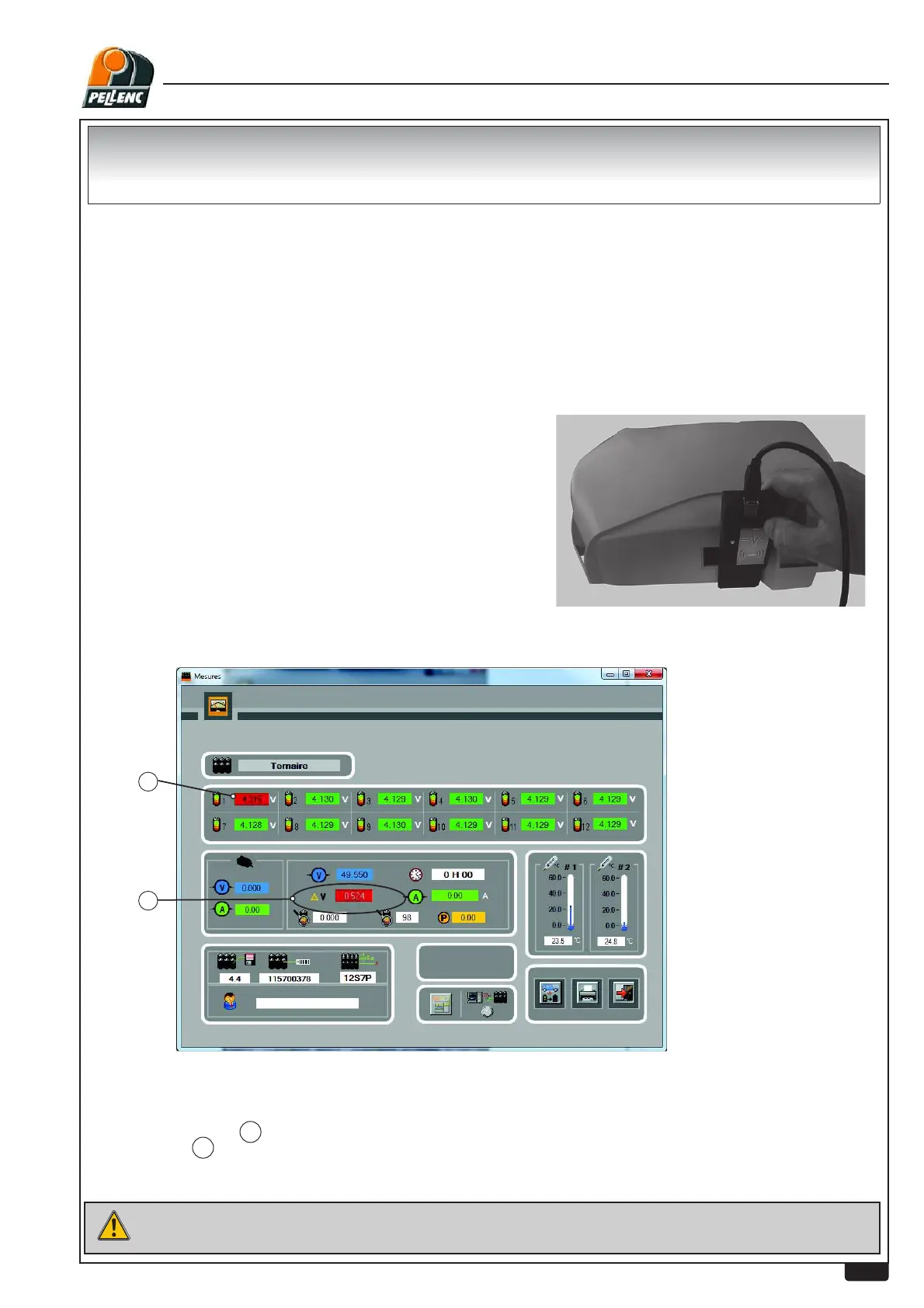
ĺ2SHQWKH0HDVXUHPHQWV)ZLQGRZ
After a storage period the battery may have a delta V > 0.100 V after charging (when the charger with display at 99% steady is
disconnected, it quickly displays a value below 99%).
This phenomenon may occur again for up to four cycles.
DIAGNOSTICS FOR BATTERY COMPONENTS
Put the card in the precise position shown in the photo opposite.
PROCEDURE
1. Pre-requisites
• A battery assembly includes the battery and its board.
• The battery must be charged at least 20% to be checked.
• PC with latest version of Diagnostic software installed and operational
• Battery returns must comply with standard transport practices and norms.(
In storage/display inactive).
,IDIDXOWLVREVHUYHGWKHUHVXOWPXVWEHFRQ¿UPHGE\PDNLQJD
FRQQHFWLRQYLDWKH5),'FDUG
If the battery makes it impossible to comply with these rules, or if the downloading is not possible, a new board must be installed
and\checked.
If the battery is faulty, recover the new board and return it to stock.
a. If 1 cell or more is red.
1
E,I¨9!9
2
c. Battery unserviceable if > 50 mV and "over charge" fault
After checking that there are no faults on the circuit board.


 To Next Page