76700 -11/94-
⑥
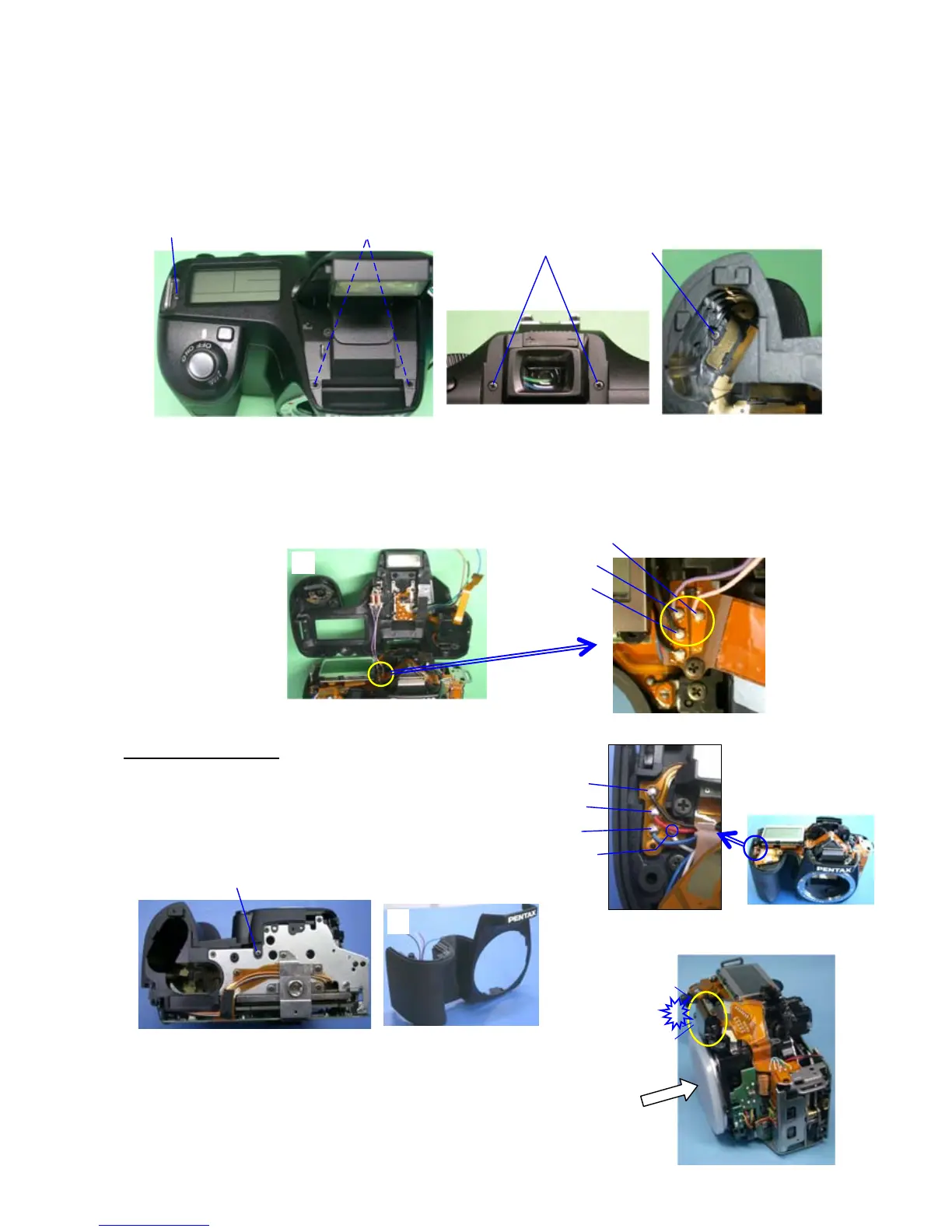
④ Unscrew A73 (TY screw x2 4.5mm) --- It is already done at 1-②
⑤ Unscrew A73 (TY screw)
⑥ Unscrew A74 (TY screw x2 5.5mm)
⑦ Unscrew TY-CNL-D 1.7x8.0 (Inside of battery chamber)
⑧ Lift up top cover.
⑨ Unsolder 3 lead wires. (Pink, Purple, Black/ G119, A330)
⑩ Remove the top cover.
5. A150(Front cover)
① Unsolder 4 lead wires. (Black, Red, Blue, White /0-T950)
② Unscrew CNL-D1.7x2.5
③ Take off fromt cover (A150)
*When working on the camera, put the mount cover to protect SI-LED part.
⑤
④
⑦
⑨ Pink
Purple
Black
(A330)
⑧
③
①
Black
Red
Blue
White
②



 To Next Page