76700 -13/94-
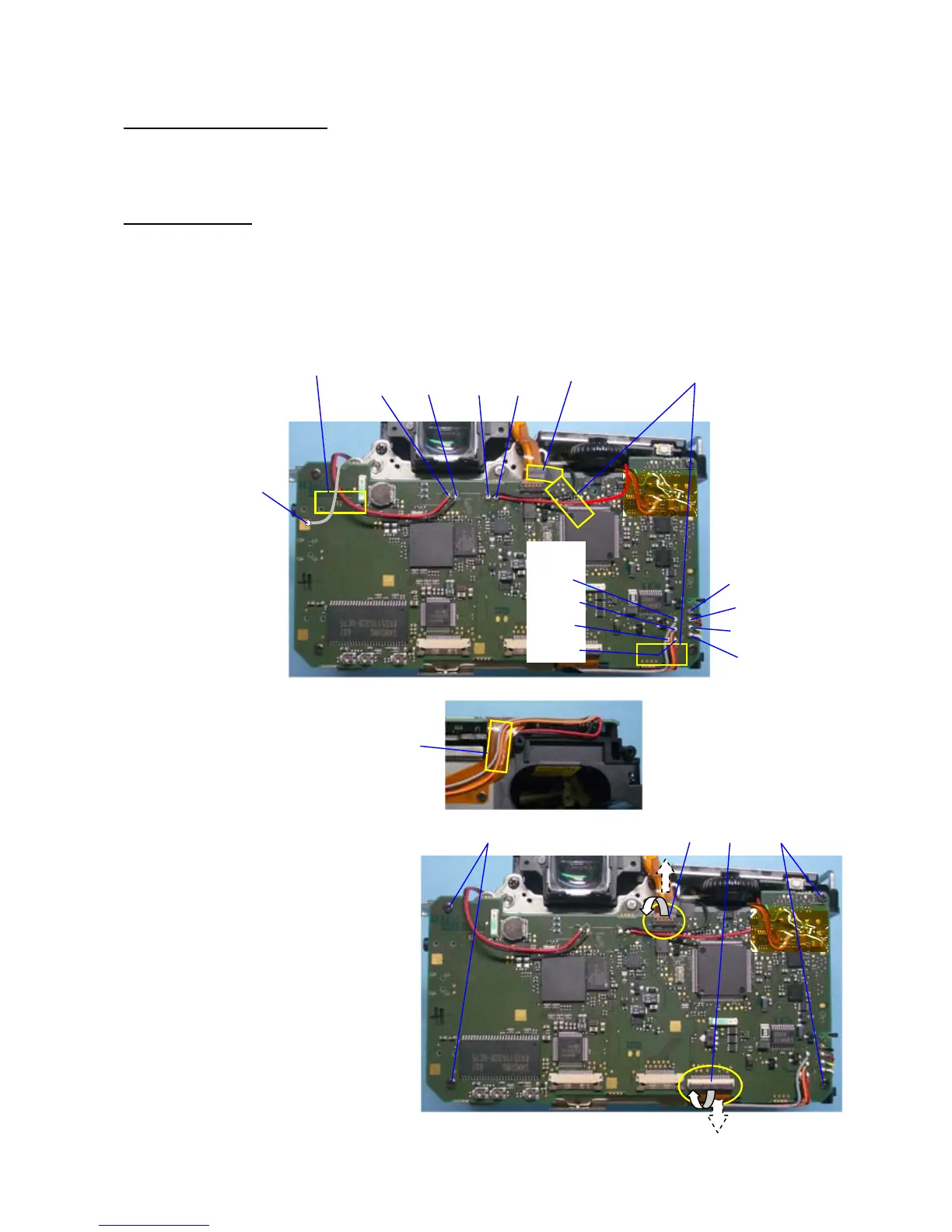
7. 0-T100 (Main PC board)
① Peel off BT(6x15) --- 3 points
② Peel off A38(PT3.8x10) while holding flex board.
Unsolder lead wires.
③ Unsolder 2 lead wires. (Red, Black /Q200)
④ Unsolder 2 lead wires. (Black, Red /T200, A14)
⑤ Unsolder 4 lead wires. (Gray, Orange, Black, Red / S300, S250)
⑥ Unsolder 4 lead wires. (Black, Red, Yellow, White / T10, N300)
⑦ Unsolder 1 lead wire. (Gray / I17)
⑧ Peel off BT(6x15) from bottom side.
⑨ Disconnect J100 flex from connector
(Flip lock connector)
⑩ Disconnect T901 flex from connector
(Frip lock connector)
⑪ Unscrew CNL-D 1.7x2.5 (x2)
⑫ Unscrew TY-CNL-D 1.7x3.5 (x2)
⑧
①
②
③
Red, Black
①
④
Black, Red
⑥
Black
Red
Yellow
White
⑤
Gray
Orange
Black
Red
⑦
Gray
⑫
⑪
⑨
⑩



 To Next Page