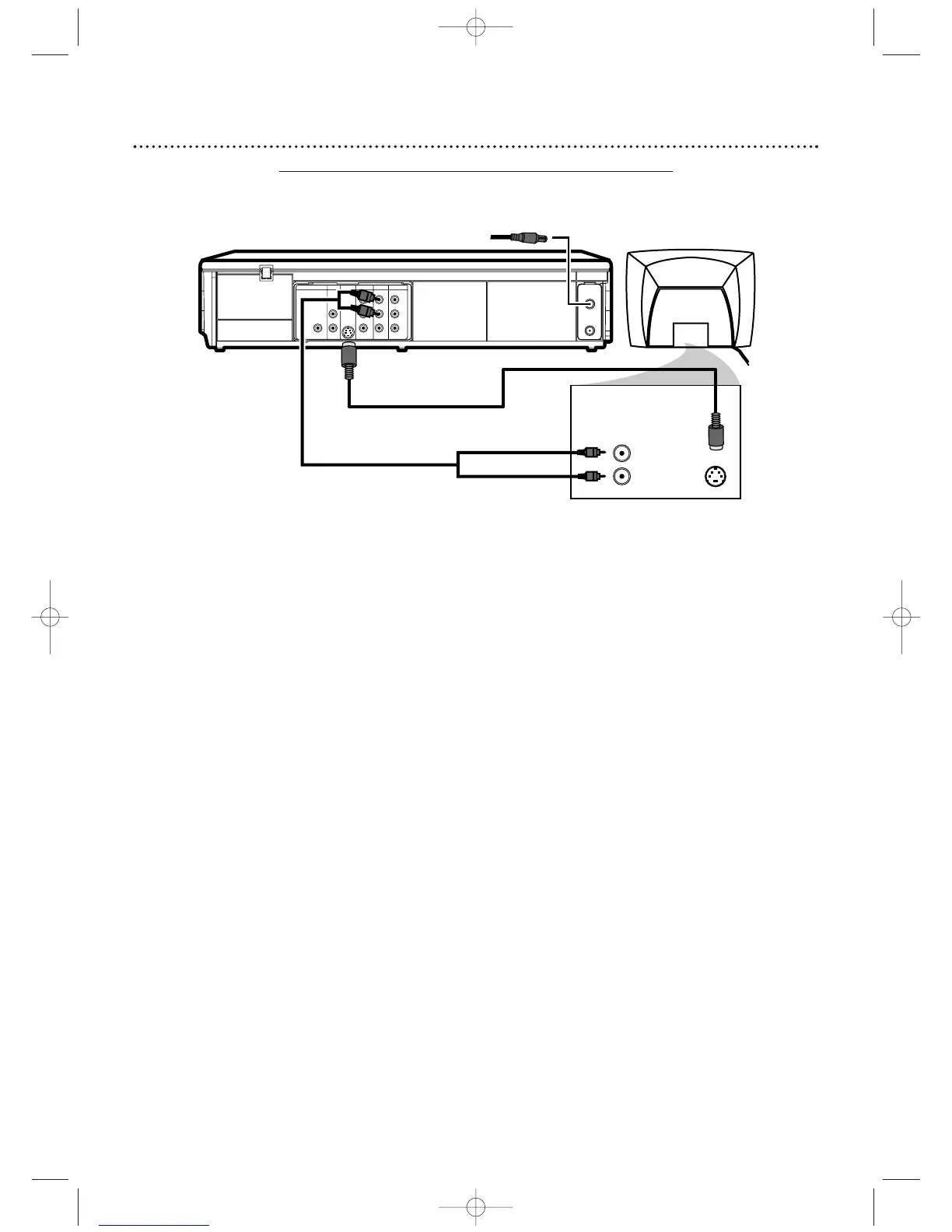
1
Connect the antenna or Cable TV signal to the ANT-IN (Antenna In)
jack of your DVD/VCR.
2
Connect the supplied red and white audio cables to the red and
white DVD/VCR AUDIO OUT jacks on the DVD/VCR and to the red
and white AUDIO IN jacks on the TV.
Match the cable colors to the jack
colors.
3
Connect an S-Video cable (not supplied) to the S-VIDEO OUT jack
on the DVD/VCR and to the S-VIDEO IN jack on the TV.
The S-Video connection only supplies video (picture) for the DVD Player of the
DVD/VCR.Therefore, in order to use the VCR features or view TV channels at the
DVD/VCR, you still need to either connect the RF coaxial cable between the ANT-OUT
jack of the DVD/VCR and the TV’s Antenna In jack, or connect the yellow video cable.
To connect the supplied RF coaxial cable, see step 2 on page 7.To connect the
supplied yellow video cable, see step 3 on page
10.
4
Connect the power cords of the DVD/VCR and TV to a power outlet.
Turn on the TV and set it to the S-Video In channel for DVD Player
features.
If you are using the RF coaxial cable for VCR playback, choose channel 3 or 4
at the TV. If you are using the yellow video cable for VCR playback, choose the
Video In channel at your TV.To find the correct Video In channel, go to your
lowest TV channel and change channels downward until you see VCR or DVD
playback on the TV screen, or try channel 3 or 4 at the TV.
To help you find the right S-Video In channel, turn on the DVD/VCR. Press DVD to
put the DVD/VCR in DVD mode.With no Disc in the Player, a large DVD Video
logo will appear on the TV screen when you get the TV on the S-Video In channel.
Make sure PROGRESSIVE is OFF and “P.SCAN” does not appear on the DVD/VCR
display panel. Disable
Progressive Scan by pressing and holding PLAY B (DVD)
on the front of the DVD/VCR for more than five seconds SO “P.SCAN” does
not appear on the display panel. Details are on pages 63-64.
5
You are ready to turn on the DVD/VCR. Go to page 16 before
turning on the DVD/VCR.
3
2
Antenna/Cable
TV Signal
1












 To Next Page