EasyManua.ls Logo

Power Electronics SD300 Series - Page 129

Power Electronics SD300 Series
354 pages
Print Icon
To Next Page IconTo Next Page
To Previous Page IconTo Previous Page
Loading...
POWER ELECTRONICS
DESCRIPTION OF PROGRAMMING PARAMETERS
127
Screen
Description
Default
value
Range
Function
Set
on
RUN
bA.78
[6]
Acceleration
ramp 6
20.0s
Note: comes from the previous page
The setting is carried out by assigning a speed
value for each parameter of this group:
- - bA.70 to bA.82: for acceleration times.
- - bA.71 to bA.83: for deceleration times.
Once multi-function terminals have been
configured (In.65-71) as Speed-L/M/H (options
11, 12 and 49), acceleration and deceleration
commands will control the drive operation
based on the setting of bA.70-83.
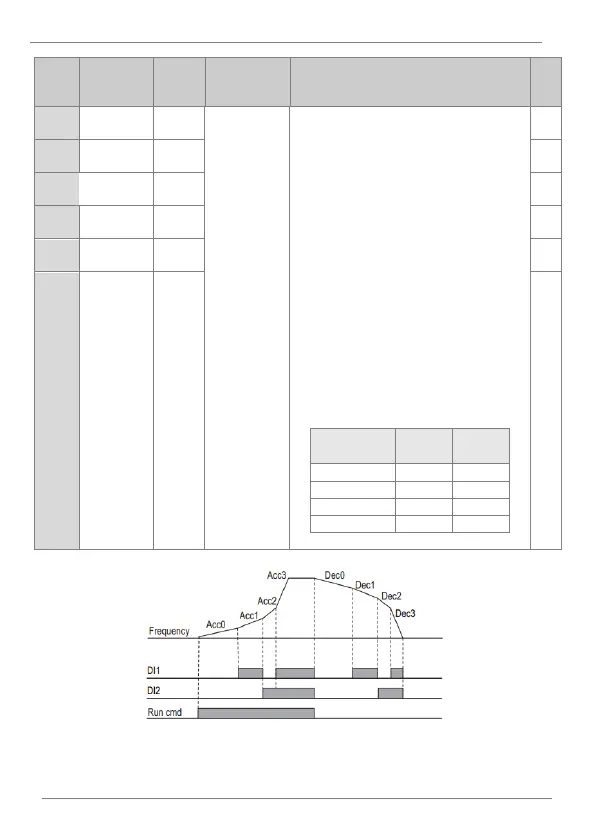
For example, with the following options the
drive will operate as shown in the following
Figure Ramp operation example.
- In.65 ED1 = ′Speed-L′
- In.65 ED2 = ′Speed-M′

Accel / decel
time
DI1
DI2
0
1
2
3
YES
bA.79
[6]
Deceleration
ramp 6
30.0s
YES
bA.80
[6]
Acceleration
ramp 7
20.0s
YES
bA.81
[6]
Deceleration
ramp 7
30.0s
YES
bA.82
[6]
Acceleration
ramp 8
20.0s
YES
bA.83
[6]
Deceleration
ramp 8
30.0s
YES
Ramp operation example

Table of Contents

Related product manuals