4-68 Controls and Instruments
PA-1628Operator's ManualH3-45 COACH
select a pulling away gear different than the one
selected by using the + and - buttons.
When the vehicle is moving in automatic drive mode,
the driver can intervene manually, while maintaining
the accelerator pedal depressed, by selecting a
higher or lower gear using the + and - buttons. The
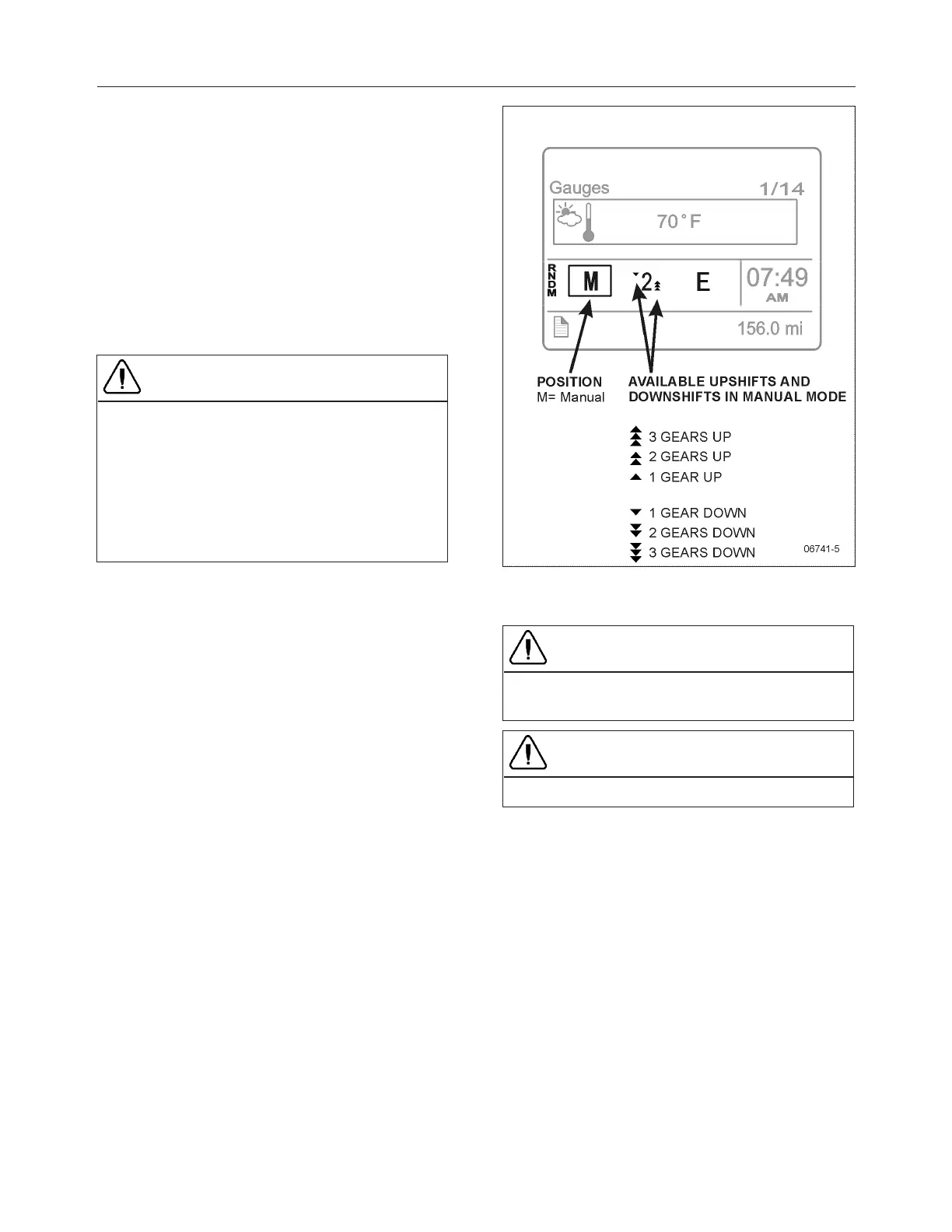
arrows in the display show how many gears are
available to change up or down.
Whenever gear changing is not desired while in
automatic drive mode, change the pushbutton shift
selector from D to M. No further gear changes will be
carried out and the current gear will remain engaged.
CAUTION
There is a risk of over-revving the engine when the
transmission is locked in a gear. Damage to the
engine may occur. To lock the transmission in the
current gear, change the pushbutton shift selector
from the D position to the M position. This function
can be used for all 12 forward gears. To return to
the automatic drive mode, set the pushbutton shift
selector back to the D position.
M Position
It is possible to drive the vehicle with full manual
gear changing or take over from the automatic gear
changing system whenever required. Gear changing
is done by first selecting the manual position M.
In manual shift mode, the driver use the + and –
buttons to select gears.
The transmission will not automatically change
gears as the driving conditions change. The current
gear is displayed in the DID along with the up and
down arrows. The number of available upshifts and
downshifts will change as driving conditions change.
When changing a gear, the accelerator pedal should
not be released.
CAUTION
Starting in too high a gear exposes the clutch to
high levels of wear.
CAUTION
The driver must avoid over-revving the engine.
R Position
The system will select R2 automatically when the
pushbutton shift selector is set to R, but if wanted,
the driver can select R1 as reverse gear manually
using the – button. During reverse, it is possible to
shift between gear R1 and R2 using the + and –
buttons.







 To Next Page