7-8 Safety Features and Equipment
PA-1628Operator's ManualH3-45 COACH
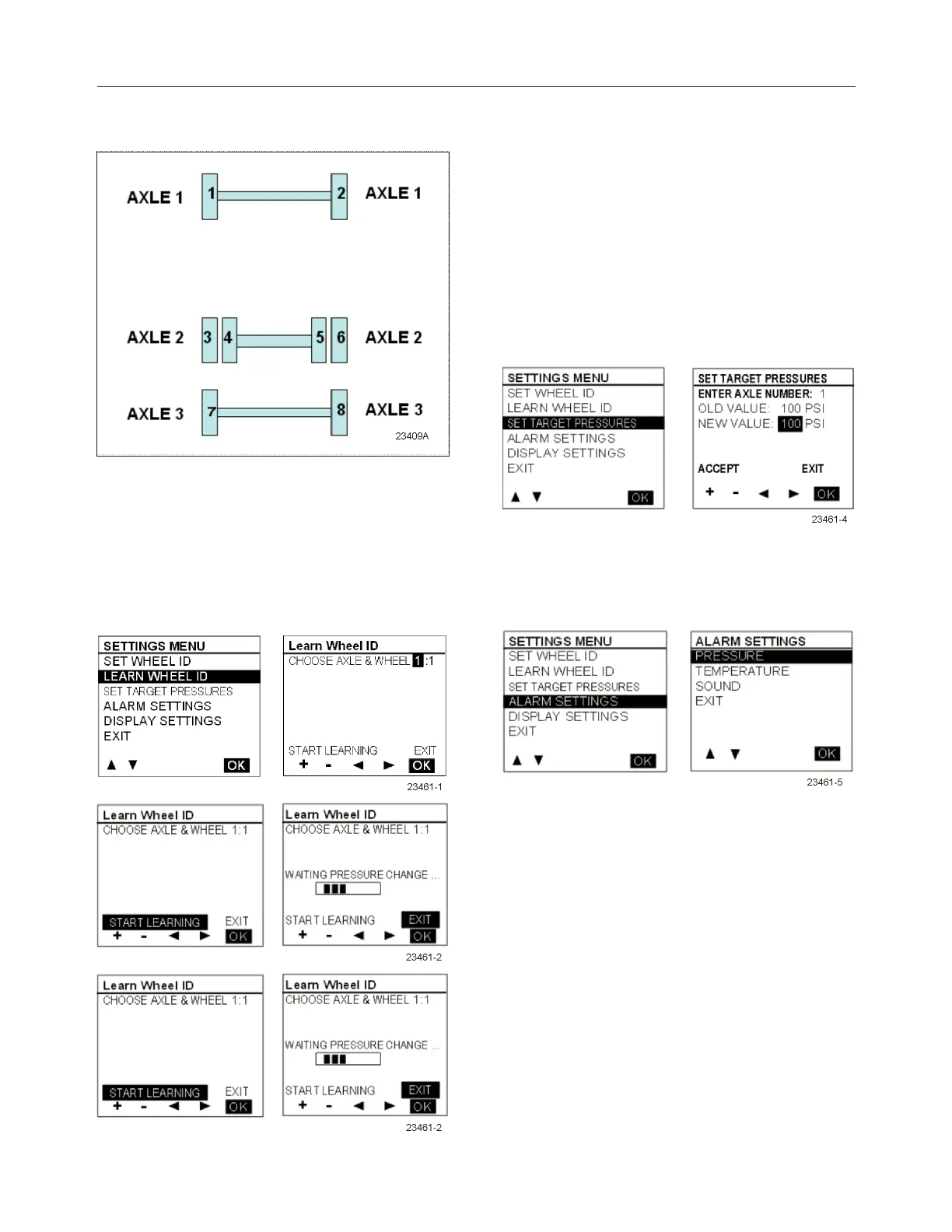
right, and then moves to the next axle, counting
axles from front to rear.
It activates the next wheel parameter each time a
wheel is done. This setting is integrated with the
vehicle electronic, activating an audible signal on the
vehicle, thus providing feedback to the user that he
can move on to the next wheel.
The spare tire can be done by selecting the
axle/wheel “spare” which is internally encoded to
15:1.
l Set Target Pressures
This menu allows the end user to fine-tune the target
pressure setting, taking account for the specific
operating conditions (cold weather operation or
unloaded operation). The end user can readjust the
target pressure within +30% and -20% of the factory
set target pressure but not outside this range.
The factory set target pressure is always kept in
permanent memory into the TPMS display and
cannot be edited by the end user.
When the user sets a new target value, the selection
can’t be made outside the valid range.
l Alarm Settings
When selecting the Alarm Settings Menu, a
submenu containing Pressure Alarm and
Temperature Alarm appears.
When selecting Pressure, the following pressure
alarm screen appears. A similar screen is displayed
for temperature settings. The cursor can be moved to
highlight the data beside “new value” and the “accept
/ exit” option. +/- allows increasing or decreasing the
“new value” data. Pressure alarm changes are made
by steps of 1 PSI, in the range from 5 to 20 PSI.
Temperature alarm is done by steps of 5°F (2°C) in
the range from 150°F to 180°F (64°C to 82°C).
Pressing OK with “accept” highlighted applies
changes and exits to the previous menu, while
pressing OK while the “exit” option is highlighted
exits without changes.








 To Next Page