GTR-3455
Doc Ref: Page: 56
Date: 13/01/13 Issue: H
Pr
seal
®
uk
Tray Sealing Solutions
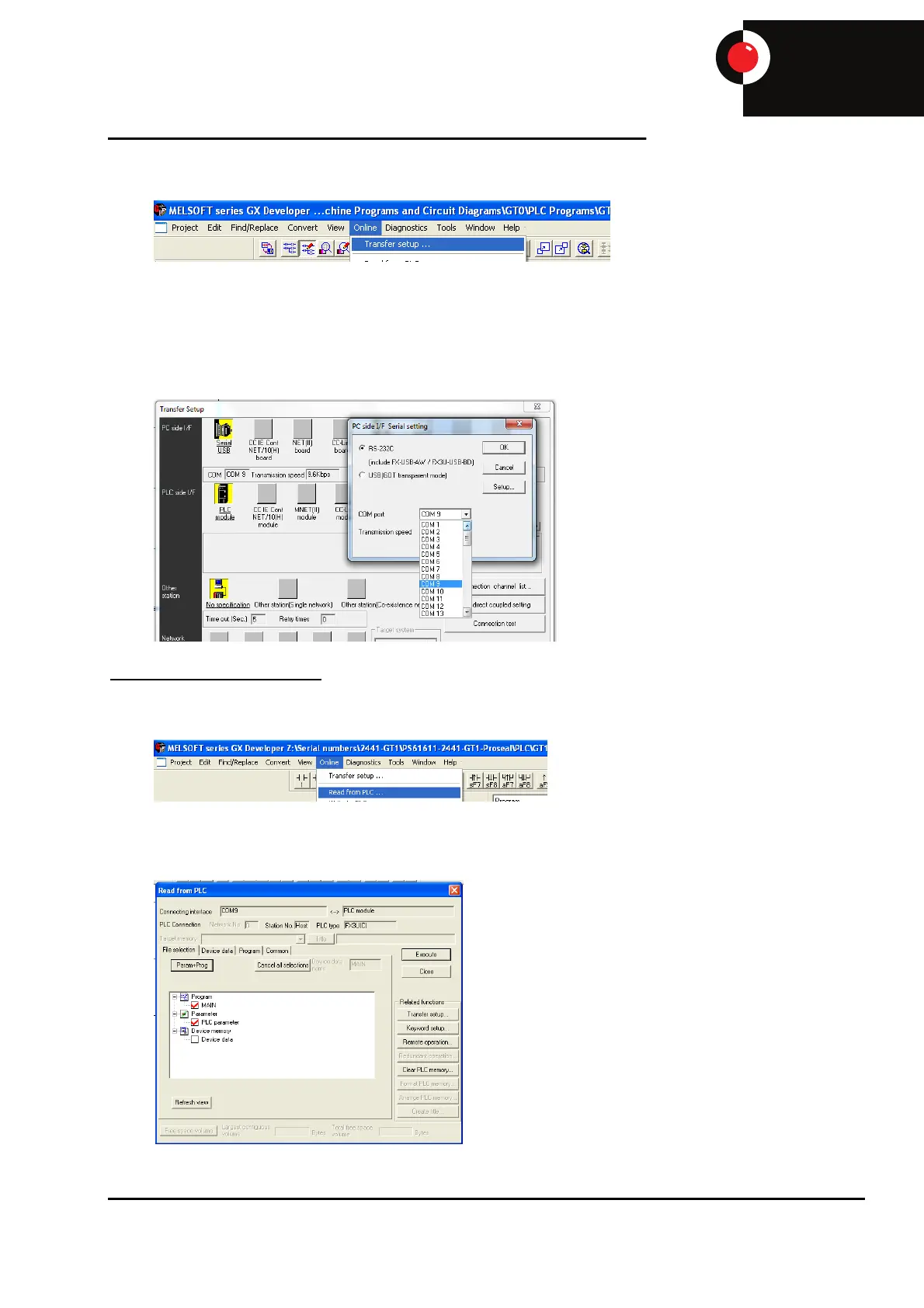
Open up the PLC program in GX Developer and select ‘Online’ – ‘Transfer setup’.
Ensure the com port selected is correct, COM 1 when using the red cable directly in the PLC or
COM 9 if VSP is configured for connection through the screen. If the wrong port is selected, double
click the serial USB icon and set com port to correct setting using the drop down box then select
OK. When this is correct, select connection test to test the connection between the PC and the
PLC.
To Upload a PLC Program
Select ‘Online’ – ‘Read from PLC’.
Select ‘Param+Prog’ then ‘Execute’. Click ‘YES’ on the ‘Execute read from PLC’ pop up. Another
pop up box will ask to confirm selection, click ‘YES’.


 To Next Page