MVI69E-MBS Backplane Data Exchange MVI69E-MBS ♦ CompactLogix Platform
User Manual Modbus Serial Enhanced Communication Module
Page 72 of 154 ProSoft Technology, Inc.
June 28, 2017
4.4.2 Master Mode
In Master mode, the MVI69E-MBS module issues read or write commands to
slave devices on the Modbus network. These commands are user-configured in
PCB; refer to Modbus Port x Commands (page 52). This list is transferred to the
module when the module receives its configuration from the processor.
The commands can also be issued directly from the CompactLogix or MicroLogix
1500-LRP processor (Special Command Blocks).
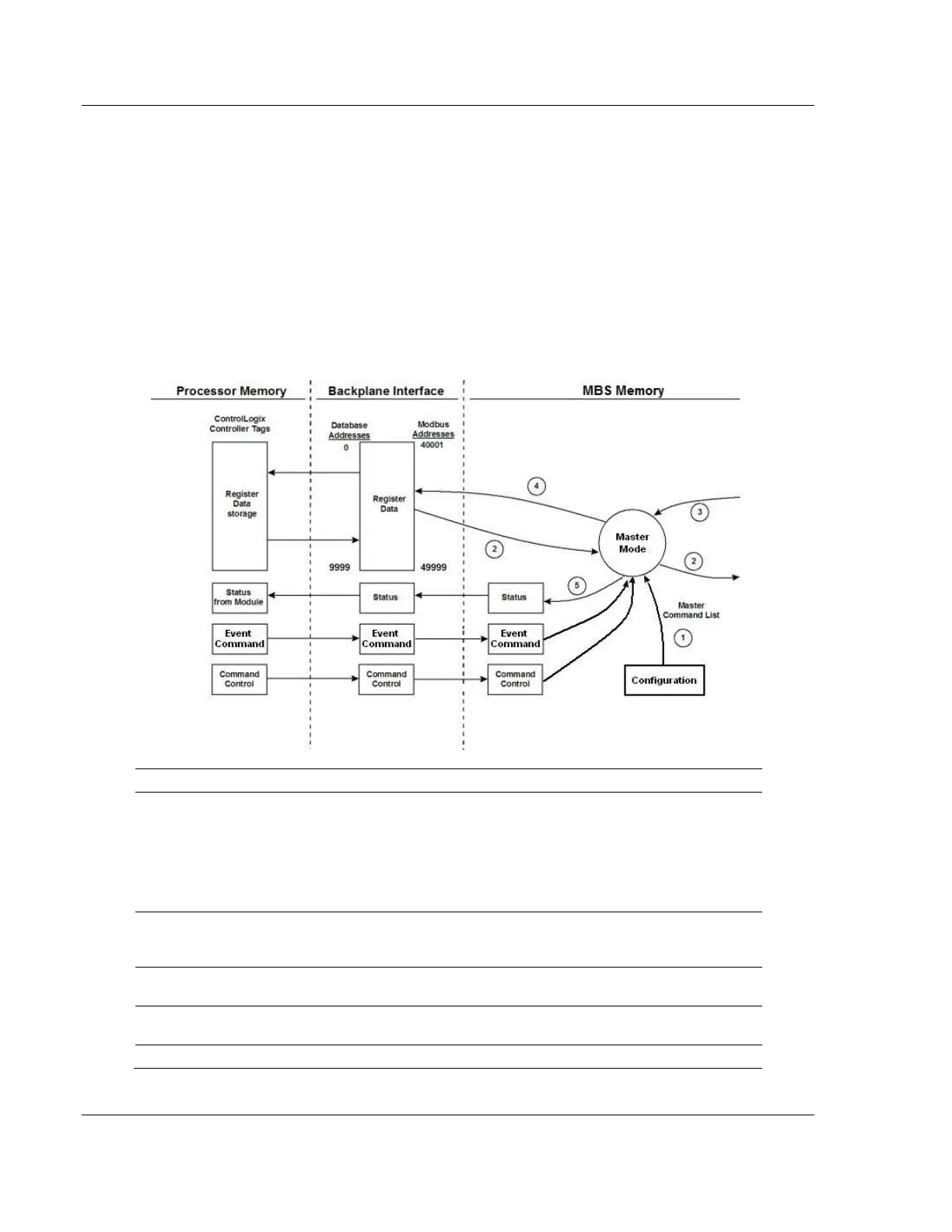
Command status is returned to the processor for each individual command in the
command list. The location of this command status list in the module’s internal
database is user-defined. The following flow chart and associated table describe
the flow of command data into and out of the module.
Upon module boot-up, the Master driver obtains configuration data from the MBS
controller tags. The configuration data retrieved includes port configuration and the
Master Command List.
Special Commands can be issued directly from the CompactLogix or MicroLogix 1500-
LRP processor using Event Commands and Command Control. These command values
are used by the Master driver to determine the types and order of commands to send to
slaves on the network.
After configuration, the Master driver begins transmitting read and/or write commands to
slave nodes on the network. If the Master driver is writing data to a slave, the data for the
write command is retrieved from the module’s internal database.
Once the specified slave has successfully processed the command, it returns a response
message to the Master driver for processing.
Data received from a slave in response to a read command is stored in the module’s
internal database.
Status is returned to the processor for each command in the Master Command List.



 To Next Page