Q40 Tape Library Installation and Operations Manual
511026 Rev. 07-01-19 106
6.18.3 Opening a Magazine
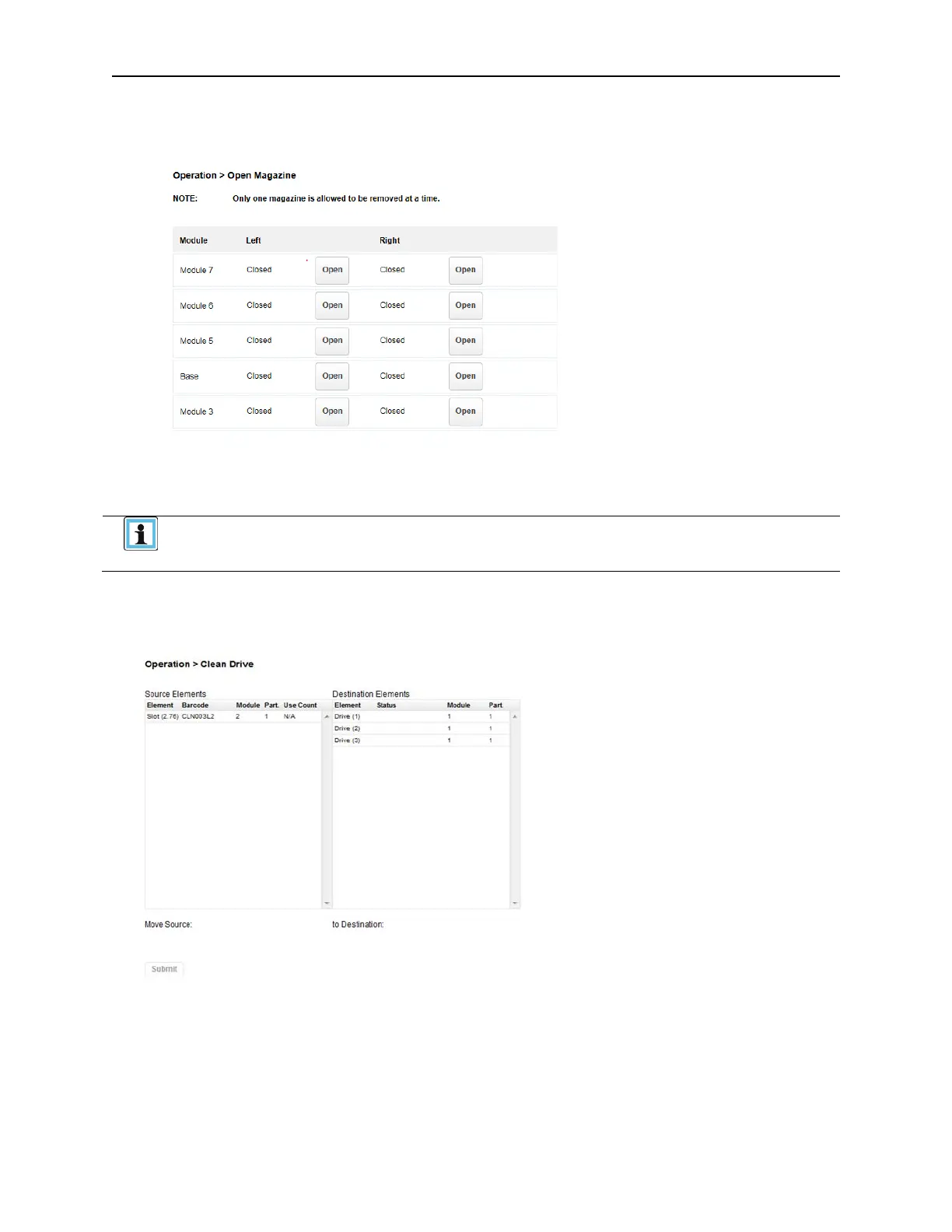
From the Operation > Open Magazine screen you can unlock any magazine in the library.
To unlock a magazine, click Open for the magazine. The library will release the lock. You can then pull
the magazine out of the library to access the storage slots.
• Opening a magazine will take the library off-line.
• The magazines will relock after 30 seconds.
6.18.4 Cleaning a Tape Drive
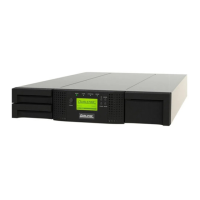
From the Operation > Clean Drive page you can initiate a drive cleaning operation.
1. Select a cleaning cartridge from the Source Elements list. The library uses the barcode label to
identify cleaning cartridges. The prefix of the label must be “CLN”
If no cleaning cartridges are available, load one into a mailslot or magazine slot.
2. Select the tape drive to be cleaned from the Destination Elements list.
Tape drives currently containing a cartridge are not listed. To clean a tape drive not listed, move t
he
c
artridge out of the drive.
3. Click Submit


 To Next Page