Q40 Tape Library Installation and Operations Manual
511026 Rev. 07-01-19 74
6 Operating the library using the RMI
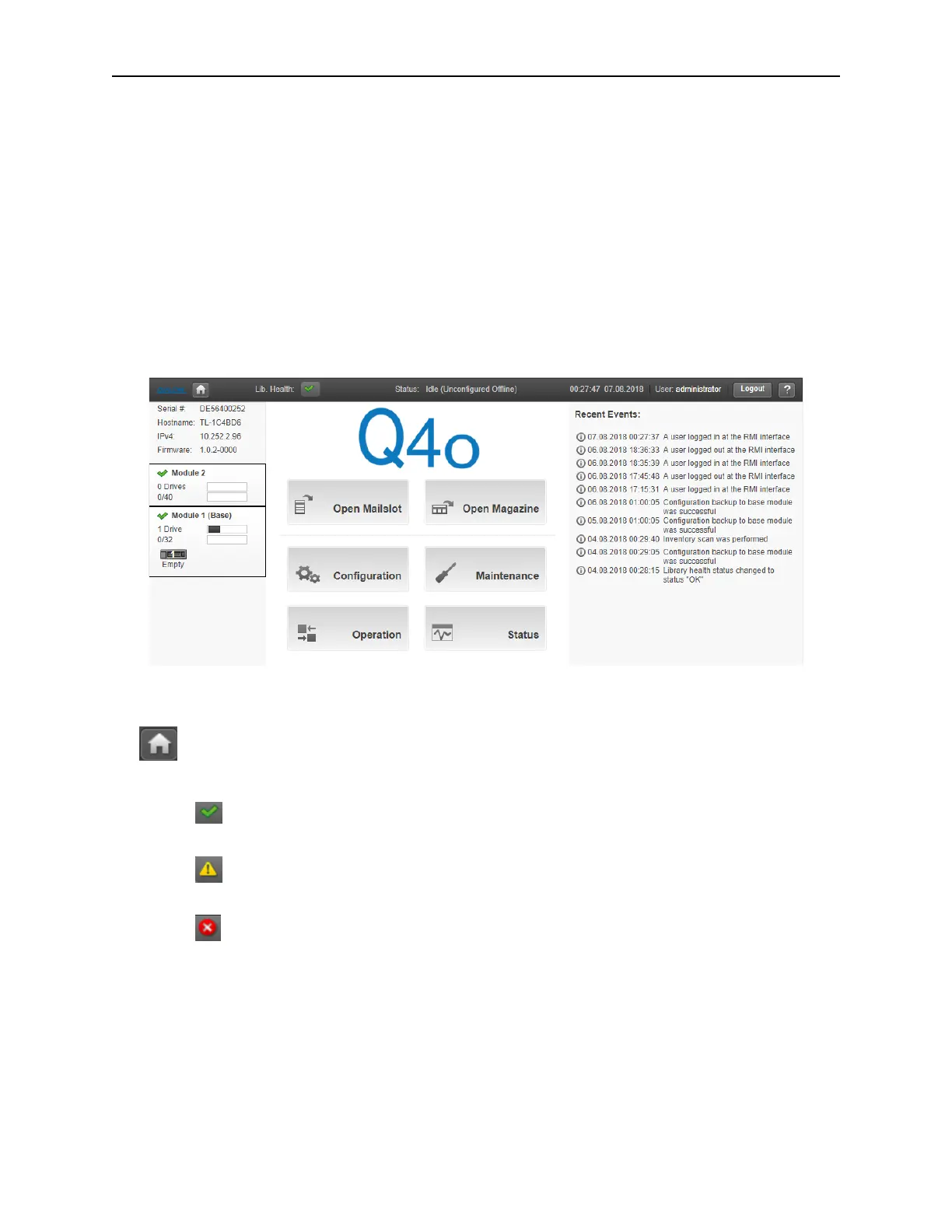
6.1 Using the Library Main Screen with the RMI
The library main screen is organized into the following regions:
• Top Banner - Contains the home button and displays the overall status and information about the
l
ibrary and user
• Left Pane - Displays the library identity and module status
• Center Pane - Provides access to operate and configure the library and to view additional status
information
• Right Pane - Displays a log of recent events
6.1.1 Top Banner Elements
• – Home Icon – Returns the RMI to the library home screen
• Library Health – An icon indicating the overall health status of the library
• – The green check mark icon indicates that all library components are fully operational
and that no user intervention is required.
• – The yellow triangle exclamation point icon indicates that user attention is needed, but
that the library can still perform most operations. Click the icon to display the event ticket log.
• – The red circle X icon indicates that user intervention is required and the library is not
capable of performing some operations. Click the icon to display the event ticket log.
• Status – The status of the library’s robot
• Idle – The library’s robot is ready to perform an action.
• Moving – The library’s robot is moving a cartridge.
• Scanning – The library’s robot is performing an inventory of cartridges.
• Offline – The library’s robot has been taken off line by the library.



 To Next Page