Q40 Tape Library Installation and Operations Manual
511026 Rev. 07-01-19 84
6.3.4 Configuring Tape Drives
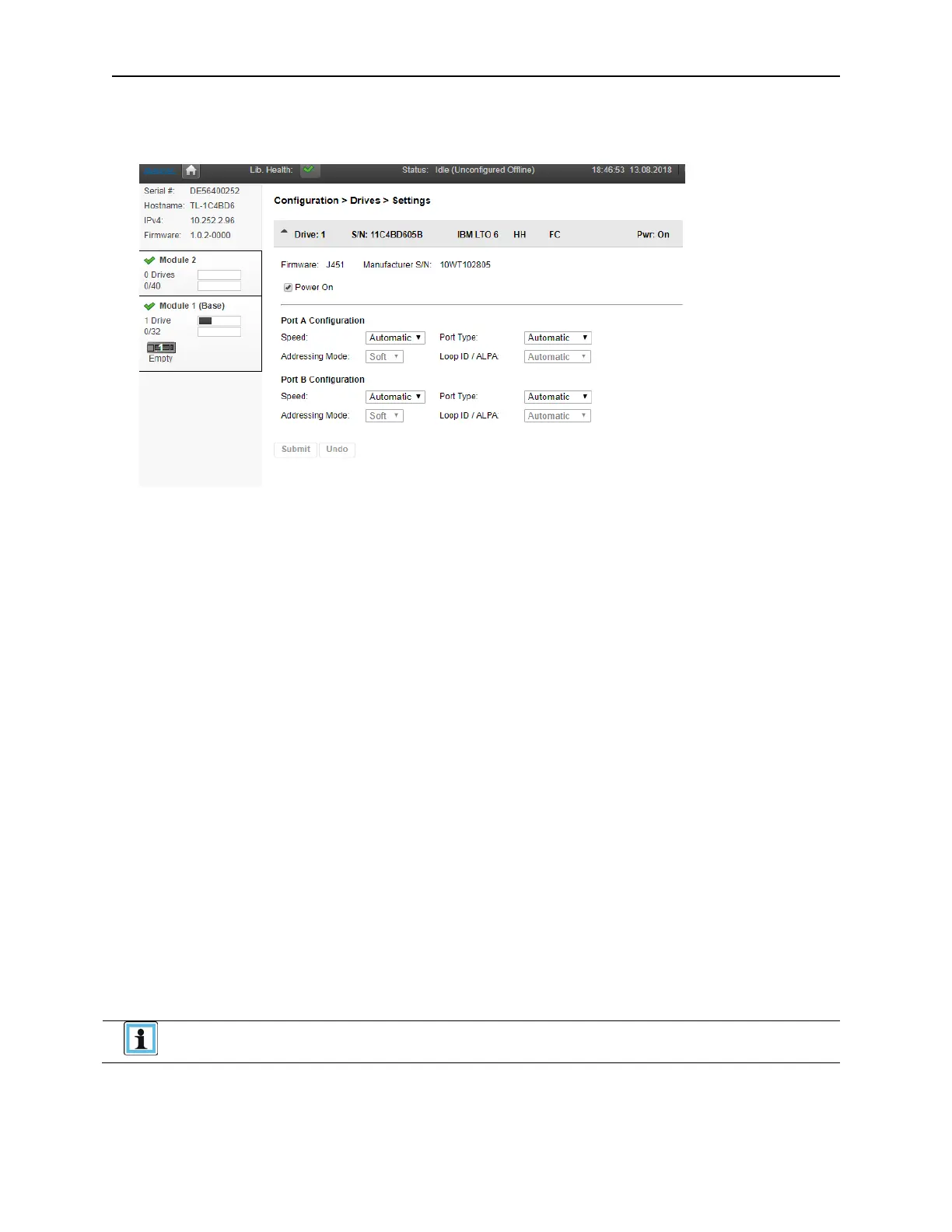
Use the Configuration > Drives page to see and modify drive configuration settings.
• Drive number – Drives are numbered from the bottom of the library up beginning with one. The drive
c
urrently hosting the SCSI communication for the library is designated with (LUN).
• Serial Number – The serial number assigned to the tape drive by the library. This serial number is
reported to host applications. The serial number cannot be modified. Please note: this is not the
serial number of the drive. The tape drive serial number is shown in the Manufacturer S/N field.
• LTO generation
• LTO 6 Ultrium Tape Drive
• LTO 7 Ultrium Tape Drive
• LTO 8 Ultrium Tape Drive
• Drive interface
• FC – Fibre Channel
• SAS – Serial Attached SCSI
• (Modified) – When present indicates that a setting has been changed. To apply the changes, click
Submit. To reset all changed fields to their previously saved values, click Undo.
• Pwr – Indicates whether the drive is currently powered on or off.
• Firmware – The version of firmware currently installed on the drive.
• Manufacturer S/N – The tape drive serial number. Use this serial number when working with
Q
ualstar Technical Support.
• Power On – Checked when the drive is powered on.
Always power off a tape drive before removing it from the library or moving it to a
new location within the library.



 To Next Page