EB200 Manual Operation
4052.2000.02 3.40 E-7
3.18.4.4 SYSTEM menu
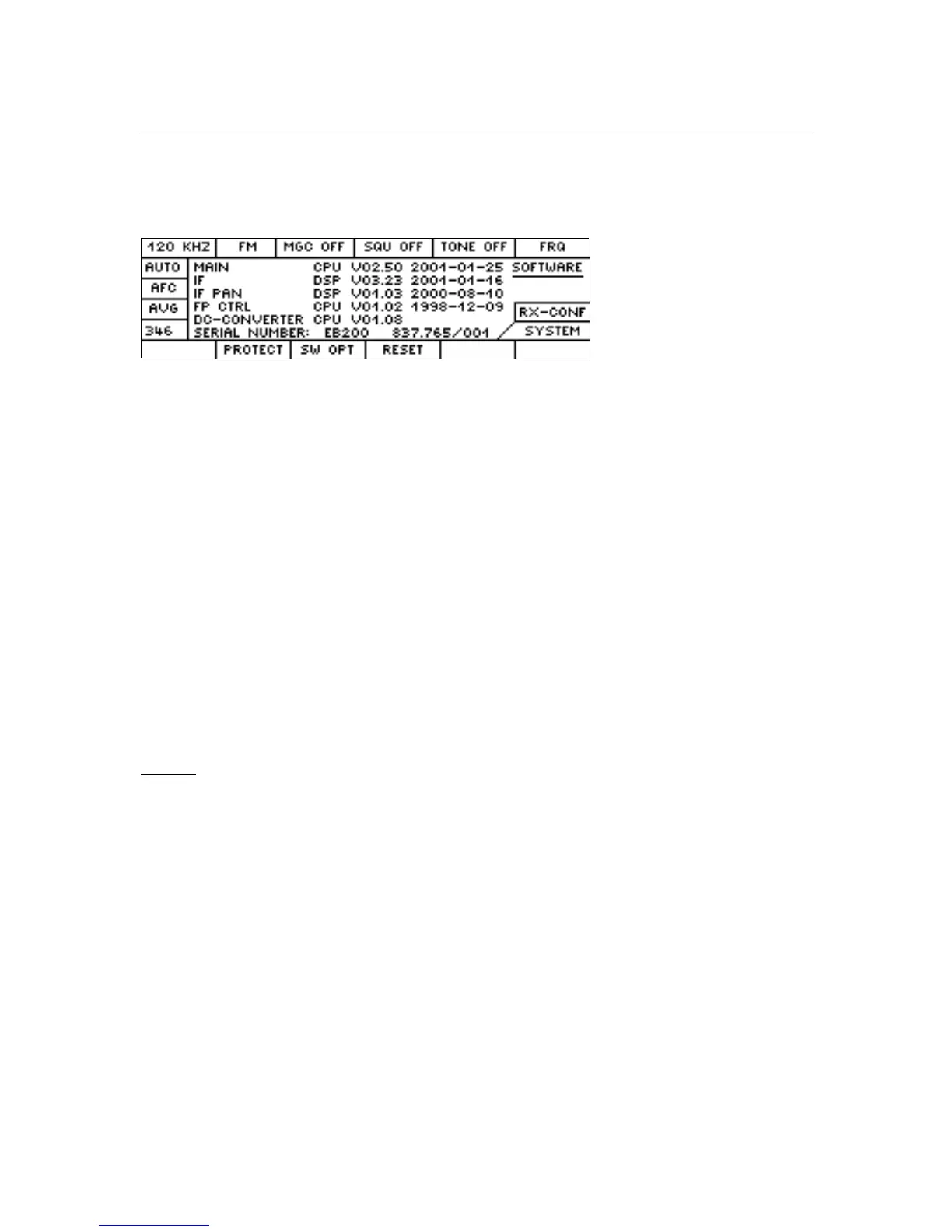
This menu is obtained by pressing the SYSTEM softkey in the RX-CONF menu.
Display of software version and series number
MAIN CPU Main controller
IF DSP DSP for the IF-section
IF PAN DSP DSP for IF-panorama (option)
FP CTRL Keyboard controller
DC-CONVERTER CPU Controller for DC/DC converter
SERIAL NUMBER Receiver serial number
Note:
From MAIN CPU version 2.31 onwards, the configuration of the IF section can be determined from the
version of the DSP software (IF DSP).
If the version is shown to be less than V03.00, the IF section is equipped with DDC1.
If the version is shown to be greater than V03.00, the IF section is equipped with DDC2.
Configuration with DDC2 is the precondition for future software options such as EB200CM and the
configuration of a measuring time. For IF sections with DDC2 no offset measurement is possible in the
CW, USB, LSB and IQ modes.
Softkeys
RESET Reset to the Rohde & Schwarz default settings. The same function is triggered via
remote control by the command *RST.
PROTECT Branches to the password entry menu
SW OPT Branches to the menu for SW options


 To Next Page