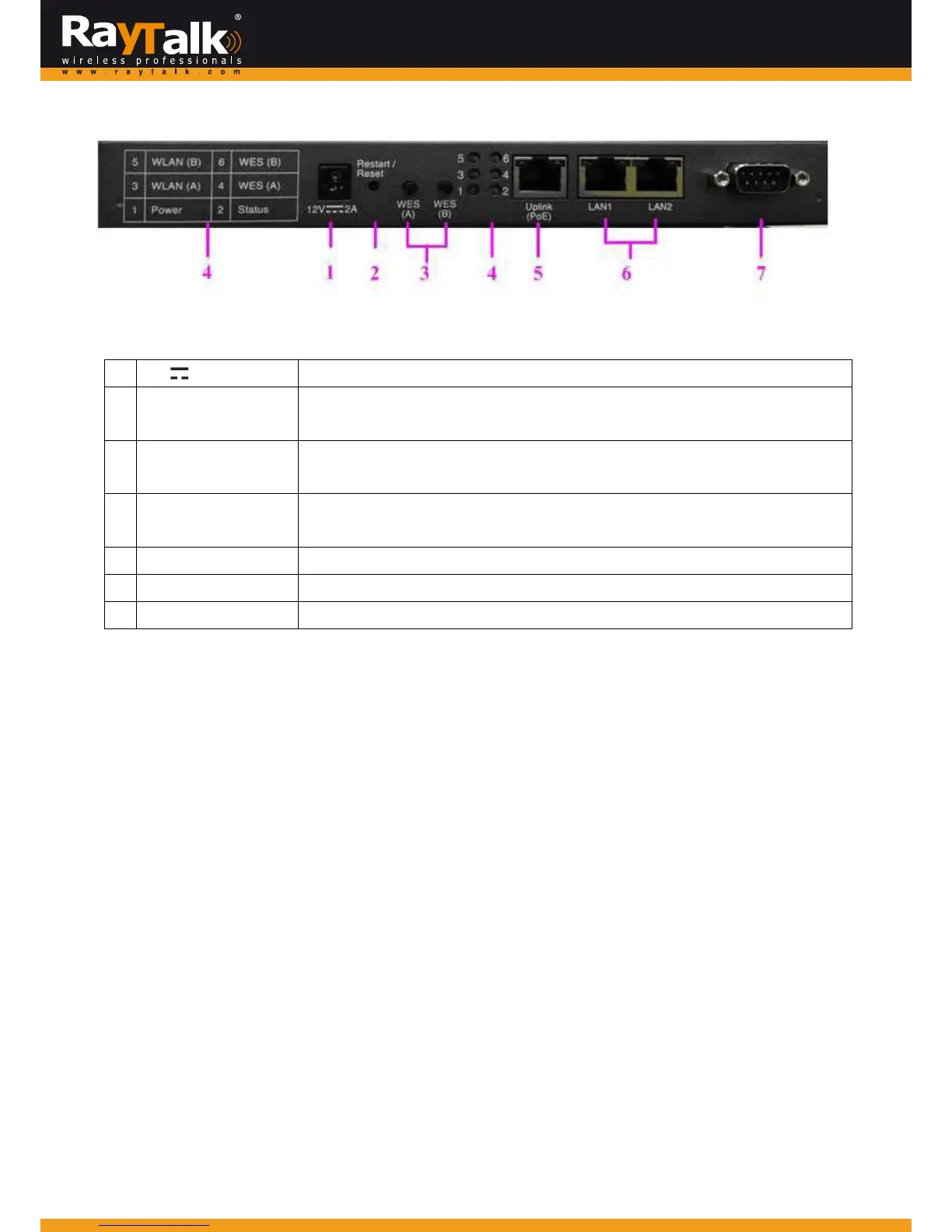
RearPanel
1
12V 2A
PowerJackSocketforthepoweradaptor.
2 Restart/Reset
Pressoncetorestartthesystem;Pressandholdformorethan5secondsto
resettofactorydefault.
3 WESButton(A/B)
WDSEasySetup.PressthebuttontobuildupaWDSlinkwithanotherpeer.4
WDSlinkscanbesetupperRFcard.
4 LEDIndicators
6indicatorsthatdisplaysthestatesof6variousfunctionsorprogresses.The
numbersareexplainedontheleftmostsideoftherearpanel.
5 WAN
ForattachinganEthernetcabletoanuplinkservice.
6 LANPorts1‐2
TheportsforconnectionswithLANsidedevices.
7 ConsolePort
ToaccessRayTalkRA‐696viatheconsoleinterface.



 To Next Page