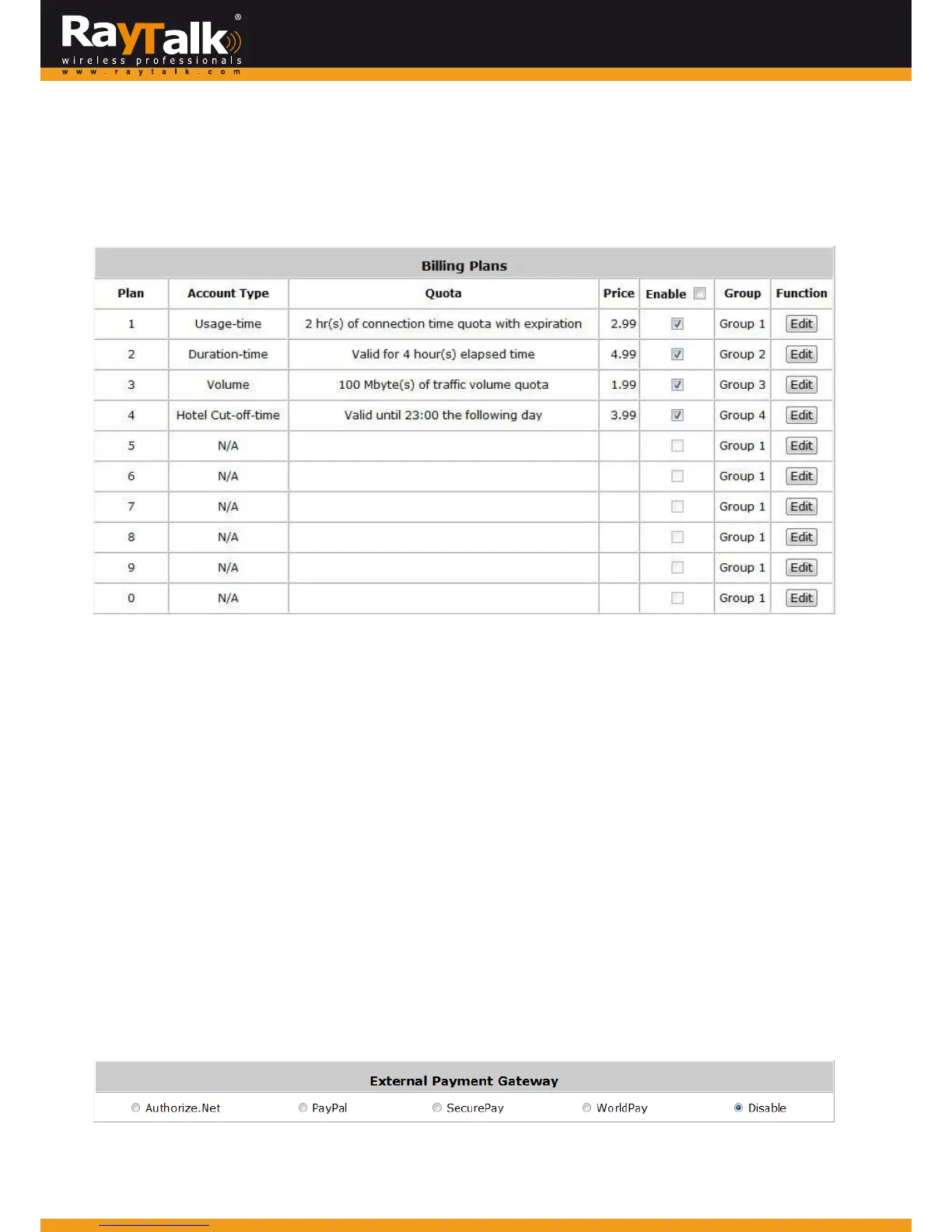
4) BillingPlans
Administratorscanconfigureseveralbillingplans.ClicktheEditbuttontoenterthepageofEditingBillingPlan.
Configurebillingplanswithdesiredaccounttype,expirationdate,price,etc.ClickApplytosavetheplan.
Goback to the screenof BillingPlans,check the Enablecheck boxorclick Select all , and thenclick Apply, theplan(s) willbe
activated.
Plan:Thenumberofthespecificplan.
Type:Thisis thetypeofplan, basedonwhich itdefineshowthe accountcanbe usedincludingUsage‐time, Volume,
HotelCut‐offandDuration‐time.
Quota:ThelimitonhowOn‐demandusersareallowedtoaccessthe network.
Price:Theunitpricechargedforbuyinganac countfromthisbillingplan.
Enable:Checkthecheckboxtoactivatetheplan.
Group:Usersunderthisbillingplanwillbeclassifiedunderthisgroup.ThedefaultvalueisGroup1.
Function: Click the Edit button to add one billing plan. For detailed information regarding on‐demand accounts and
billingplanconfiguration,pleaserefertoAppendixE,On‐demandAccounttypes&BillingPlan.
5) ExternalPaymentGateway
This sectionis for merchantsto set up an externalpaymentgatewayto accept paymentsin order to provide wireless access
serviceforendcustom erswhowishtopayfortheserviceonline.
The options are Authorize.Net,PayPal, SecurePay, WorldPayor Disabl e. For detailed parameter descriptionsplease refer to
AppendixF,ExternalPaymentGateways.



 To Next Page