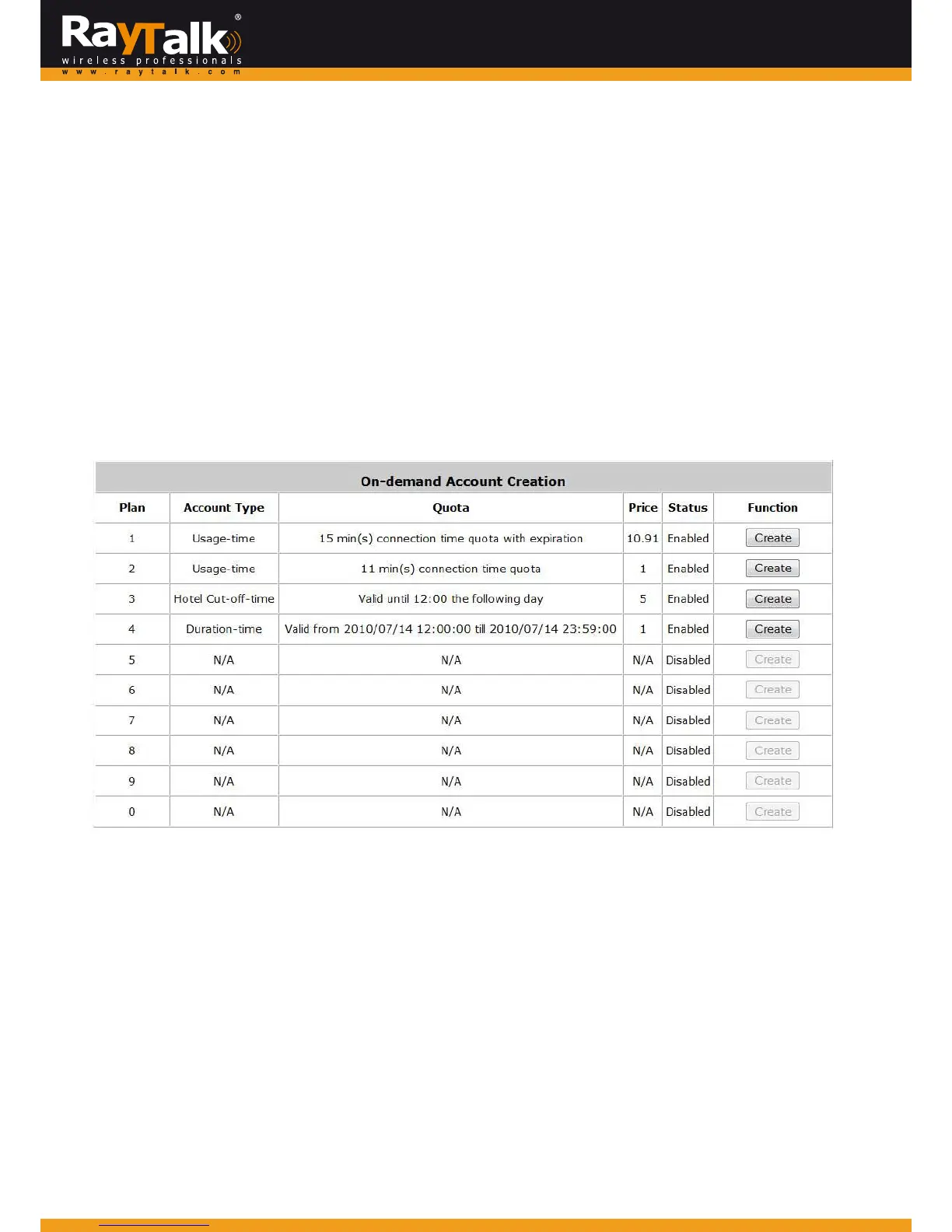
6) On‐demandAccountCreation
Afteratleastonebillingplanisenabled,theadministratorcangeneratesingleon‐demanduseraccountshere.
Clickthistoenterthe
On‐demand
AccountCreationpage.
ClickCreatefromthedesiredplantocreateanon‐demandaccount.
Theusernameandpasswordofto‐be‐createdon‐demandaccountisconfigurable.SelectManualcreatedinUsername/Password
Creationandadministratorcanenteradesiredusernameandpasswordfortheon‐demandaccount.
Inaddition,anEx
ternalIDsuchasstudent’sschoolIDcanbeenteredtogetherwithaccountcreation.
After the accou nt is created, you can click Printout to print a receipt which will contain the on‐demand user’s information,
includingtheusernameandpassword.Moreover,youcanclickSendtoPOStoprintareceiptbyaPOSdevice.
Note:
IfnoBillingplanisenab led,accountscannotbecreatedbyclickingCreate.
PleasegobacktoBillingPlanstoactivateatleastoneBillingplanbyclickingEditandApplythesettingtoactivatetheplan.The
printerusedby
Printisapre‐configuredprinterconnectedtotheadministrator’scomputer.
Plan:Thenumberofaspecificplan.
AccountType:ShowaccounttypeoftheplaninUsage‐time.Duration‐timeorHotelCut‐off.
Quota:Thetotalamountoftime,intervalortrafficvolumeforOn‐demanduserstoaccessthenetwork.
ForTimeusers,itisthetotaltime.ForVolumeusers,itisth
etotalamountoftraffic.
Price:Foreachplan,thisistheunitpricechargedforanaccount.
Status:Showthestatusinenabledordisabled.
Function:PressCreateforthedesiredplan;and‘CreatinganOn‐demandAccount’willappearforcreation.



 To Next Page