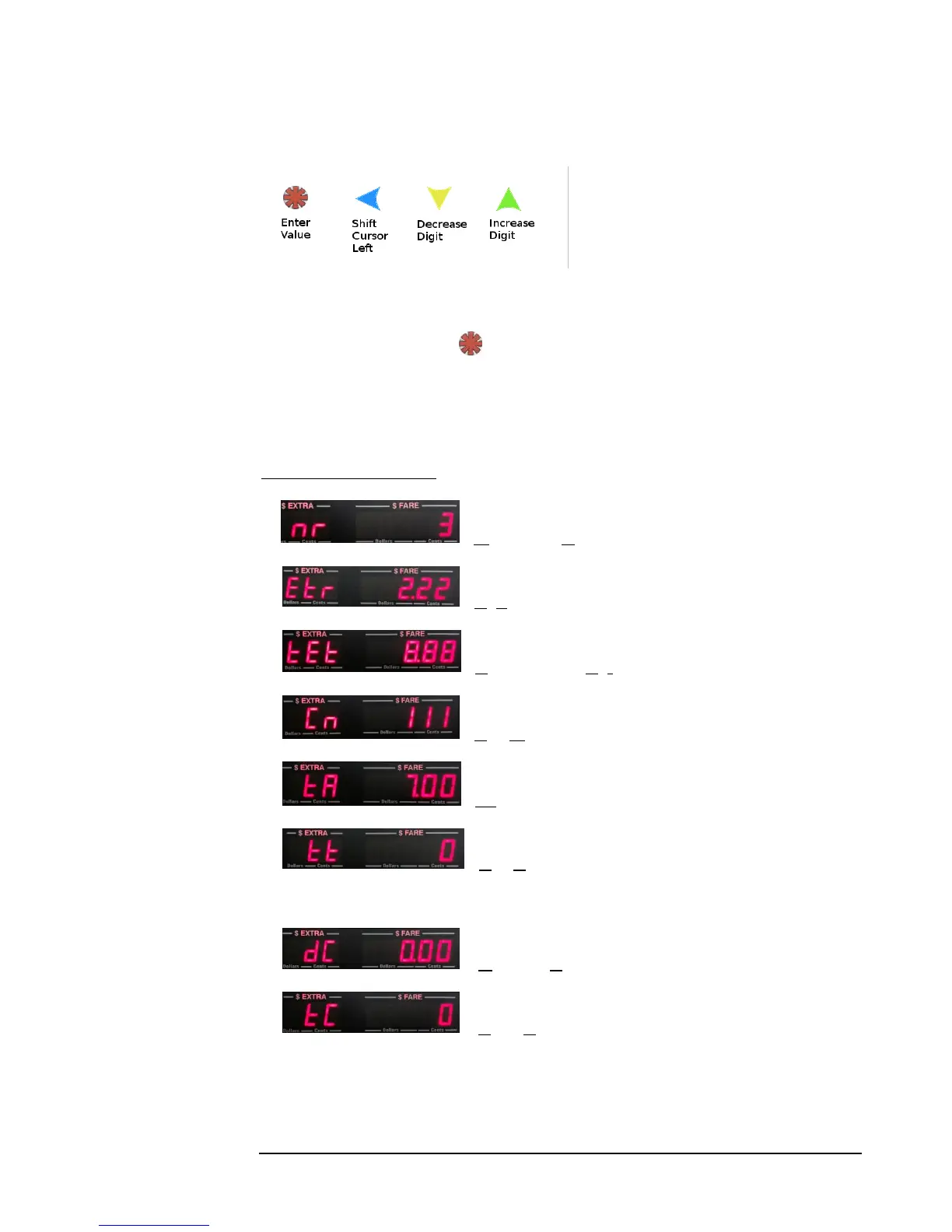
4.4.4 Programming Rates
Button functions are shown to the
left. A flashing cursor on the Fare
display indicates which digit can be
adjusted. Use the buttons to set and
navigate the rate values sequentially.
The rate values are ordered as presented below. The left-hand display indicates the
current value being adjusted, while the right-hand display contains the actual value to
be adjusted. Pressing the button enters each value into memory, and will
automatically advance the menu forward to the next item in sequence.
The rate programming is divided into 2 parts: the Common Rate, and the Individual
Rates Section (Note: the values shown here are only for example).
Common Rate Section:
1. - Number of Rates (Max. 6 *)
2. - Extra Charges
3. - Total Allowed Extras
4. - Cab Number
5. - Tax %
6. - Tax Type: 0 – Entry will split out tax at end of fare
1 – Entry will add tax at end of fare.
7. - Distance Controlled Rate Change**
8. - Time Controlled Rate Change**
* It is possible for the CG3 to handle more than 6 rates. Please call us if this something that you require.
** Not used with regular rates, and RARELY used. Generally, you should ignore the dC and tC values and leave them as
zeroed values, unless otherwise directed to do so.



 To Next Page