User Manual Bearing System RT-300
Issue: 2017/06/27 [Rev 1.04.c] Page 42 of 79 12-9-1-0013-9-2-0001-3-1-60
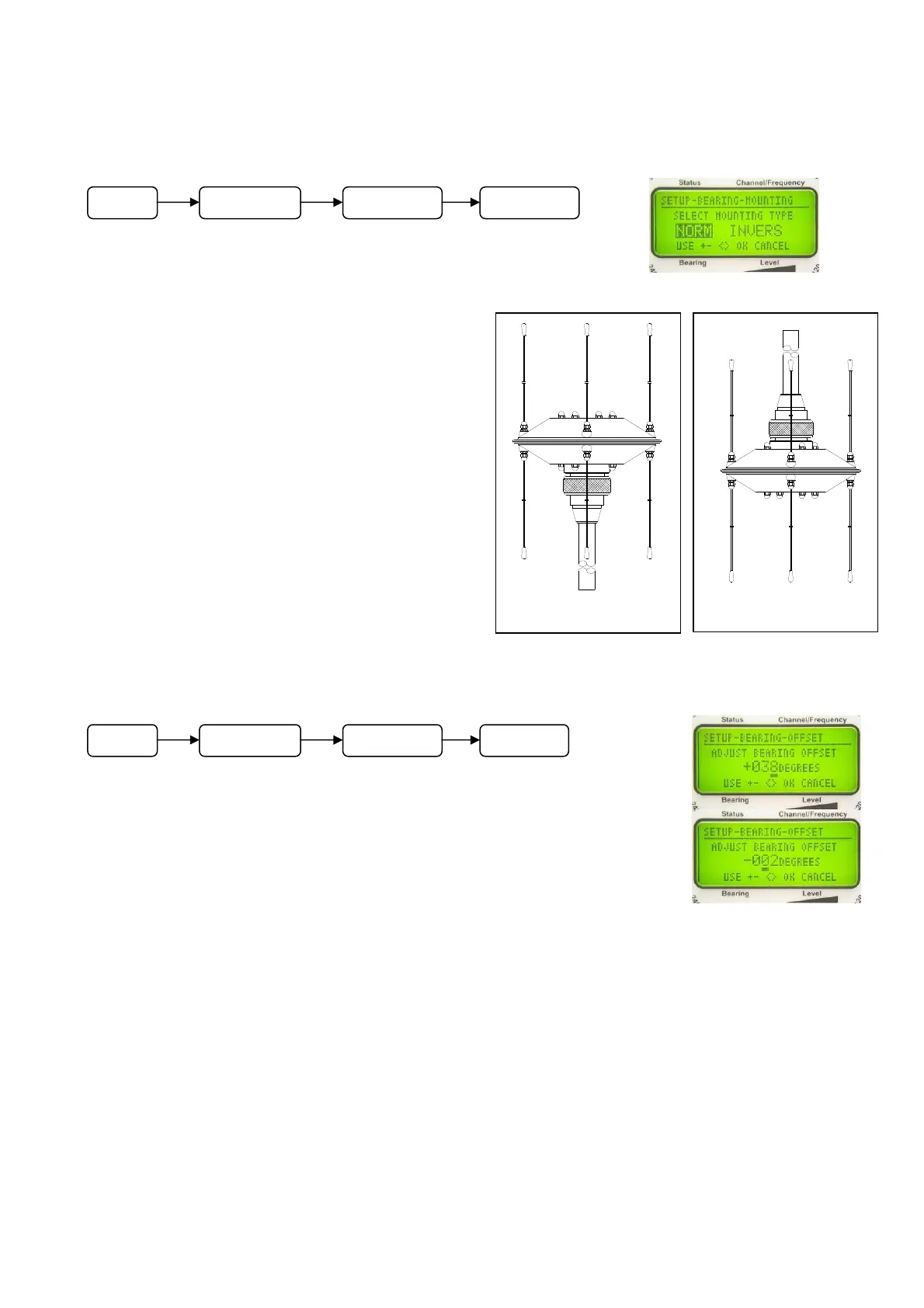
6.2.1.5.1.3 Selecting Mounting Direction of Antenna: SELECT MOUNTING TYPE
Usually the antenna is mounted on top of a
mast (see Fig. 55). In special cases it may be
necessary to mount the antenna upside down
(see Fig. 56).
In submenu SETUP – BEARING - MOUNTING,
the mounting direction is selected.
NORM is corresponding to the normal top-
mounting Fig. 55, INVERS corresponds to the
upside down mounting as shown in Fig. 56.
6.2.1.5.1.4 Adjusting Correcting (Offset)
Value: ADJUST BEARING OFFSET
If bearing results are differing with a constant value from the actual
angle of arrival, a correcting value (offset) can be adjusted, to be added
to each bearing result. Deviations are caused e.g. by incorrect
alignment of the antenna with the longitudinal axis of the vehicle.
Adjust offset in submenu SETUP – BEARING – OFFSET:
- Select the decimal with keys 3 < > and 8 < > .The position is
underlined.
- Keys 5 < + > and 10 < – > are increasing / decreasing the value.
- If decreasing the value to +000, the sign will change to negative. A negative sign indicates
the value to be substracted from the bearing result.
- Confirm the adjusted value with key 6 < Ok >. The device is returning to the next higher
menu level.
- Key 9 < Clr > will reject the adjusted value. The device is returning to the next higher menu
level and will work with the previous offset adjustment.
Fig. 54
Fig. 55
normal mounting
Fig. 56
upside down mounting
Fig. 57
M
n
SETUP BEARING MOUNTING
M
n
SETUP BEARING OFFSET



 To Next Page