2. DIP SW, LED, VR, AND TP TABLES
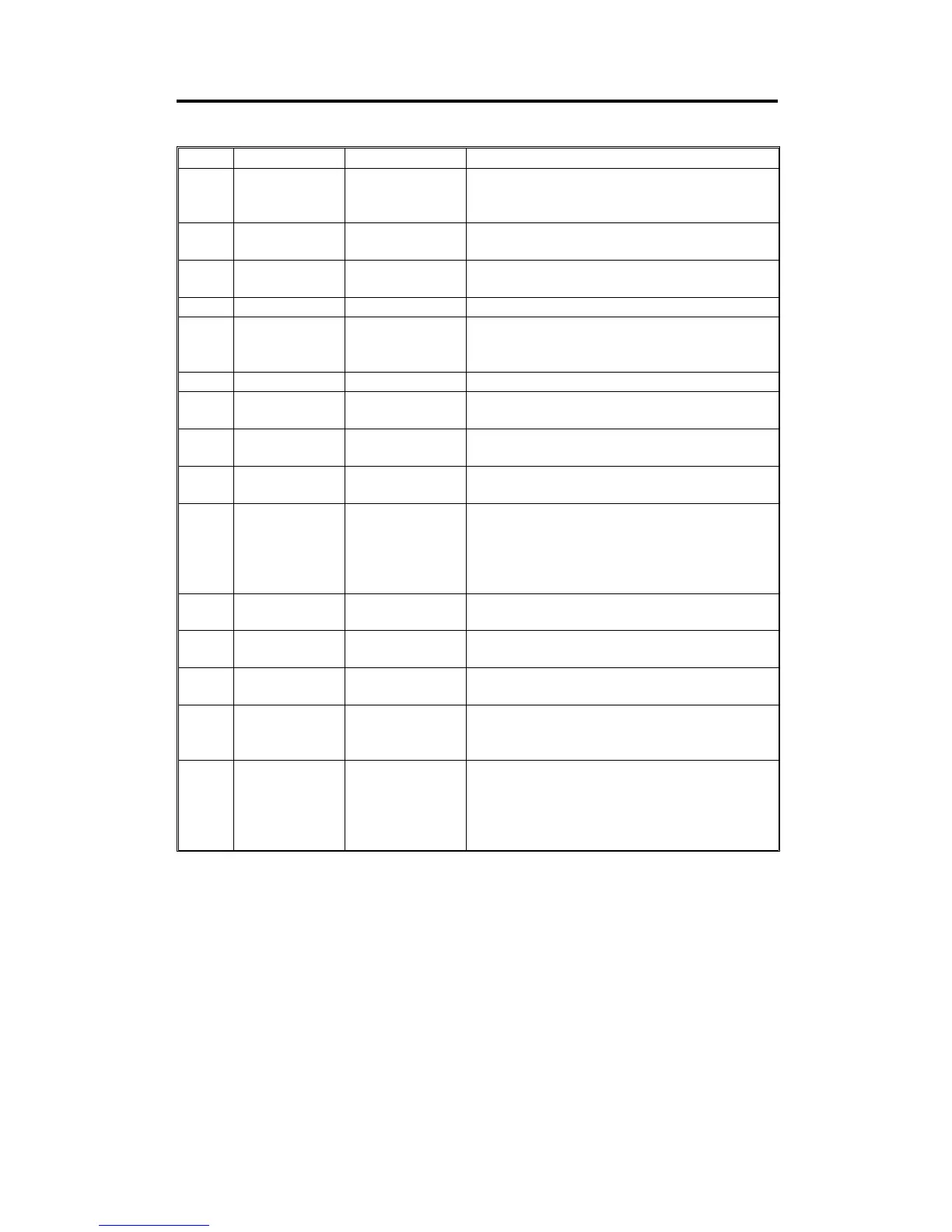
2.1 DIP SW TABLE (ON THE MAIN BOARD)
No. DIP SW Function Remarks
1 DP102–1 Cover Open
Turn on to disable all cover safety switch
functions except ADF cover safety.
(Normal: OFF)
2 DP102–2 ADF Cover Open
Turn on to disable the ADF cover safety switch
function. (Normal: OFF)
3 DP101–1 Key Counter
Turn on when installing the key counter.
(Normal: OFF)
4 DP101–2 Buzzer ON/OFF Turn on to sound the beeper. (Normal: OFF)
5 DP101–3 Initial Print
ON: Makes two prints after making a master.
OFF: Makes one print after making a master.
(Normal: OFF)
6 DP101–4 ADF Operation Turn on to kill the ADF function. (Normal: OFF)
7 DP101–5
Class/Memory
Selection
To select class or memory function.
OFF: Class, ON: Memory. (Normal: ON)
8 DP101–6
I/O Check
Procedure
Selects the I/O check mode access procedure.
(ON: Europe/Asia version, OFF: US version)
9 DP101–7 Erase White Line
Turn on to erase the white line 60 mm from the
leading edge. (NOTE1) (Normal: OFF)
10 DP101–8
Double Master
Compression
If this switch is ON, when the master making
key is pressed, masters in the master eject
box are compressed once before plotting
starts and detects if the master box is full.
(NOTE2) (Normal: OFF)
11 DP103–1
Reduction Ratio
Compensation
Used to adjust the reduction ratio in the
sub-scan direction.
12 DP103–2
Reduction Ratio
Compensation
Used to adjust the reduction ratio in the
sub-scan direction.
13 DP103–3
Reduction Ratio
Compensation
Used to adjust the reduction ratio in the
sub-scan direction.
14 DP103–4 Mode Clear
If this switch is turned on, the blind key on the
operation panel is used as the clear mode key.
(Normal: OFF)
15
DP103–5
DP103–6
Skip Paper Feed
Setting
Setting these switches enables skip paper
feed mode. After setting these switches, the
blind key is used to access skip paper feed
mode. (NOTE3)
(Normal: 103-5 OFF, 103-6 OFF)
SM 4-2 C216


 To Next Page