3. DIP SW, LED, VR, AND TP TABLES
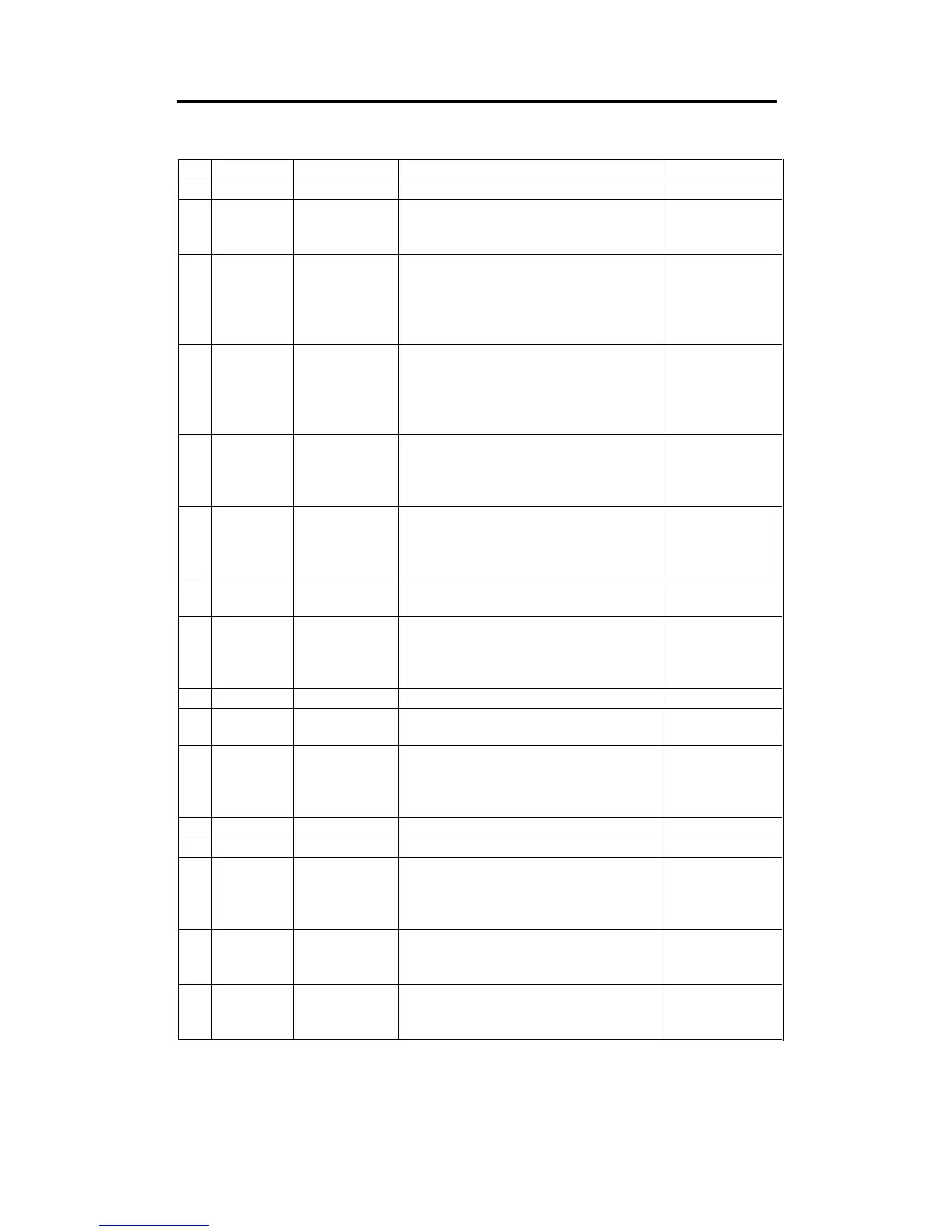
3.1 DIP SW TABLE (ON THE MAIN BOARD)
No. DIP SW Function Remarks Factory Setting
1 DPS101 Not Used OFF
2 DPS102-1
Thermal Head
Test
Turn off to access test pattern mode.
(Refer to the Thermal Head Test,
section 4.4)
ON
3 DPS102-2
Dither Matrix
Selection
Turn off to select the 6 x 6 dither
matrix. (Image will be lighter if the 6 x 6
dither matrix is selected.)
ON: 4 x 4
OFF: 6 x 6
ON
4
DPS103-1
DPS103-2
Skip Paper
Feed Setting
Select the number of drum rotations
between every print when the Skip
Paper Feed mode is selected. (See the
skip paper setting table on the next
page.)
DPS103-1: OFF
DPS103-2: OFF
5 DPS103-3
Initial Full
Master Check
If this switch is on, when the main
switch is turned on, masters in the
master eject box are compressed once
to check if the master eject box is full.
OFF
6 DPS103-4
Initial Print ON: Make two prints after making
a master.
OFF: Make one print after making
a master.
OFF
7 DPS103-5
Beeper
ON/OFF
Turn on to sound the beeper.
OFF
8 DPS103-6
Security
Function
If this switch is on, prints cannot be
made without making a new master
after the main switch is turned off and
on.
OFF
9 DPS103-7 Key Counter Turn on after installing the key counter. OFF
10 DPS103-8
On Line Turn on after installing the option
controller.
OFF
11
DPS104-1
DPS104-2
DPS104-3
Reduction
Ratio
Compensation
Used to adjust the reduction ratio in the
sub-scan direction. (Refer to Image
Magnification in the Sub-Scan
Direction Adjustment. section 5.1.9)
12 DPS104-4 Not Used OFF
13 DPS104-5 Not Used OFF
14 DPS104-6
Auto Class If this switch is on, in Memory/Class
mode, the next job will start 5 seconds
after the previous job is finished even if
the tape marker is not installed.
OFF
15 DPS104-7
Reduction
Ratio Selection
Select the reduction ratio setting.
ON: 93%, 75%, 64%.
OFF: 93%, 82%, 71%.
A4 version: OFF
LT version: ON
16 DPS104-8
Class/Memory
Selection
Select class or memory function.
ON: Memory
OFF: Class
ON
C224 4-6 SM


 To Next Page