1) The replacement and adjustment procedures not mentioned in the
following pages are identical to those of the VT2000 series.
2) The purpose and procedure of the following adjustments are identical to
those of the VT2000 series, however the adjusting value or VR is
different.
•
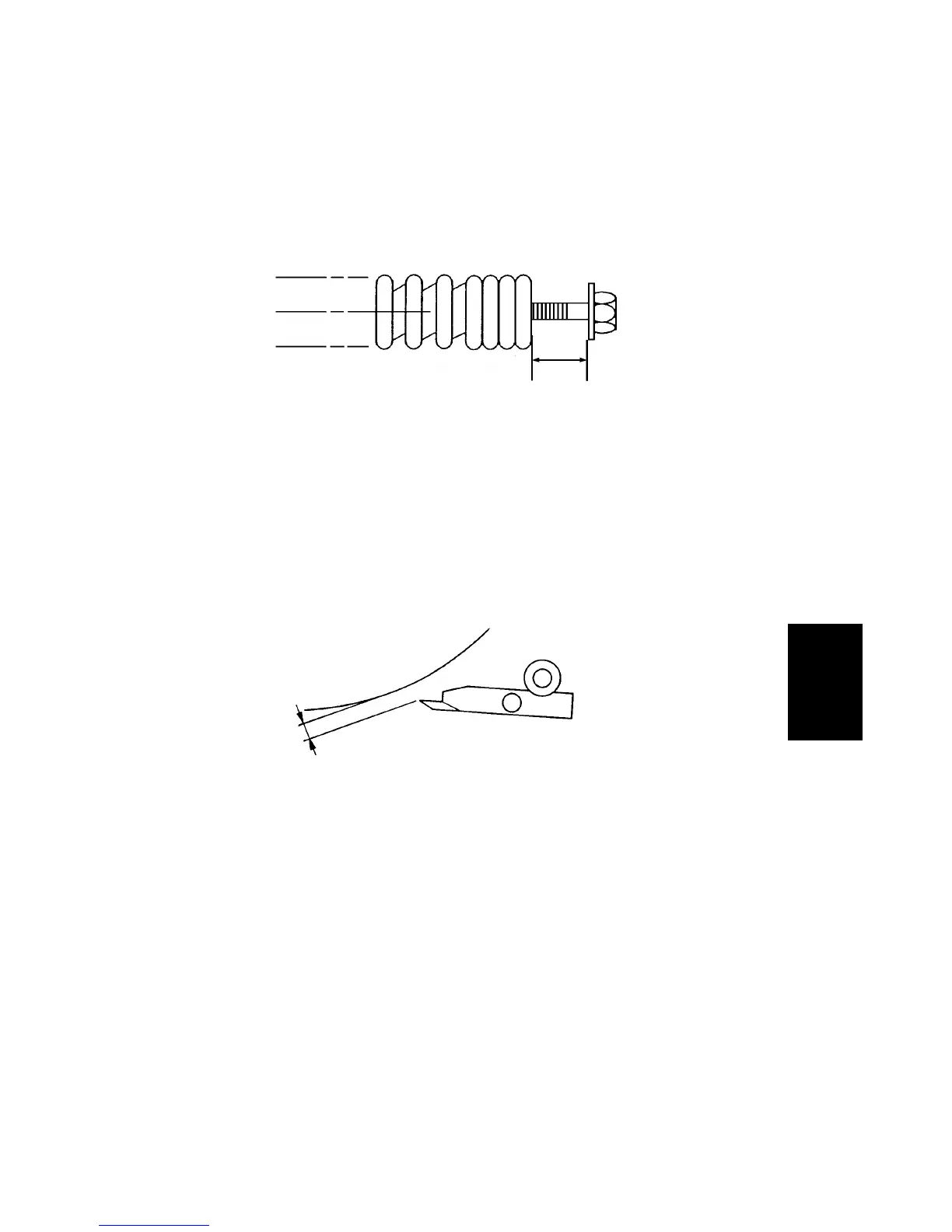
PRINTING PRESSURE ADJUSTMENT
Adjust the clearance [A] to be 14
±
0.5 mm by turning the adjusting belt [B].
•
PRINTING SPEED ADJUSTMENT
Adjust the drum speed by turning VR101 on the main board.
•
EXIT PAWL CLEARANCE ADJUSTMENT
Adjust the exit pawl clearance so that the distance between the exit pawl and
the drum is between 0.5 and 0.7 mm.
•
FIRST PAPER EXIT SENSOR ADJUSTMENT
Adjust the 1st paper exit sensor sensitivity by turning VR103. Check the
sensor status with LED103.
•
SECOND PAPER EXIT SENSOR ADJUSTMENT
Adjust the 2nd paper exit sensor sensitivity by turning VR102. Check the
sensor status with LED102.
[A]
Drum
0.5 + 0.2 mm
– 0 mm
Replacement
Adjustment
SM 5-1 C216


 To Next Page