09/2016 Page 22 5IN2371 C
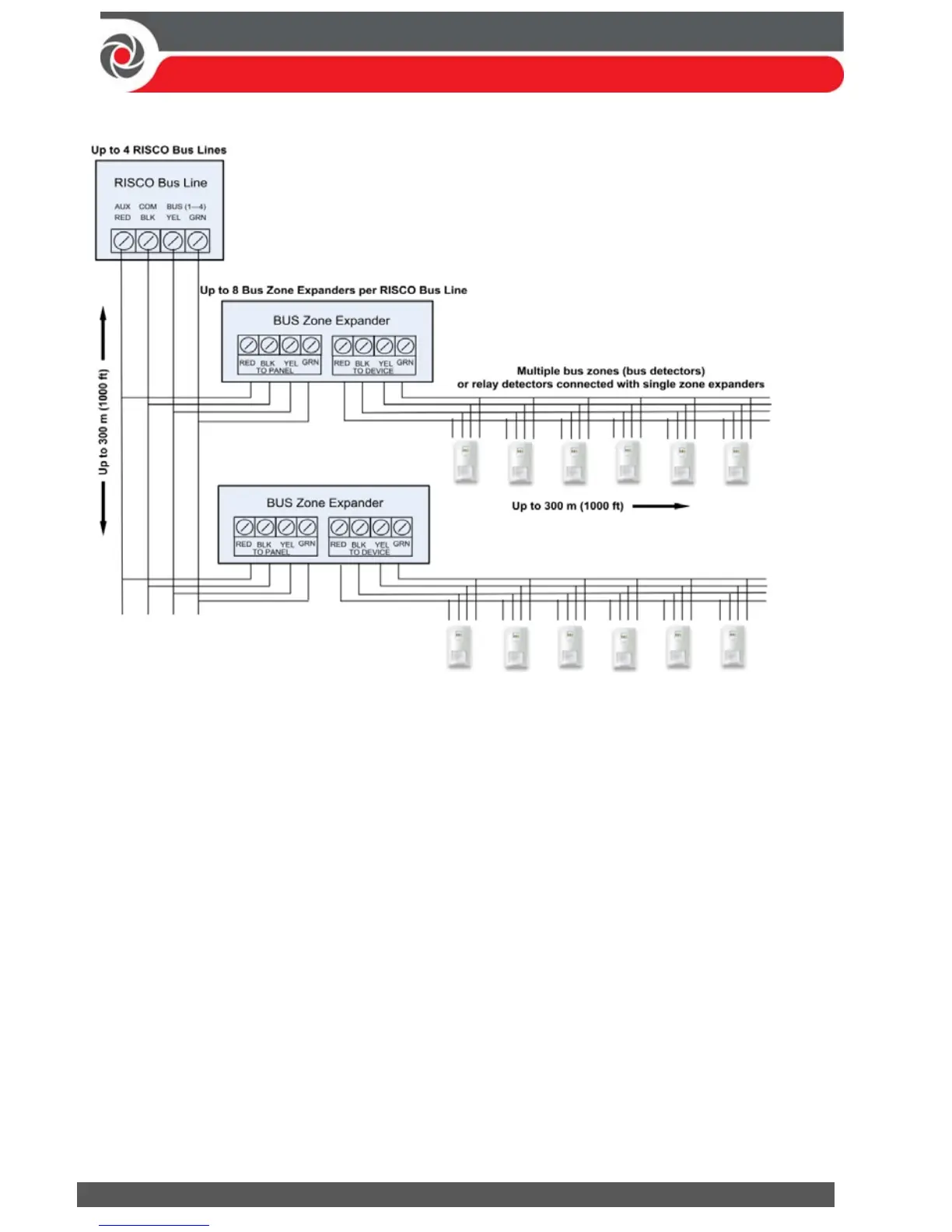
Connecting Multiple Bus Detectors using Bus Zone Expanders
To connect multiple bus detectors to bus lines using bus zone expander(s):
1. Remove system power.
2. At SW1 on the BZE (bus zone expander), use DIP switches 1—3 to sequentially
set the BZE’s physical ID number. Note that DIP switch 4 is not used.
3. At SW2 on the BZE set DIP switch 3 to ON.
4. At SW2 on the BZE, set DIP switch 4 to OFF to utilize the tamper switch, or set
it to ON to disable the tamper.
5. Wire the bus line to the BZE terminals marked TO PANEL.
6. Set each bus detector’s physical ID number sequentially, using each detector's
DIP switches. NOTE: Do not assign the same physical ID number to more than
one detector on the same BZE.
7. Wire each bus detector's terminals to the relevant BZE terminals marked
TO DEVICE.
NOTE: For maximum operation stability, do not exceed 300 meters (1000 feet)
of wiring from any BZE to the main panel and do not exceed 300 meters (1000
feet) of wiring from any BZE to the farthest detector it supports.
NOTE: For testing the bus, see Performing a Bus Test, page 31.



 To Next Page