AX10 Palletizing Solution
Safety Signal Connections
1. Run the safety I/O cable harness (W103) through an opening under the Universal Robots controller.
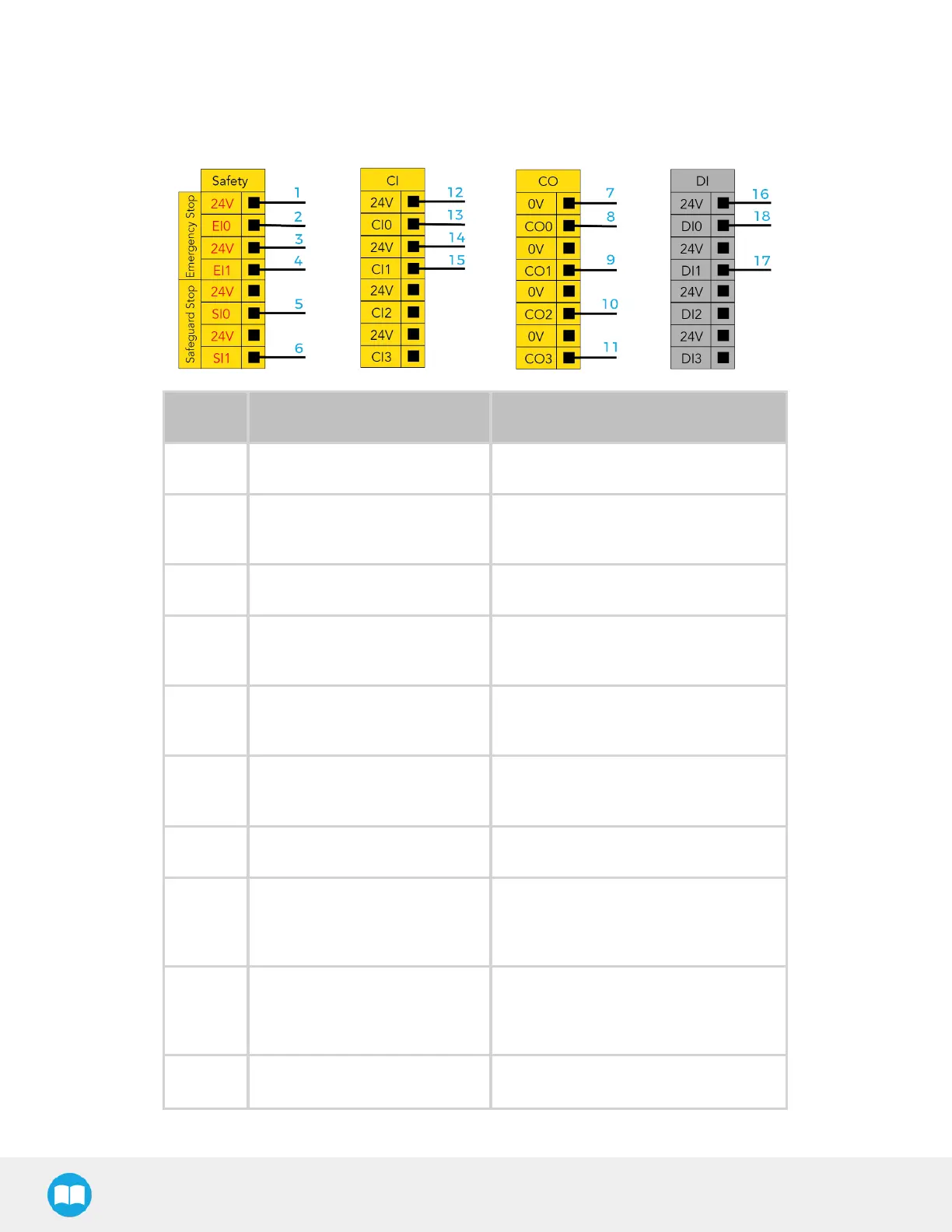
2. Connect the cables following the diagram and table below.
Wire # Function Description
1 24 V 24 V supply
2 UR e-Stop Status 1
e-Stop status signal when an
emergency signal is applied to EI0
3 24 V 24 V supply
4 UR e-Stop Status 2
e-Stop status signal when an
emergency signal is applied to EI1
5 UR Safeguard input 1
Safeguard status signal when a
safeguard signal is applied to SI0
6 UR Safeguard input 2
Safeguard status signal when a
safeguard signal is applied to SI1
7 0 V 0 V supply
8 Emergency Stop
Emergency stop status signal (from
robot) to safety relay input of Robotiq
controller (signal #1)
9 Emergency Stop
Emergency stop status signal (from
robot) to safety relay input of Robotiq
controller (signal #2)
10 Reserved
46



 To Next Page