Robotiq Screwdriving Solution - Instruction Manual
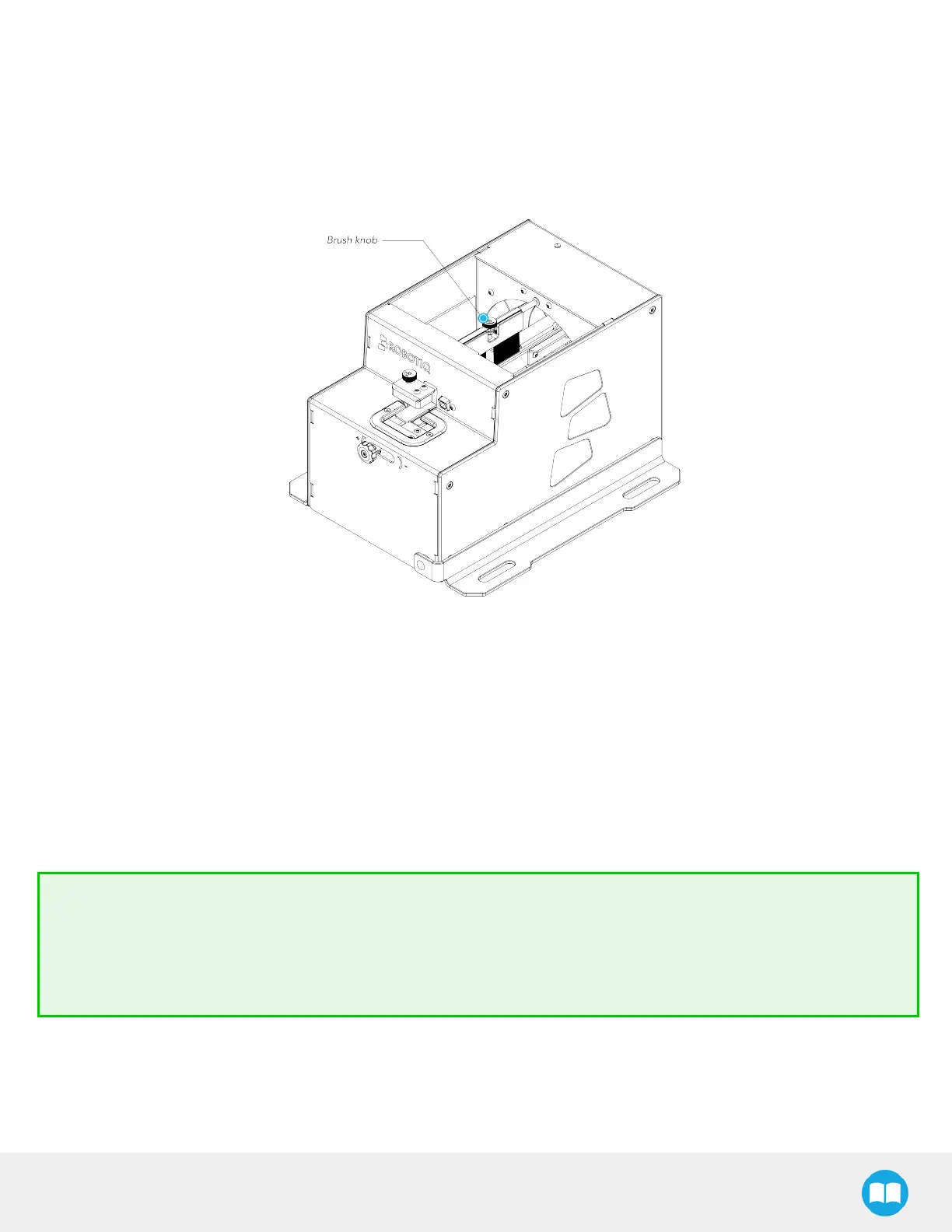
4.7.3. Brush Knob
The brush knob can be found at the top of the Screw Feeder, more specifically on the shaft holding the brush. The shaft oscillates
thus allowing the brush to clear incorrectly positioned screwstraveling acrossthe rail, from the reclaiming wheel to the screw
singulator.
Fig. 4-8: Location of the Rail Knob at the Top of the Screw Feeder.
l
Turning the brush knob clockwise increasesthe gap between the brush and the rails, to accommodate higher head screws.
l
Turning the brush knob counterclockwise decreases the gap between the brush and the rails, to accommodate lower head
screws.
Best practice for adjusting brushheight:
l
Turn off the Screw Feeder.
l
Set the brush height using the brush knob so that the bristlesbarely come into contact with the top of the screw head.
l
Adjust the brush height if incorrectly positioned screws are still traveling along the rail.
Tip
When bringing the brush assembly closer to the rail, make sure to leave a certain play to prevent the brush from pushing
correctly positioned screws into the screw chamber.
The brush isoften stopped at an angle when the Screw Feeder isstopped. The user can rotate it freely to align it with
the rail.
46



 To Next Page