Robotiq Screwdriving Solution - Instruction Manual
Calib Tab
Info
This subsection isonly used to list the elements of the Calibration user interface.
Please refer to the Calibration Procedure section for specific guidelineson how to calibrate or refine the calibration of
the Robotiq Screwdriver.
Info
Should the Calib tab not be displaying a Screwdriver, please open the Screwdriver Toolbar and tap on the Activate
button.
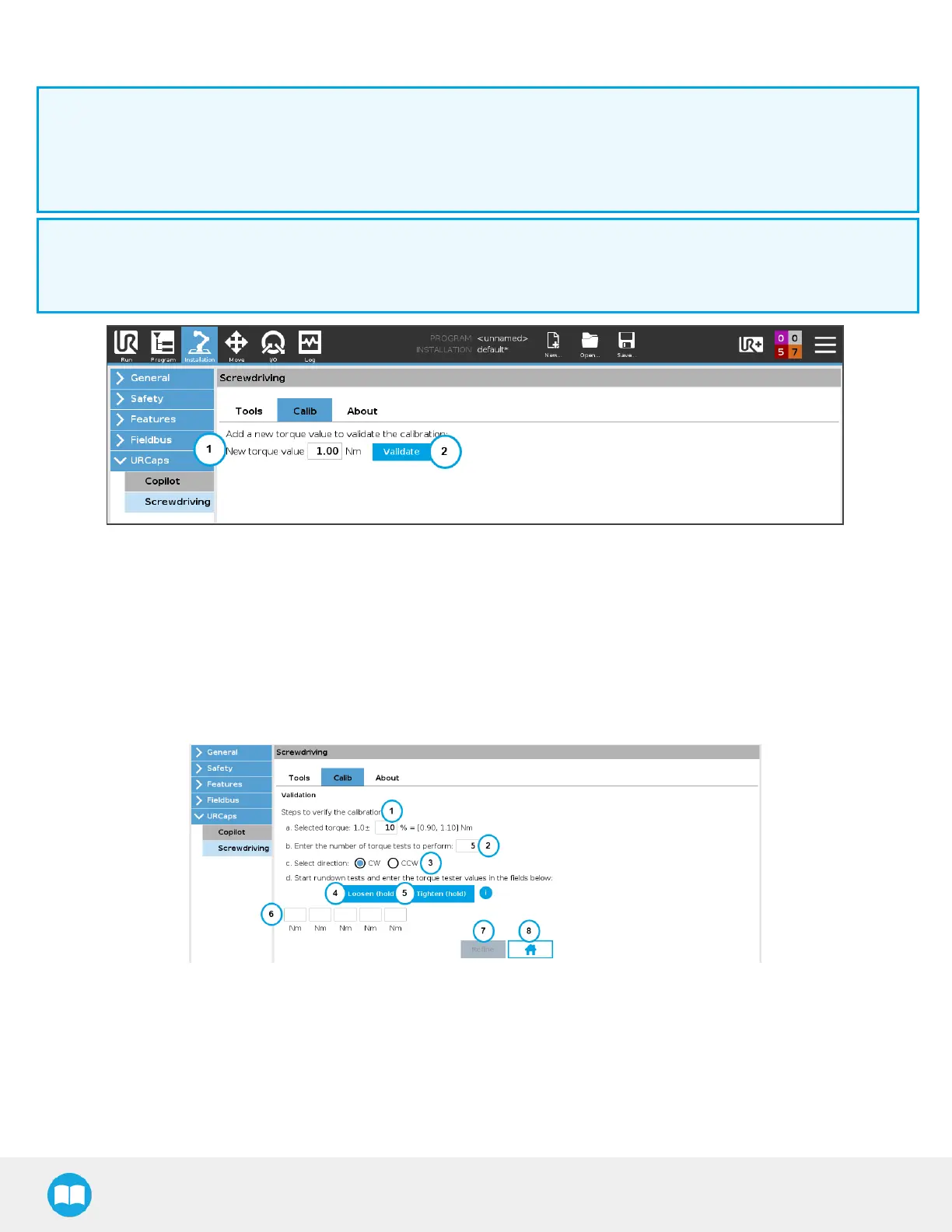
1. New torque value field
o
Enter torque value requested, corresponding to your application.
2. Validate button
o
Tapping this button will display the validation interface, allowing you to carry on with the torque testing procedure.
o
If one or several torque valuesare listed lower in the interface, you can directly tap the Validate button next to each.
o
Tapping the Delete button will remove the torque value.
1. Torque value tolerance field
o
Enter the tolerance in percentage; the interface will surround out-of-range valueswith a red border, and within-range
valueswith a green border.
2. Number of teststo perform field
o
Enter the number of rundown tests to perform using a torque tester and rundown adapter.
51



 To Next Page