Robotiq Screwdriving Solution - Instruction Manual
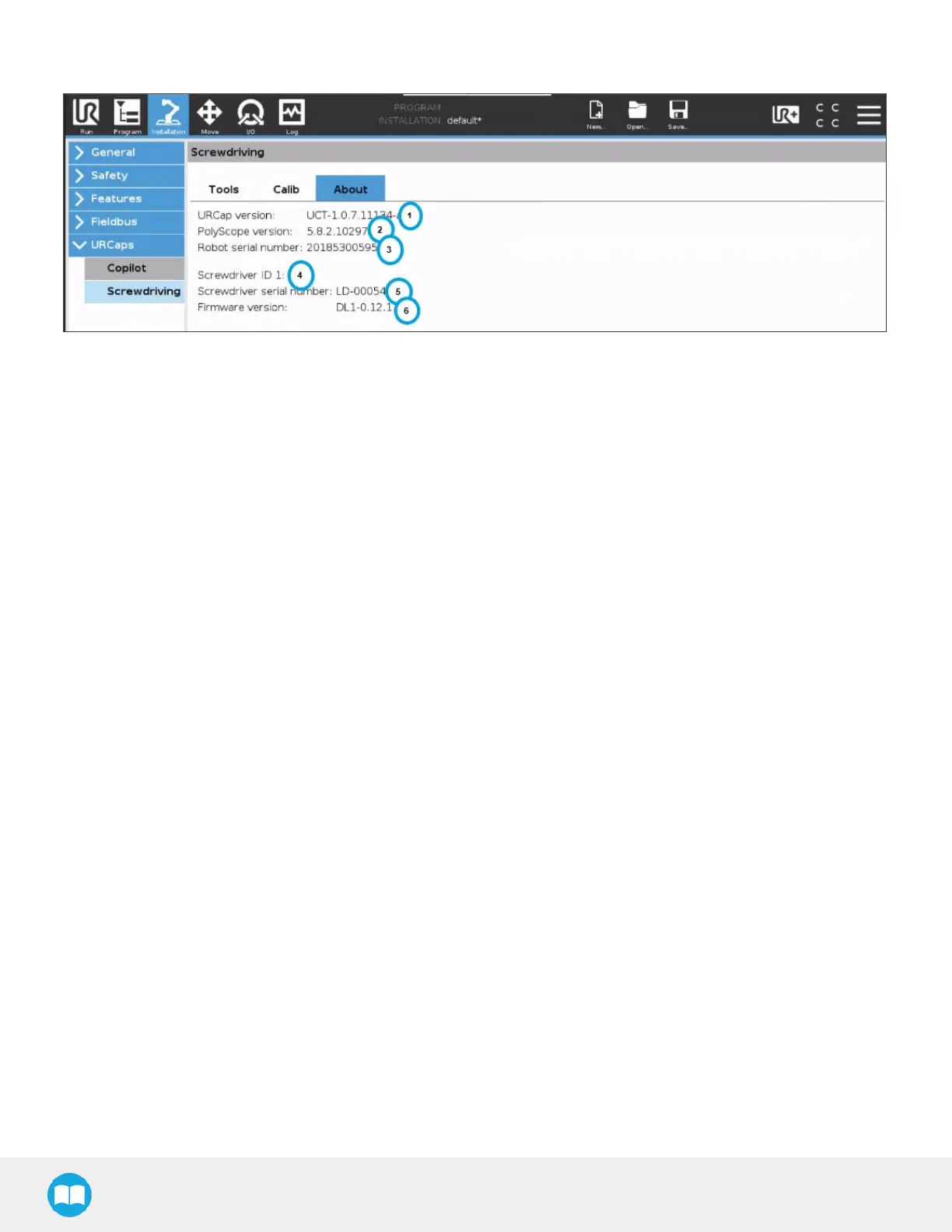
About Tab
1. URCap version
o
Displays current URsoftware package version for the Robotiq Screwdriver.
2. PolyScope version
o
Displays current URrobot software version.
3. Robot serial number
o
Displays the serial number of the robot on which the Screwdriver is installed.
4. Screwdriver ID
o
Displays Screwdriver ID (assigned by default upon activation).
5. Screwdriver serial number
o
Displays the serial number of the activated Screwdriver.
6. Firmware version
o
Displays the current version of the Screwdriver firmware.
5.1.2.Command Window
Pick Screw Node
l
CB-Series
a. From the PolyScope homepage, tap Program Robot.
b. Open an empty program or load an existing program.
c. Go to the Structure tab.
d. Tap the URCapssubmenu.
e. Tap the PickScrew button to add a Pick Screw node to the program tree.
f. Go to the Command tab to edit the Pick Screw node inserted in the program tree.
53



 To Next Page