Robotiq Screwdriving Solution - Instruction Manual
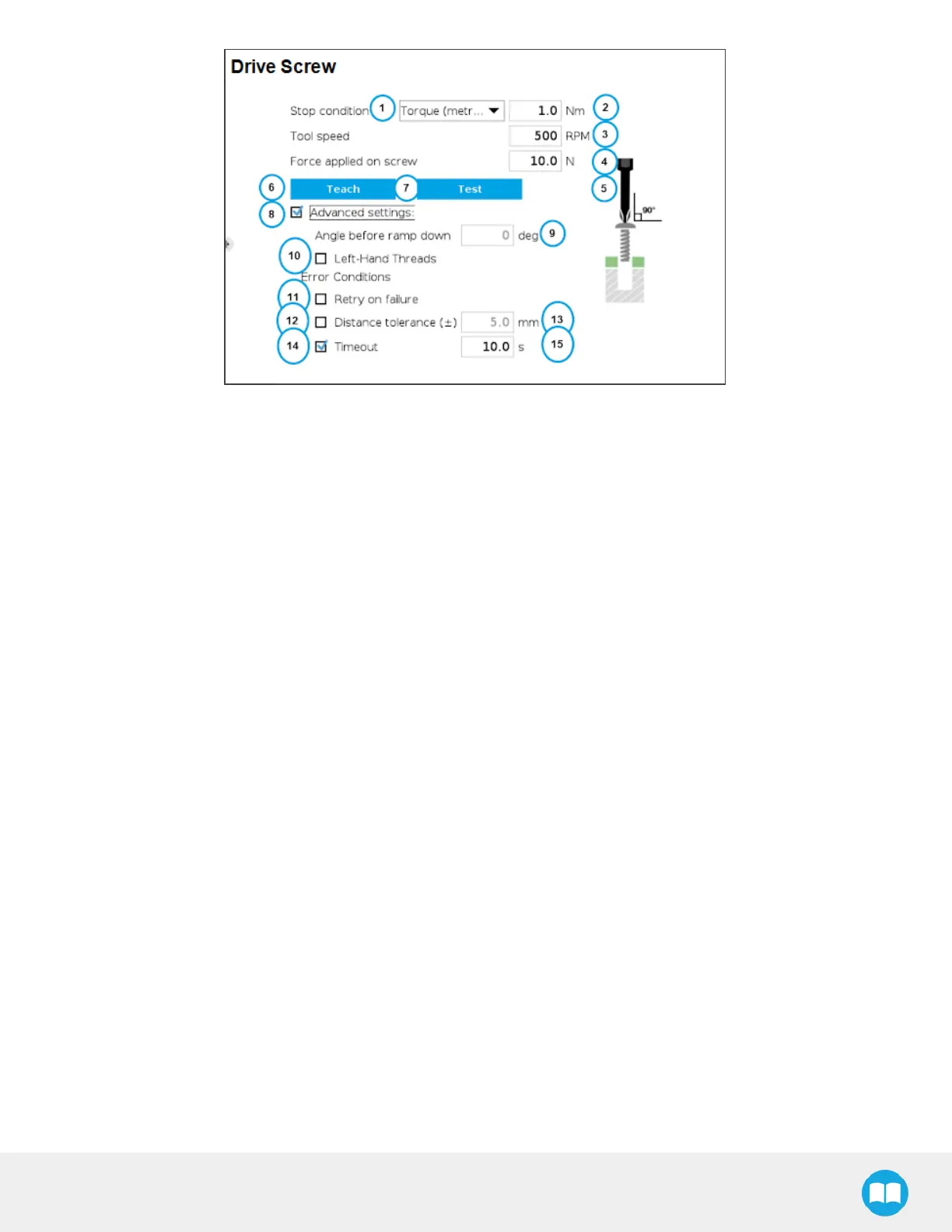
1. Stop Condition dropdown menu
o
Expand to select which of the stop conditions will be used to trigger the end of the screwdriving sequence: torque value
reach (metric), torque value reached (imperial), or number of turns.
2. Stop condition value field
o
Expressed in either newton-meters (Nm), pound-force feet (lbf·ft) or angle (deg)
o
Enter value to set the Screwdriver stop condition
3. Tool speed field
o
Expressed in revolutionsper minute (RPM)
o
Enter value to set the speed at which the Screwdriver will be rotating.
4. Force applied on screwfield
o
Expressed in newtons (N)
o
Enter value to set the force that the Screwdriver will apply in the tool’s Z axis when performing the screwdriving action.
5. Start Teach position indicator
o
Visual element that tellsthe user where to position the Screwdriver before pressing the Teach button.
6. Teach button
o
Tap to teach the screwdriving cycle. A program will perform a screwing sequence followed by an unscrewing sequence
based on the parameters set in the previous steps, and will collect the additional parameters needed to reproduce the
sequence at runtime.
7. Test button
o
Tap to test the screwdriving action based on the parameters set in the previous steps.
8. Advanced settingscheckbox
o
Tick the box to expand the advanced settings section.
o
Untick the box to hide the advanced settings section.
56



 To Next Page