Robotiq Screwdriving Solution - Instruction Manual
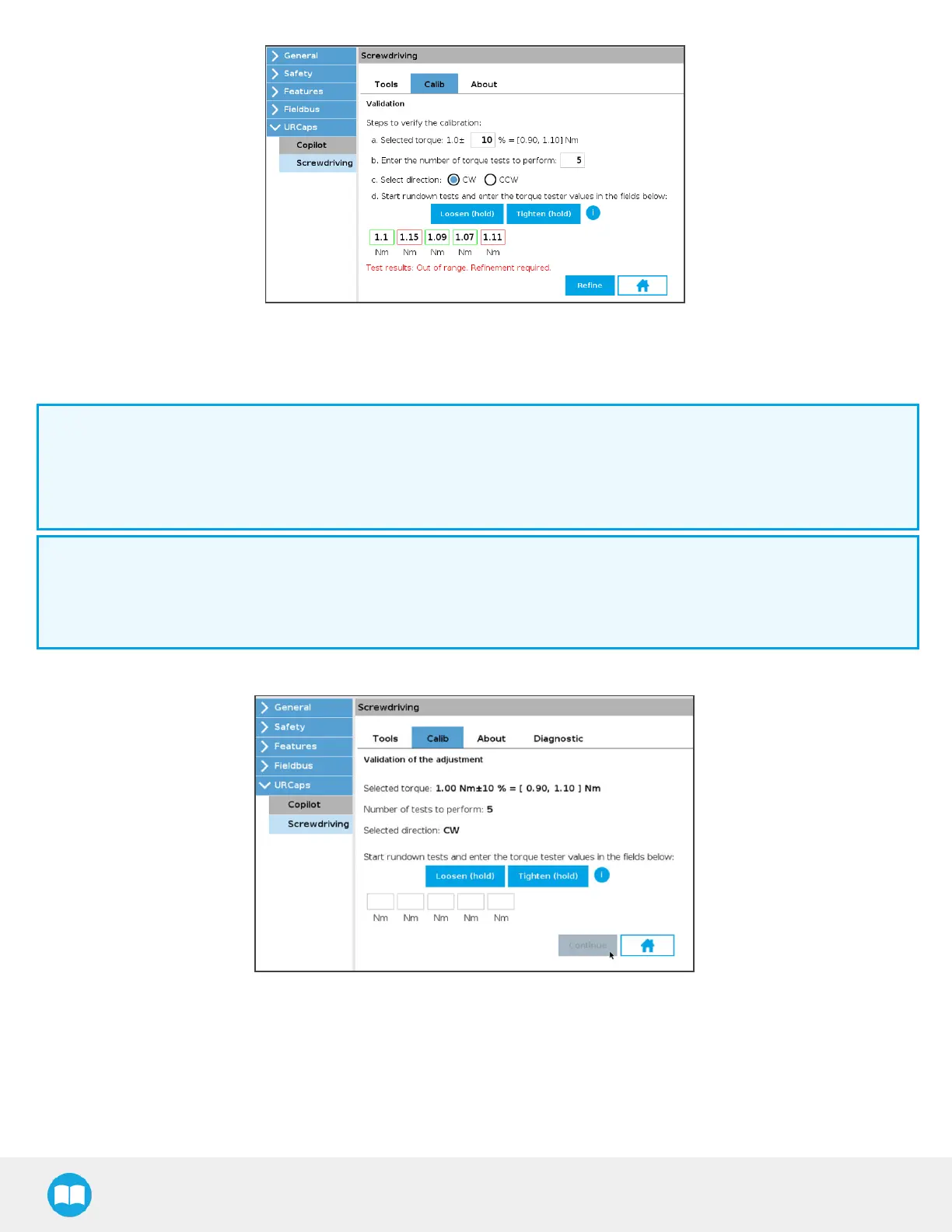
17. If the test results indicate “ Out of range,” tap the Refine button.
18. If the test results indicate “ Within range,” you can also tap the Refine button should you want to potentially achieve better
results.
Info
Once the Refine button istapped, the mean value of the entered valueswill be used to refine the calibration results.
The refinement interface/process is similar to that of the actual validation, although the refinement interface/process will
not indicate if the the valuesare within or out of range.
Info
During the rundown tests for the refinement of the calibration, the Screwdriver firmware will send torque valuesthat are
slightly lower or higher than the requested torque value depending on the mean value from the Validation rundown
tests..
19. Start the Adjustment rundown tests:
a. Hold the Loosen (hold) button to release any torque stressapplied on the rundown adapter.
b. Hold the Tighten (hold) button until the popup window displays, indicating that the requested torque has
been reached.
c. Read the torque value.
67



 To Next Page