Robotiq Screwdriving Solution - Instruction Manual
d. In the Calib tab of the URCap, enter the value in the first field.
e. Repeat until you have populated all fields in the Calib tab.
20. Tap the Validate button to complete the refinement process. The system will use interpolation on the discrete torque data
generated during both seriesof rundown tests to predict the torque valuesthat should be within the requested range.
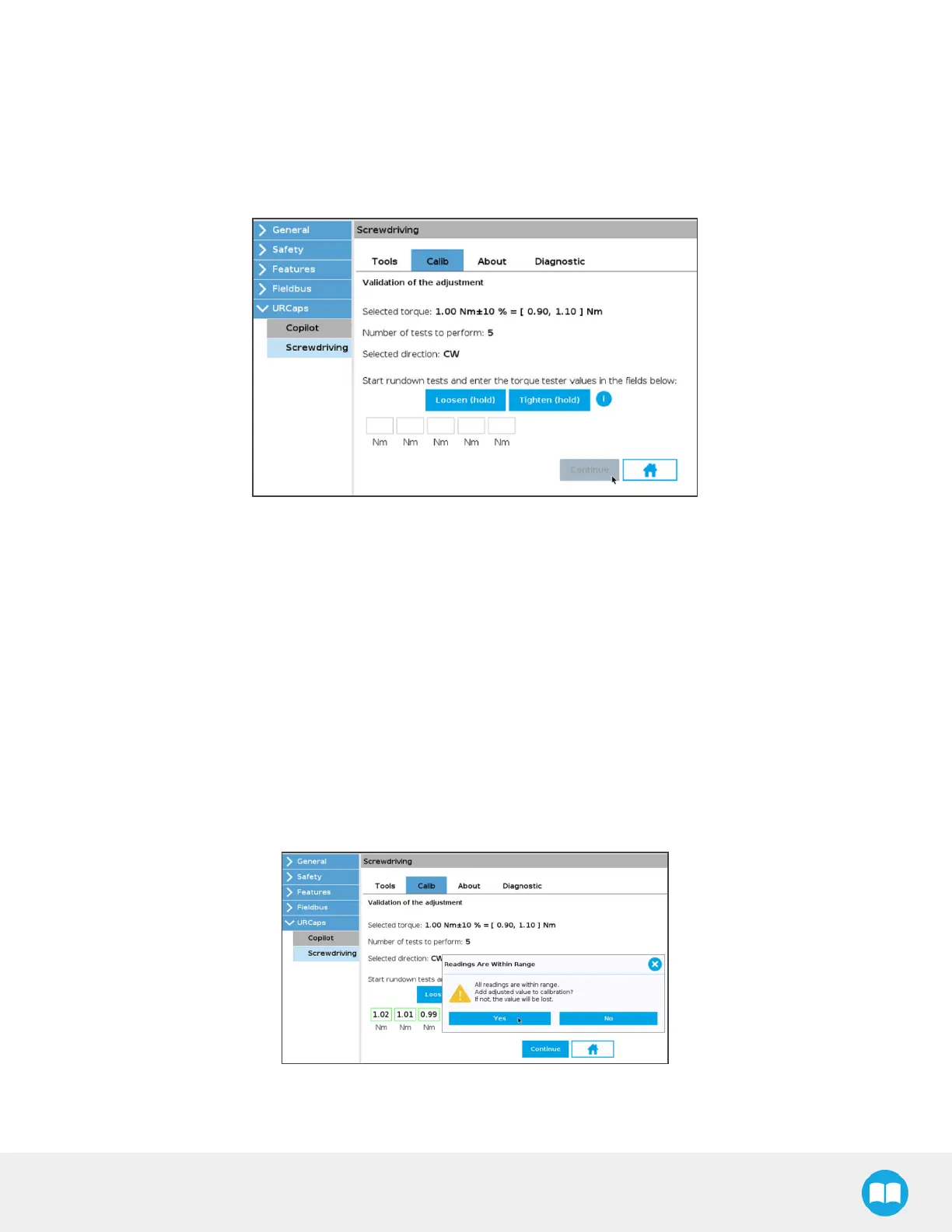
21. Start the Validation of adjustment rundown tests:
a. Hold the Loosen (hold) button to release any torque stressapplied on the rundown adapter.
b. Hold the Tighten (hold) button until the popup window displays, indicating that the requested torque has
been reached.
c. Read the torque value.
d. In the Calib tab of the URCap, enter the value in the first field.
e. Repeat until you have populated all fields in the Calib tab.
f. Once all fields are populated, tap the Continue button.
22. Follow a course of action based on these factors:
a. If all fields are green, a popup window displays, asking whether or not the user wishes to add the refined torque
value to the Screwdriver calibration.
68



 To Next Page