Robustel R5020 User Guide
RT_UG_R5020_v.1.0.2 Mar. 17, 2023 110/167
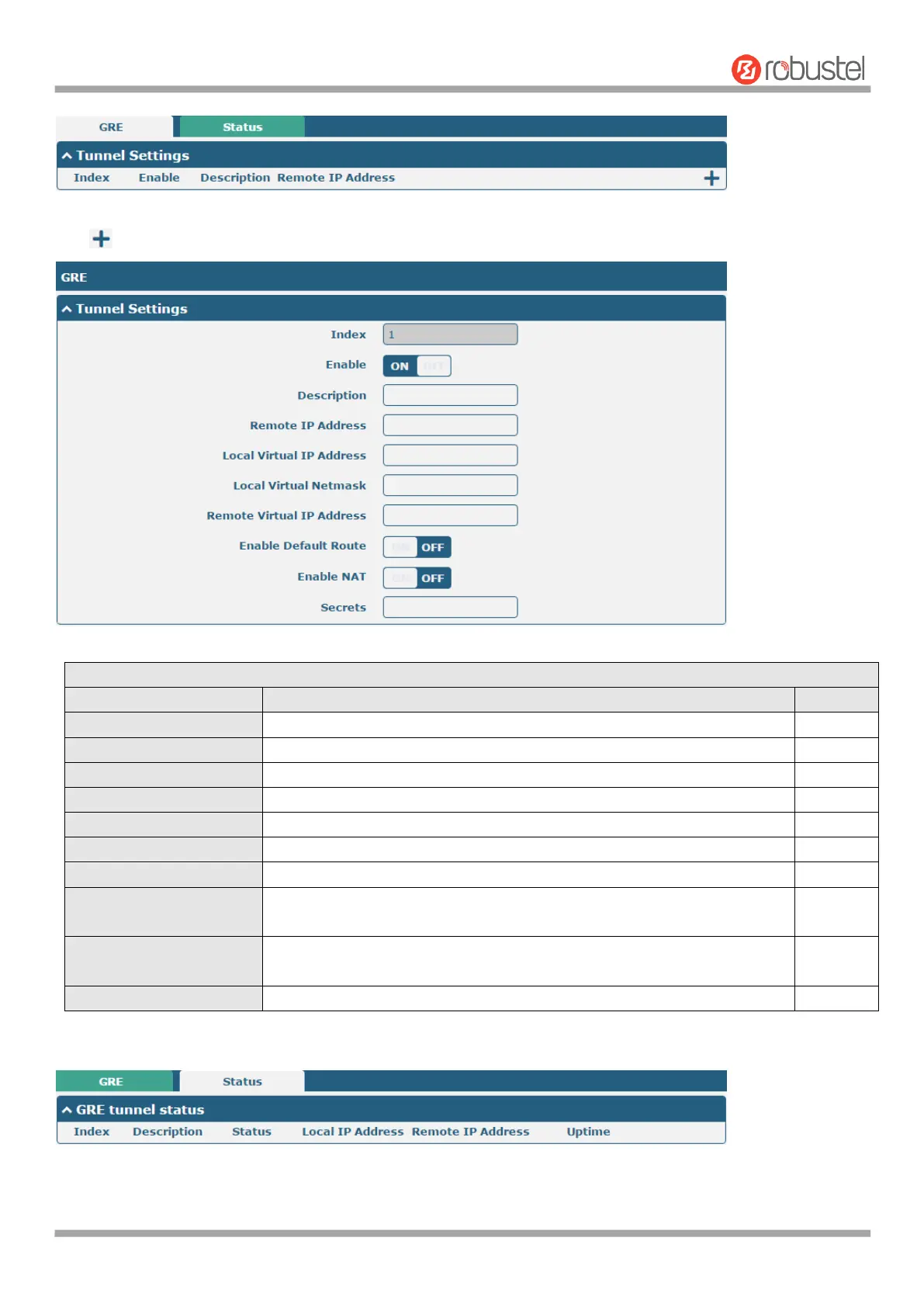
Click to add tunnel settings. The maximum count is 5.
Indicate the ordinal of the list.
Click the toggle button to enable/disable this GRE tunnel.
Enter a description for this GRE tunnel.
Set the remote real IP address of the GRE tunnel.
Set the local virtual IP address of the GRE tunnel.
Set the local virtual Netmask of the GRE tunnel.
Remote Virtual IP Address
Set the remote virtual IP Address of the GRE tunnel.
Click the toggle button to enable/disable this option. When enabled, all
the traffics of the router will go through the GRE VPN.
Click the toggle button to enable/disable this option. This option must be
enabled when router under NAT environment.
Set the key of the GRE tunnel.
This section allows you to view the status of GRE tunnel.













 To Next Page