Robustel R5020 User Guide
RT_UG_R5020_v.1.0.2 Mar. 17, 2023 127/167
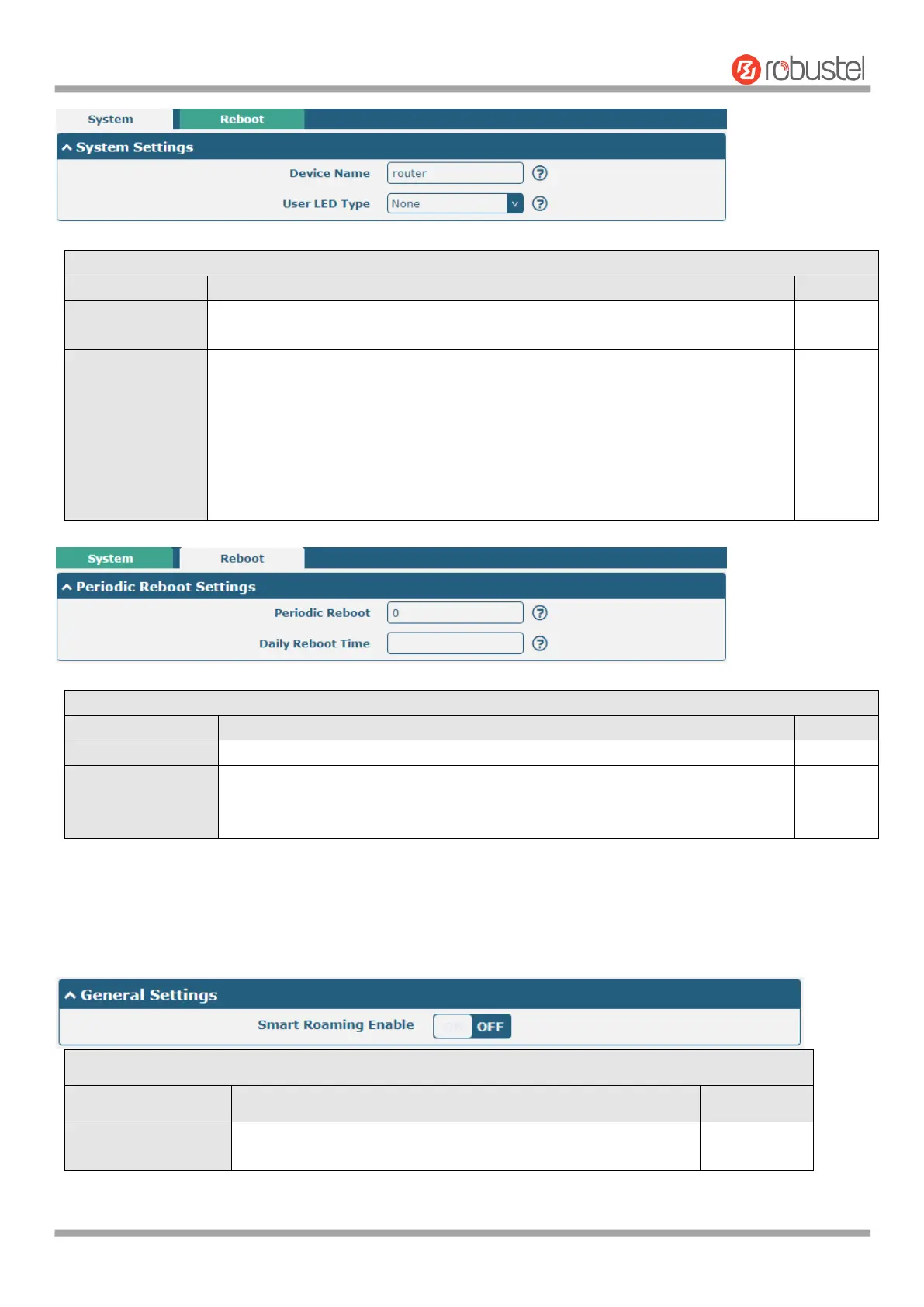
Set the device name to distinguish different devices you have installed; valid
characters are a-z, A-Z, 0-9, @, ., -, #, $, and *.
Specify the display type of your USR LED. Select from “None”, “OpenVPN” or
“IPsec”.
None: Meaningless indication, and the LED is off
SIM:show the sim status.
OpenVPN: USR indicator showing the OpenVPN status
IPsec: USR indicator showing the IPsec status
Note: For more details about USR indicator, see “2.2 LED Indicators”.
Set the reboot period of the router. 0 means disable.
Set the daily reboot time of the router, you should follow the format as HH:
MM, in 24h time frame, otherwise the data will be invalid. Leave it empty means
disable.
4.5.12 Smart roaming
Smart roaming settings include common settings, health check, Ping settings and advanced settings.
Click the toggle button to enable/disable the "Smart Roaming"
function.








 To Next Page