Robustel R5020 User Guide
RT_UG_R5020_v.1.0.2 Mar. 17, 2023 136/167
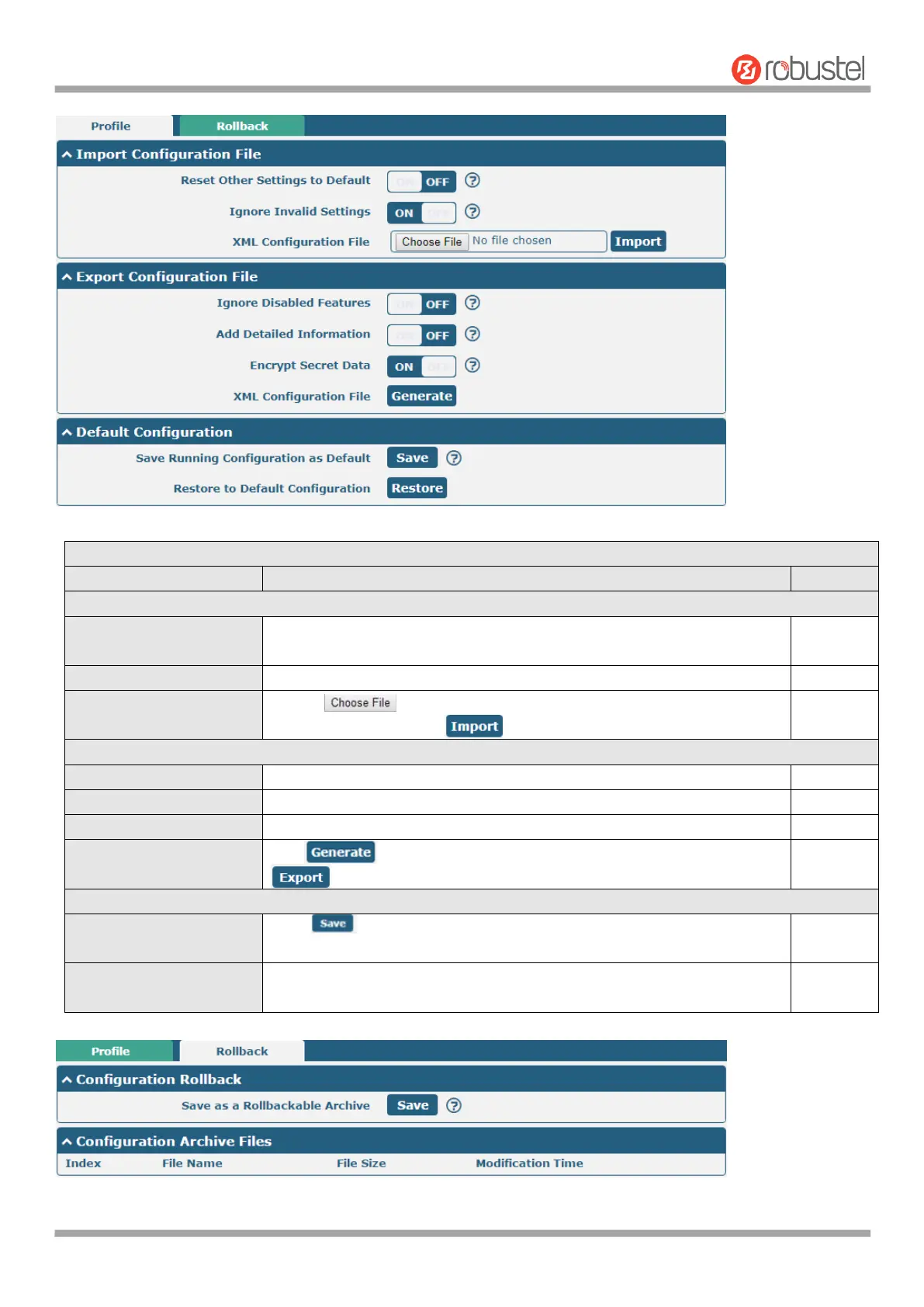
Import Configuration File
Reset Other Settings to
Default
Click the toggle button as “ON” to return other parameters to default
settings.
Click the toggle button as “ON” to ignore invalid settings.
Click on to locate the XML configuration file from your
computer, and then click to import this file into your router.
Export Configuration File
Click the toggle button as “ON” to ignore the disabled features.
Click the toggle button as “ON” to add detailed information.
Click the toggle button as “ON” to encrypt the secret data.
Click button to generate the XML configuration file, and click
to export the XML configuration file.
Save Running
Configuration as Default
Click button to save the current running parameters as default
configuration.
Restore to Default
Configuration
Click ”restore” button to restore the factory defaults.













 To Next Page