40
NOTE-MH01-EN rev05
5.5.1 Ready / Standby
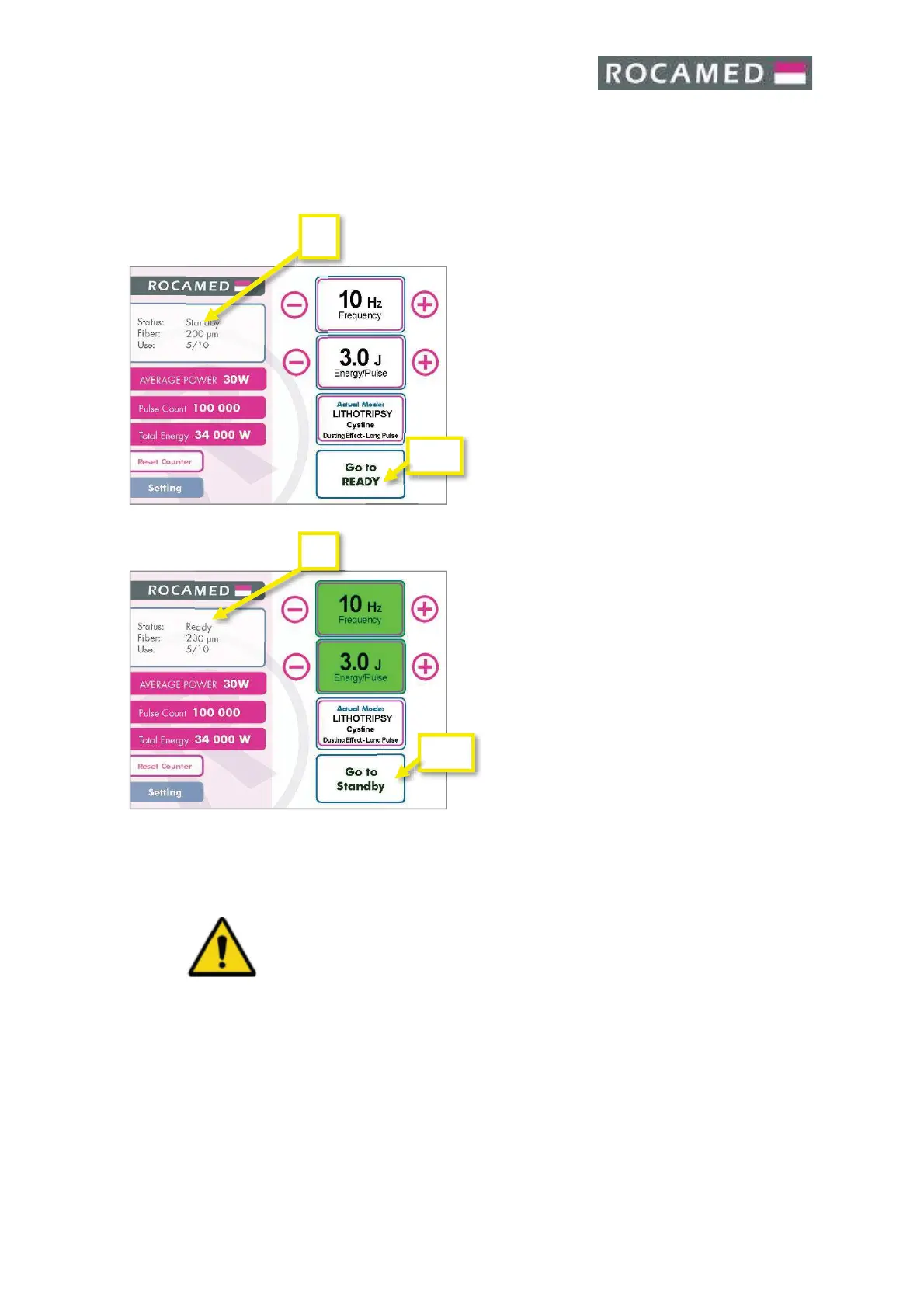
The Ready / Standby function area places the system in the Ready or Standby Mode. In the
Standby mode, the laser is not firing and the system cannot emit energy. In the Ready mode,
the laser is firing and ready to emit energy.
The Ready/Standby Area (1) show the actual state of
the Laser System .
By touching the button Ready/Standby (2a) when in
“Standby” the Laser will go to “Ready” mode.
By touching the button Ready/Standby (2b) when in
“Ready” the Laser will go to “Standby” mode.
Along with the first change from Standby to Ready
mode the Warning Safety Screen will appear.
IMPORTANT
Please read the Chapter:
2 - LASER SAFETY
before continuing using the laser!
If you use the double footswitch element you can use the dedicated button to change the
system status from standby to ready or vice versa.
The footswitch (only with double footswitch – Optional) or the ready/standby display area
can be used interchangeably for the same function.
WARNING!
All the personnel present in the laser working area must wear all the
protective items
5.5.2 Ready Mode
When you change the system from standby to ready to the first time the Warning Safety
Screen will appear:


 To Next Page