42
NOTE-MH01-EN rev05
Frequency
The repetition rate is selected using frequency.
Touching the + button increase the repetition rate displayed.
Touching the
- button decreases the repetition rate displayed.
If the energy set is too high for the frequency selected, the laser will automatically decrease
the value of energy pulse. The sound emission of laser changes with the selected frequency.
Energy
The treatment energy available is displayed.
Touching the
+ button increase the energy displayed.
Touching the
- button decreases the energy displayed.
If the energy set is too high for the frequency selected, the laser will automatically decrease
the value of energy pulse
5.5.5 Emission
While in “Ready” mode, by pressing the footswitch, the Laser System start to emit the laser
beam through the connected optical fiber. The emitted values of frequency/energy are
shown on the display.
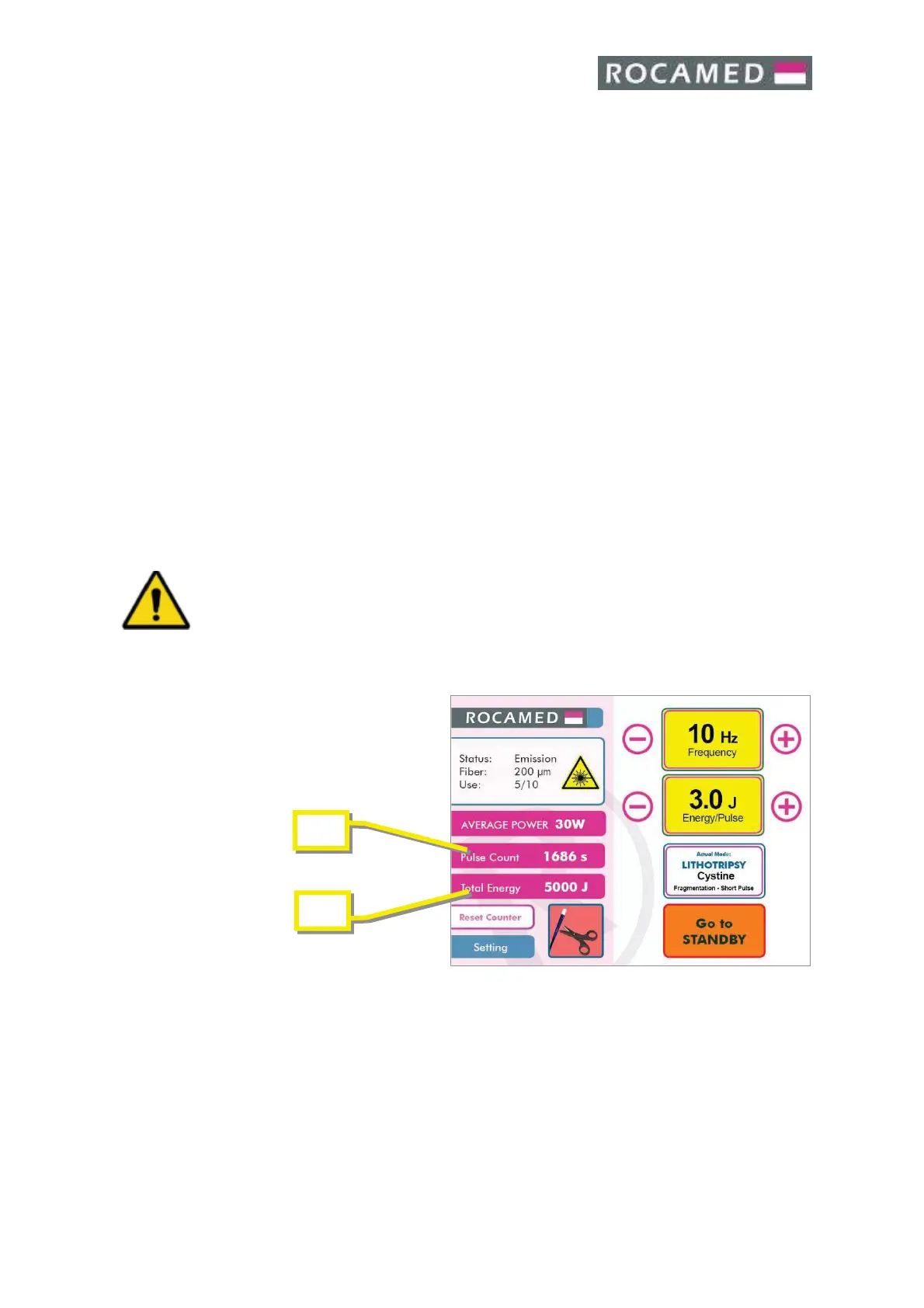
During the emission the display shows the EMISSION state:
During the emission the values of Joules (A) emitted and Lasing Time (B) will be increased.
At the end of the treatment, release the footswitch and enter in the standby mode by
pressing the Ready/Standby area on the display or the dedicated pedal of the double
footswitch (optional).
For starting a new treatment press Ready/Standby area on the display or the dedicated pedal
of the double footswitch (optional).


 To Next Page