40
7.2 Parameter settings via the service code
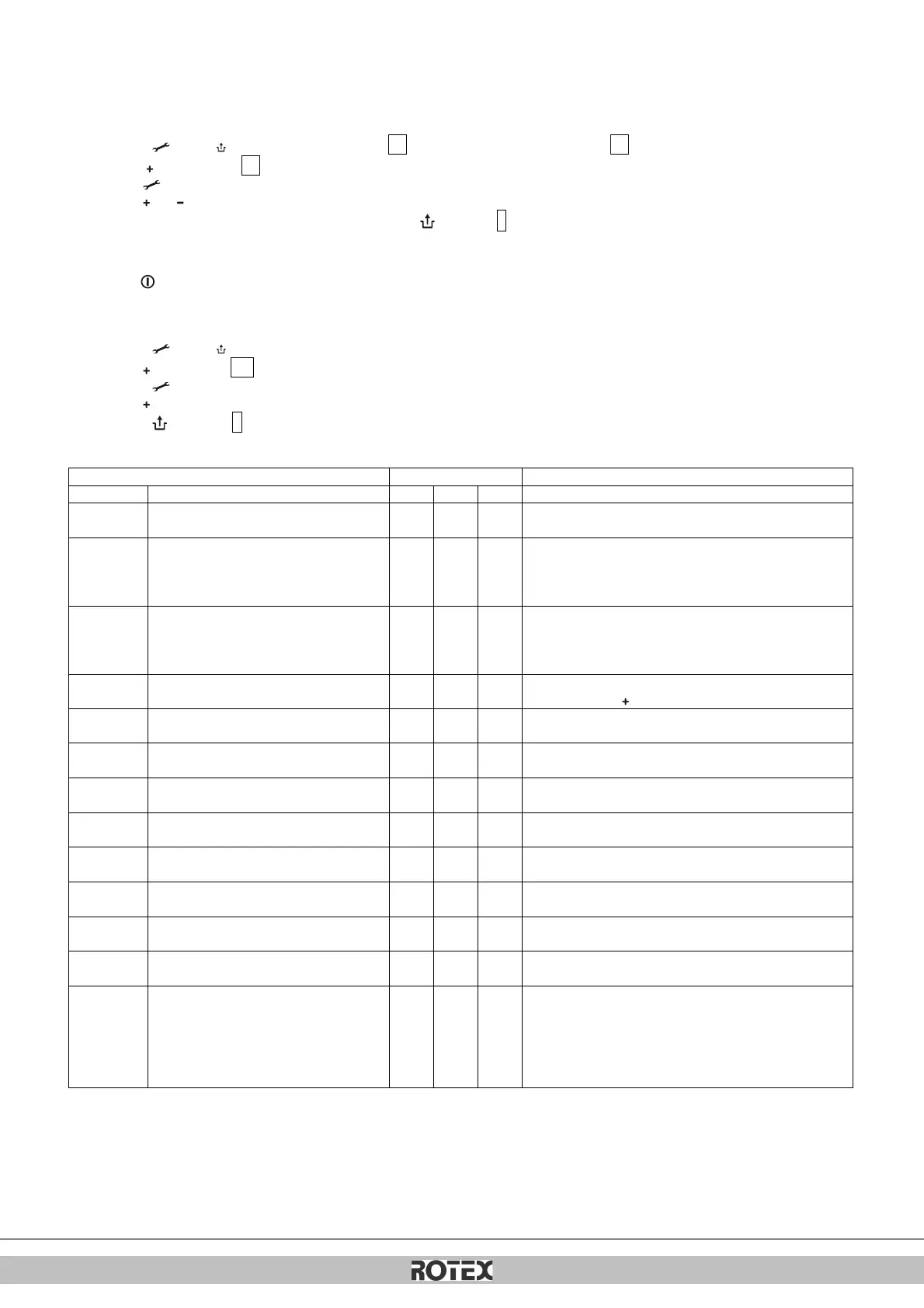
The parameters of the boiler controller have been configured in the factory in accordance with the following table.
These parameters can only be changed with the service code. Take the following actions to activate the program memory:
1. Press the and the button simultaneously, until a 0 appears on the service display and a 0 on the temperature display.
2. Use the button to enter 15 (service code) on the temperature display.
3. Use the button to set the parameter you wish to configure, on the service display.
4. Use the and button to set the parameter to the required value (visible) on the temperature display.
5. After all the required changes have been entered, press the button until P appears on the service display.
The boiler controller has now been reprogrammed.
Note
Pressing the button will take you out of the menu without saving the parameter changes.
Example: Change maximum CH power
1. Press the and the button simultaneously.
2. Use the button to go to 15 .
3. Press the button 3 x. 60 and 3 will appear on the display.
4. Use the button to change the 60 to 70.
5. Press the button until P appears.
6. The change has now been implemented. The maximum CH power has been increased from 60 to 70 %.
Access to installers settings, the service code must be
entered (=15)
0= combi
1= Solo RKOMBG22AAV1 + boiler
2= Tap (hot water only)
3= Solo
0= pump post-running time active
1= pump continuously active
2 – 5 = Not active
Setting reach set value parameter c up to 100%
(100 % = 99 + 1x )
Maximum capacity modulating CH pump
Setting reach set value parameter c. up to 100%
Set maximum hot water power
Setting reach set value parameter d up to 100%
Min. leaving water temperature of the fuel
line
Setting reach 10°C to set value parameter 5
Max setting value leaving water
temperature via operating panel
Setting reach 30°C to 90°C
Min. outdoor temperature of the fuel line
Setting reach -30 to 10°C
Max. outdoor temperature of the fuel line
Setting reach 15°C to 30°C
CH pump post-running time after CH
operation
Setting reach 0 to 15 minutes
CH pump post-running time after boiler
operation
Setting reach 0 to 15 minutes (n/a to Combi unit)
Setting three-way valve or electrical valve
0= powered during CH operation
1= powered during hot water operation and rest
2= powered during every heat request (CH, hot water and
continuous heating function)
3= group regulation
4 and higher = Not applicable


 To Next Page
 Loading...