MCA-C3 Test Procedure
Page 4 of 77
Install Wake On LAN GUI
1. Obtain the file “WakeOnLanGui.exe” from the Russound SQA department.
2. This is a self executable file.
Run the “WakeOnLanGui.exe” file.
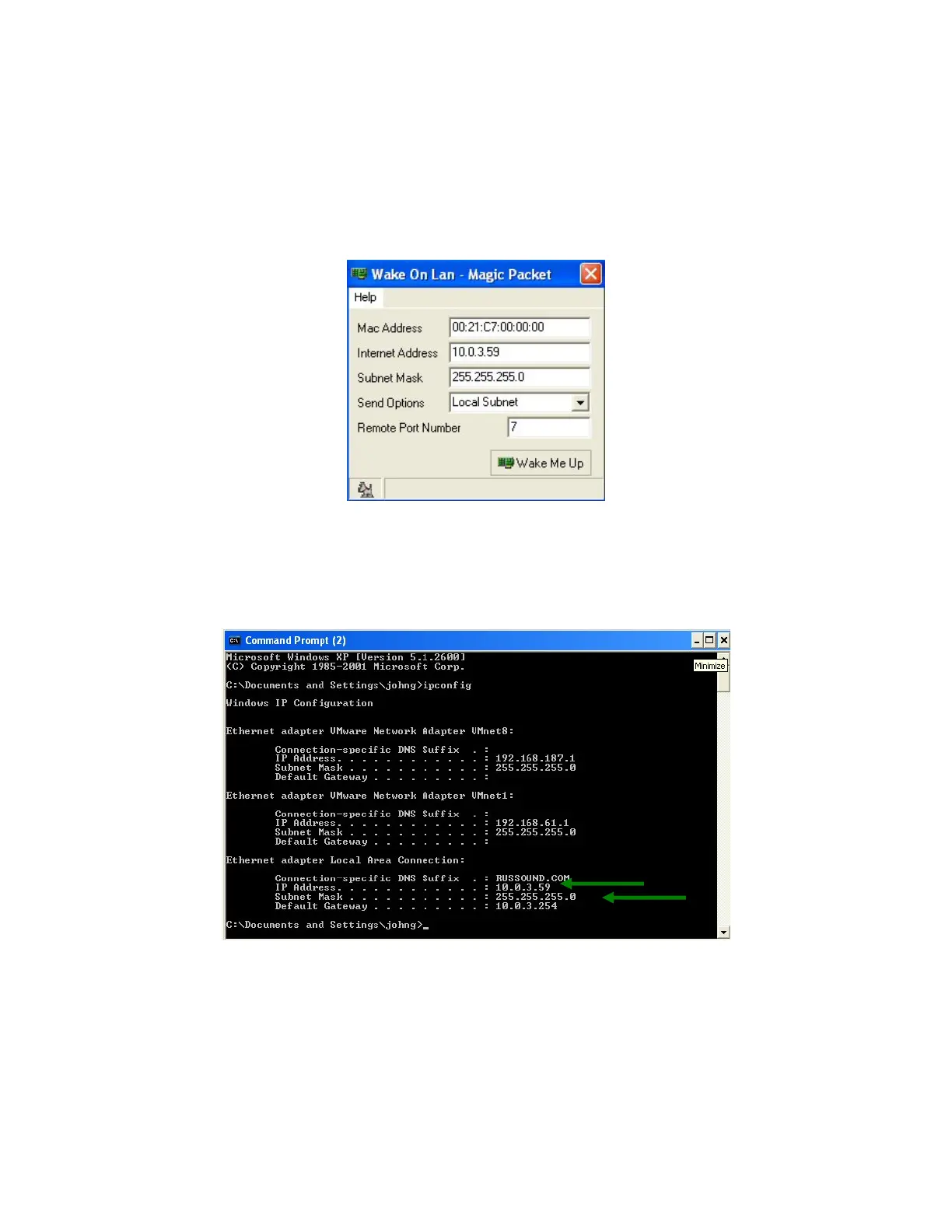
3. The “Wake On Lan – Magic Packet” GUI will display
4. Open a Windows Command Prompt window.
Go to Start\All Programs\Accessories and select C:\Command Prompt.
Type ipconfig in the window next to the command prompt
The window will display below.
5. Type the IP address listed under the “Ethernet adapter Local Area Connection”
in the “Internet Address” window of the WOL GUI. Look at pix in Step 4.
Your IP Address will be different than listed here.
Type the subnet mask to the WOL GUI from the same area
6. Close the WOL GUI and Command Prompt window.



 To Next Page